<?xml version="1.0" encoding="utf-8"?>
<feed xmlns="http://www.w3.org/2005/Atom" xml:lang="en">
  <updated>2026-11-19T06:13:20.097603+00:00</updated>
  
  <author>
    <name>Alex Chan</name>
    <email>alex@alexwlchan.net</email>
  </author>
  
  <link href="https://alexwlchan.net/atom.xml" rel="self" type="application/atom+xml" />
  <link href="https://alexwlchan.net/" rel="alternate" type="text/html" />
  <id>https://alexwlchan.net/</id>
  <title type="html">alexwlchan</title>
  <subtitle>Alex Chan’s personal website</subtitle>

<entry>
  <title type="html">funkycache: a Python library to cache functions in SQLite</title>
  <link
    href="https://alexwlchan.net/2026/funkycache/"
    rel="alternate"
    type="text/html"
    title="funkycache: a Python library to cache functions in SQLite"
  />
  <published>2026-11-16T08:01:35+00:00</published>
  <updated>2026-11-16T08:01:35+00:00</updated>

  <id>https://alexwlchan.net/2026/funkycache/</id>

  <content type="html" xml:base="https://alexwlchan.net/2026/funkycache/">
    <![CDATA[<p>Six months ago, I wrote an <a href="https://alexwlchan.net/2026/sqlite-cache/">SQLite-backed cache</a> to speed up the build system for this site.
A static site generator is an ideal candidate for <a href="https://en.wikipedia.org/wiki/Caching">caching</a>, because there are lots of steps that have deterministic behaviour and no side effects.
On a site with hundreds of pages, even a few milliseconds per step adds up to a meaningful improvement.</p>
<p>That first cache was fairly basic.
It supported getting and setting strings, with a namespace for different functions, and not much else:</p>
<pre class="lng-python"><code><span class="kn">from</span> <span class="n">mosaic</span><span class="p">.</span><span class="n">cache</span> <span class="kn">import</span> <span class="n">SQLiteCache</span>

<span class="n">cache</span> <span class="o">=</span> SQLiteCache<span class="p">(</span><span class="s2">"example.db"</span><span class="p">)</span>

cache<span class="o">.</span>set<span class="p">(</span>namespace<span class="o">=</span><span class="s2">"fibonacci"</span><span class="p">,</span> key<span class="o">=</span><span class="s2">"10"</span><span class="p">,</span> value<span class="o">=</span><span class="s2">"55"</span><span class="p">)</span>
print<span class="p">(</span>cache<span class="o">.</span>get<span class="p">(</span>namespace<span class="o">=</span><span class="s2">"fibonacci"</span><span class="p">,</span> key<span class="o">=</span><span class="s2">"10"</span><span class="p">))</span></code></pre>
<p>This showed the value of a cache, but it provided cache <em>storage</em>, not cache <em>logic</em>.
If I wanted to cache a function, I had to write per-function logic for saving values to the cache and retrieving them later.
A lot of that code was tricky to test, and broken in subtle ways.
I was so unsure of this code that I deleted the cache whenever I built the site for publication.</p>
<p>I wanted something better, so last week I wrote <a href="https://alexwlchan.net/projects/funkycache/">funkycache</a>, a new library that encapsulates all of my caching logic, and is much easier to use and test.
It can store arbitrary Python objects as both inputs and outputs, and the interface is much simpler for the caller.</p>
<p>To cache a function, you create a <code>FunkyCache</code> instance and add a decorator to your function:</p>
<pre class="lng-python"><code><span class="kn">from</span> <span class="n">funkycache</span> <span class="kn">import</span> <span class="n">FunkyCache</span>

<span class="n">cache</span> <span class="o">=</span> FunkyCache<span class="p">(</span>storage<span class="o">=</span><span class="s2">"sqlite"</span><span class="p">)</span>

@cache<span class="o">.</span>register
<span class="k">def</span> <span class="n">expensive_function</span><span class="p">(</span><span class="n">arg1</span><span class="p">:</span> str<span class="p">,</span> <span class="n">arg2</span><span class="p">:</span> int<span class="p">,</span> <span class="n">arg3</span><span class="p">:</span> date<span class="p">)</span> <span class="o">-&gt;</span> tuple<span class="p">[</span>str<span class="p">,</span> date<span class="p">]:</span>
    <span class="o">...</span></code></pre>
<p>This is modelled after <a href="https://docs.python.org/3/library/functools.html#functools.cache"><code>functools.cache</code></a> in the standard library.
The output of the expensive function is written to an SQLite database, so it’s available after the Python process exits.</p>
<p>The cache tries to be smart about invalidations.
If the source file containing <code>expensive_function</code> changes, the cache for that function is invalidated and will be rebuilt on the next call.</p>
<p>You can also specify a dependency on other files and static values, changes to which will also trigger a cache invalidation:</p>
<pre class="lng-python"><code><span class="kn">from</span> <span class="n">funkycache</span> <span class="kn">import</span> <span class="n">FunkyCache</span>

<span class="n">cache</span> <span class="o">=</span> FunkyCache<span class="p">(</span>storage<span class="o">=</span><span class="s2">"sqlite"</span><span class="p">)</span>

@cache<span class="o">.</span>register<span class="p">(</span>
    files<span class="o">=</span><span class="p">[</span><span class="s2">"data/input.yml"</span><span class="p">,</span> <span class="s2">"templates/example.html"</span><span class="p">],</span>
    values<span class="o">=</span><span class="p">[</span>pygments<span class="o">.</span>__version__<span class="p">],</span>
<span class="p">)</span>
<span class="k">def</span> <span class="n">expensive_function</span><span class="p">(</span><span class="n">arg1</span><span class="p">:</span> str<span class="p">,</span> <span class="n">arg2</span><span class="p">:</span> int<span class="p">,</span> <span class="n">arg3</span><span class="p">:</span> datetime<span class="p">)</span> <span class="o">-&gt;</span> tuple<span class="p">[</span>str<span class="p">,</span> datetime<span class="p">]:</span>
    <span class="o">...</span></code></pre>
<p>When writing funkycache, I wanted to spend a week thinking hard about caching logic, test it thoroughly, then not think about it again for months.
You should be able to use funkycache without understanding how it works – but if you’d like to, that’s what I’ll explain in the rest of this post.</p>
<p>If you’d like to try it yourself, funkycache is <a href="https://pypi.org/project/funkycache/">on PyPI</a>, and the source code is <a href="https://alexwlchan.net/projects/funkycache/">on this website</a>.</p>

<nav aria-labelledby="toc-heading" class="table_of_contents">
<h3 id="toc-heading">Table of contents</h3>
<ul><li>
<a href="#cache-keys-are-function-arguments-hashed-and-json-encoded">Cache keys are function arguments, hashed and JSON-encoded</a><ul><li><a href="#getting-a-complete-set-of-arguments-for-a-function">Getting a complete set of arguments for a function</a></li><li><a href="#converting-the-arguments-to-json">Converting the arguments to JSON</a></li><li><a href="#hashing-for-smaller-keys">Hashing for smaller keys</a></li></ul></li><li>
<a href="#cache-values-are-json-encoded">Cache values are JSON-encoded</a><ul><li><a href="#caching-lazy-generators">Caching lazy generators</a></li></ul></li><li>
<a href="#tracking-dependencies">Tracking dependencies</a><ul><li><a href="#tracking-dependent-files">Tracking dependent files</a></li><li><a href="#tracking-dependent-values">Tracking dependent values</a></li></ul></li><li>
<a href="#reactive-aspirations">Reactive aspirations</a></li></ul>
</nav>
<h2 id="cache-keys-are-function-arguments-hashed-and-json-encoded">Cache keys are function arguments, hashed and JSON-encoded</h2>
<h3 id="getting-a-complete-set-of-arguments-for-a-function">Getting a complete set of arguments for a function</h3>
<p>The cache is meant for functions which always produce the same output for a given input, so the inputs are the cache key.
When we <a href="https://docs.python.org/3/library/functools.html#functools.wraps">decorate a function</a>, we can see the arguments passed on each call:</p>
<pre class="lng-python"><code><span class="kn">from</span> <span class="n">functools</span> <span class="kn">import</span> <span class="n">wraps</span>

<span class="k">def</span> <span class="n">my_decorator</span><span class="p">(</span><span class="n">func</span><span class="p">):</span>
    @wraps<span class="p">(</span>func<span class="p">)</span>
    <span class="k">def</span> <span class="n">wrapper</span><span class="p">(</span><span class="o">*</span><span class="n">args</span><span class="p">,</span> <span class="o">**</span><span class="n">kwargs</span><span class="p">):</span>
        print<span class="p">({</span><span class="s2">"args"</span><span class="p">:</span> args<span class="p">,</span> <span class="s2">"kwargs"</span><span class="p">:</span> kwargs<span class="p">})</span>
        <span class="k">return</span> func<span class="p">(</span><span class="o">*</span>args<span class="p">,</span> <span class="o">**</span>kwargs<span class="p">)</span>
    <span class="k">return</span> wrapper</code></pre>
<p>This doesn’t account for different styles of calling the same function – for example, positional versus keyword arguments, or omitting or overriding default arguments.</p>
<p>To get a complete, consistent set of arguments, I use the <code>inspect</code> module:</p>
<pre class="lng-python"><code><span class="kn">import</span> <span class="n">inspect</span>

<span class="n">sig</span> <span class="o">=</span> inspect<span class="o">.</span>signature<span class="p">(</span>func<span class="p">)</span>
<span class="n">bound</span> <span class="o">=</span> sig<span class="o">.</span>bind<span class="p">(</span><span class="o">*</span>args<span class="p">,</span> <span class="o">**</span>kwargs<span class="p">)</span>
bound<span class="o">.</span>apply_defaults<span class="p">()</span>
<span class="n">cache_key</span> <span class="o">=</span> bound<span class="o">.</span>arguments  <span class="c1"># {"arg1": val1, "arg2": val2, ...}</span></code></pre>
<p>This gives me a Python dictionary of the complete set of arguments to the function, which is the same regardless of the calling style.</p>
<h3 id="converting-the-arguments-to-json">Converting the arguments to JSON</h3>
<p>Python dictionaries aren’t hashable, so they can’t be used as the keys in dictionaries, nor can they be used as keys in SQLite databases.
We need to serialise them as a string or byte sequence.</p>
<p>I considered two options for this serialisation: <a href="https://docs.python.org/3/library/pickle.html">pickle</a> and <a href="https://docs.python.org/32/library/json.html">JSON</a>.
In my limited testing, JSON was faster than pickle, so that’s what I chose.
Using JSON also gave me more flexibility for speeding up the serialisation.</p>
<p>My initial serialisation was a naive <code>json.dumps</code> call, with a couple of options to ensure consistent ordering and handle types that the standard library doesn’t know how to encode:</p>
<pre class="lng-python"><code><span class="n">json_key</span> <span class="o">=</span> json<span class="o">.</span>dumps<span class="p">(</span>cache_key<span class="p">,</span> sort_keys<span class="o">=</span><span class="kc">True</span><span class="p">,</span> default<span class="o">=</span>str<span class="p">)</span></code></pre>
<p>When I started using funkycache, this encoding step quickly emerged as the slowest part, so I started “reducing” the arguments to make this step faster.
This reduction included:</p>
<ul>
<li>Recursively walking the function arguments and hashing large strings</li>
<li>Using <a href="https://pydantic.dev/docs/validation/latest/get-started/">Pydantic</a> to convert Pydantic models and <a href="https://docs.python.org/3/library/dataclasses.html">dataclasses</a> into Python objects, rather than doing a string conversion</li>
<li>Refactoring my code so each function only takes a minimal set of required data</li>
</ul>
<p>These are all lossy transformations, but that’s fine for a cache <em>key</em> – we never need to retrieve the original value.
It’s theoretically possible for different values to get a colliding hash key, but at my scale it’s unlikely.
(A clean build of my site only uses 32,000 keys.)</p>
<h3 id="hashing-for-smaller-keys">Hashing for smaller keys</h3>
<p>The functions in my static site generator are processing things like the content of articles, so individual function arguments might be kilobytes in size.
You can use multi-kilobytes keys with SQLite, but you probably shouldn’t – you take a performance hit for larger keys.</p>
<p>I wrote <a href="https://alexwlchan.net/projects/funkycache/files/tests/bench_sqlite_storage.py">a small benchmark</a> to compare three approaches: storing the JSON-encoded arguments directly, hashing them with MD5, and hashing them with <a href="https://xxhash.com/">XXH64</a>.
The results are a wash for small key sizes, but for larger keys XXH64 is significantly faster, and MD5 is slower than storing the keys directly in SQLite:</p>
<svg aria-labelledby="svg_sqlite_key_benchmark" class="dark_aware" role="img" version="1.1" viewbox="0 0 708.248719 424.840937" width="750" xmlns="http://www.w3.org/2000/svg" xmlns:xlink="http://www.w3.org/1999/xlink"><title id="svg_sqlite_key_benchmark">Graph comparing the insert/lookup performance of identity, MD5 and XXH64</title>
<defs>

</defs>
<g id="figure_1">
<g id="axes_1">
<g id="patch_2">
<path d="M 52.466563 382.837656 L 552.715937 382.837656 L 552.715937 7.2 L 52.466563 7.2 z "></path>
</g>
<g id="matplotlib.axis_1">
<g id="xtick_1">
<g id="line2d_1">
<path clip-path="url(#pfa81b2d257)" d="M 75.20517 382.837656 L 75.20517 7.2 "></path>
</g>
<g id="line2d_2">
<defs>
<path d="M 0 0 L 0 3.5 " id="m79b121d2e6"></path>
</defs>
<g>
<use x="75.20517" xlink:href="#m79b121d2e6" y="382.837656"></use>
</g>
</g>
<g id="text_1"><g transform="translate(69.60517 399.137656)">
<text>
<tspan x="0" y="-0.762187">2</tspan>
<tspan x="6.458008" y="-4.892187">4</tspan>
</text>
</g>
</g>
</g>
<g id="xtick_2">
<g id="line2d_3">
<path clip-path="url(#pfa81b2d257)" d="M 166.159602 382.837656 L 166.159602 7.2 "></path>
</g>
<g id="line2d_4">
<g>
<use x="166.159602" xlink:href="#m79b121d2e6" y="382.837656"></use>
</g>
</g>
<g id="text_2"><g transform="translate(160.559602 399.237656)">
<text>
<tspan x="0" y="-0.674688">2</tspan>
<tspan x="6.458008" y="-4.804688">6</tspan>
</text>
</g>
</g>
</g>
<g id="xtick_3">
<g id="line2d_5">
<path clip-path="url(#pfa81b2d257)" d="M 257.114034 382.837656 L 257.114034 7.2 "></path>
</g>
<g id="line2d_6">
<g>
<use x="257.114034" xlink:href="#m79b121d2e6" y="382.837656"></use>
</g>
</g>
<g id="text_3"><g transform="translate(251.514034 399.237656)">
<text>
<tspan x="0" y="-0.674688">2</tspan>
<tspan x="6.458008" y="-4.804688">8</tspan>
</text>
</g>
</g>
</g>
<g id="xtick_4">
<g id="line2d_7">
<path clip-path="url(#pfa81b2d257)" d="M 348.068466 382.837656 L 348.068466 7.2 "></path>
</g>
<g id="line2d_8">
<g>
<use x="348.068466" xlink:href="#m79b121d2e6" y="382.837656"></use>
</g>
</g>
<g id="text_4"><g transform="translate(340.218466 399.237656)">
<text>
<tspan x="0" y="-0.674688">2</tspan>
<tspan x="6.458008" y="-4.804688">1</tspan>
<tspan x="10.911621" y="-4.804688">0</tspan>
</text>
</g>
</g>
</g>
<g id="xtick_5">
<g id="line2d_9">
<path clip-path="url(#pfa81b2d257)" d="M 439.022898 382.837656 L 439.022898 7.2 "></path>
</g>
<g id="line2d_10">
<g>
<use x="439.022898" xlink:href="#m79b121d2e6" y="382.837656"></use>
</g>
</g>
<g id="text_5"><g transform="translate(431.172898 399.237656)">
<text>
<tspan x="0" y="-0.674688">2</tspan>
<tspan x="6.458008" y="-4.804688">1</tspan>
<tspan x="10.911621" y="-4.804688">2</tspan>
</text>
</g>
</g>
</g>
<g id="xtick_6">
<g id="line2d_11">
<path clip-path="url(#pfa81b2d257)" d="M 529.97733 382.837656 L 529.97733 7.2 "></path>
</g>
<g id="line2d_12">
<g>
<use x="529.97733" xlink:href="#m79b121d2e6" y="382.837656"></use>
</g>
</g>
<g id="text_6"><g transform="translate(522.12733 399.137656)">
<text>
<tspan x="0" y="-0.762187">2</tspan>
<tspan x="6.458008" y="-4.892187">1</tspan>
<tspan x="10.911621" y="-4.892187">4</tspan>
</text>
</g>
</g>
</g>
<g id="text_7">
<text transform="rotate(-0 302.59125 414.758125)" x="302.59125" y="414.758125">Key size (bytes)</text>
</g>
</g>
<g id="matplotlib.axis_2">
<g id="ytick_1">
<g id="line2d_13">
<path clip-path="url(#pfa81b2d257)" d="M 52.466563 378.279088 L 552.715937 378.279088 "></path>
</g>
<g id="line2d_14">
<defs>
<path d="M 0 0 L -3.5 0 " id="md9f9dd6a9c"></path>
</defs>
<g>
<use x="52.466563" xlink:href="#md9f9dd6a9c" y="378.279088"></use>
</g>
</g>
<g id="text_8">
<text transform="rotate(-0 45.466563 382.077916)" x="45.466563" y="382.077916">0.00</text>
</g>
</g>
<g id="ytick_2">
<g id="line2d_15">
<path clip-path="url(#pfa81b2d257)" d="M 52.466563 313.44623 L 552.715937 313.44623 "></path>
</g>
<g id="line2d_16">
<g>
<use x="52.466563" xlink:href="#md9f9dd6a9c" y="313.44623"></use>
</g>
</g>
<g id="text_9">
<text transform="rotate(-0 45.466563 317.245058)" x="45.466563" y="317.245058">0.02</text>
</g>
</g>
<g id="ytick_3">
<g id="line2d_17">
<path clip-path="url(#pfa81b2d257)" d="M 52.466563 248.613372 L 552.715937 248.613372 "></path>
</g>
<g id="line2d_18">
<g>
<use x="52.466563" xlink:href="#md9f9dd6a9c" y="248.613372"></use>
</g>
</g>
<g id="text_10">
<text transform="rotate(-0 45.466563 252.4122)" x="45.466563" y="252.4122">0.04</text>
</g>
</g>
<g id="ytick_4">
<g id="line2d_19">
<path clip-path="url(#pfa81b2d257)" d="M 52.466563 183.780514 L 552.715937 183.780514 "></path>
</g>
<g id="line2d_20">
<g>
<use x="52.466563" xlink:href="#md9f9dd6a9c" y="183.780514"></use>
</g>
</g>
<g id="text_11">
<text transform="rotate(-0 45.466563 187.579342)" x="45.466563" y="187.579342">0.06</text>
</g>
</g>
<g id="ytick_5">
<g id="line2d_21">
<path clip-path="url(#pfa81b2d257)" d="M 52.466563 118.947655 L 552.715937 118.947655 "></path>
</g>
<g id="line2d_22">
<g>
<use x="52.466563" xlink:href="#md9f9dd6a9c" y="118.947655"></use>
</g>
</g>
<g id="text_12">
<text transform="rotate(-0 45.466563 122.746484)" x="45.466563" y="122.746484">0.08</text>
</g>
</g>
<g id="ytick_6">
<g id="line2d_23">
<path clip-path="url(#pfa81b2d257)" d="M 52.466563 54.114797 L 552.715937 54.114797 "></path>
</g>
<g id="line2d_24">
<g>
<use x="52.466563" xlink:href="#md9f9dd6a9c" y="54.114797"></use>
</g>
</g>
<g id="text_13">
<text transform="rotate(-0 45.466563 57.913625)" x="45.466563" y="57.913625">0.10</text>
</g>
</g>
<g id="text_14">
<text transform="rotate(-90 16.318125 195.018828)" x="16.318125" y="195.018828">Time (seconds)</text>
</g>
</g>
<g id="line2d_25">
<path clip-path="url(#pfa81b2d257)" d="M 75.20517 365.763217 L 120.682386 365.684113 L 166.159602 364.488509 L 211.636818 363.135867 L 257.114034 361.138271 L 302.59125 356.416391 L 348.068466 327.147079 L 393.545682 307.906104 L 439.022898 295.594142 L 484.500114 232.027281 L 529.97733 132.979828 "></path>
<defs>
<path d="M 0 3 C 0.795609 3 1.55874 2.683901 2.12132 2.12132 C 2.683901 1.55874 3 0.795609 3 0 C 3 -0.795609 2.683901 -1.55874 2.12132 -2.12132 C 1.55874 -2.683901 0.795609 -3 0 -3 C -0.795609 -3 -1.55874 -2.683901 -2.12132 -2.12132 C -2.683901 -1.55874 -3 -0.795609 -3 0 C -3 0.795609 -2.683901 1.55874 -2.12132 2.12132 C -1.55874 2.683901 -0.795609 3 0 3 z " id="m6bf5d4197d"></path>
</defs>
<g clip-path="url(#pfa81b2d257)">
<use x="75.20517" xlink:href="#m6bf5d4197d" y="365.763217"></use>
<use x="120.682386" xlink:href="#m6bf5d4197d" y="365.684113"></use>
<use x="166.159602" xlink:href="#m6bf5d4197d" y="364.488509"></use>
<use x="211.636818" xlink:href="#m6bf5d4197d" y="363.135867"></use>
<use x="257.114034" xlink:href="#m6bf5d4197d" y="361.138271"></use>
<use x="302.59125" xlink:href="#m6bf5d4197d" y="356.416391"></use>
<use x="348.068466" xlink:href="#m6bf5d4197d" y="327.147079"></use>
<use x="393.545682" xlink:href="#m6bf5d4197d" y="307.906104"></use>
<use x="439.022898" xlink:href="#m6bf5d4197d" y="295.594142"></use>
<use x="484.500114" xlink:href="#m6bf5d4197d" y="232.027281"></use>
<use x="529.97733" xlink:href="#m6bf5d4197d" y="132.979828"></use>
</g>
</g>
<g id="line2d_26">
<path clip-path="url(#pfa81b2d257)" d="M 75.20517 362.44785 L 120.682386 362.380744 L 166.159602 361.691984 L 211.636818 361.439609 L 257.114034 360.821716 L 302.59125 357.636419 L 348.068466 329.774521 L 393.545682 312.242726 L 439.022898 301.870098 L 484.500114 257.817748 L 529.97733 197.551283 "></path>
<defs>
<path d="M -3 3 L 3 3 L 3 -3 L -3 -3 z " id="mc8ceacb93d"></path>
</defs>
<g clip-path="url(#pfa81b2d257)">
<use x="75.20517" xlink:href="#mc8ceacb93d" y="362.44785"></use>
<use x="120.682386" xlink:href="#mc8ceacb93d" y="362.380744"></use>
<use x="166.159602" xlink:href="#mc8ceacb93d" y="361.691984"></use>
<use x="211.636818" xlink:href="#mc8ceacb93d" y="361.439609"></use>
<use x="257.114034" xlink:href="#mc8ceacb93d" y="360.821716"></use>
<use x="302.59125" xlink:href="#mc8ceacb93d" y="357.636419"></use>
<use x="348.068466" xlink:href="#mc8ceacb93d" y="329.774521"></use>
<use x="393.545682" xlink:href="#mc8ceacb93d" y="312.242726"></use>
<use x="439.022898" xlink:href="#mc8ceacb93d" y="301.870098"></use>
<use x="484.500114" xlink:href="#mc8ceacb93d" y="257.817748"></use>
<use x="529.97733" xlink:href="#mc8ceacb93d" y="197.551283"></use>
</g>
</g>
<g id="line2d_27">
<path clip-path="url(#pfa81b2d257)" d="M 75.20517 360.011845 L 120.682386 360.582779 L 166.159602 359.285425 L 211.636818 358.110149 L 257.114034 355.277043 L 302.59125 349.417638 L 348.068466 339.183367 L 393.545682 317.957968 L 439.022898 277.578442 L 484.500114 197.428371 L 529.97733 33.086259 "></path>
<defs>
<path d="M 0 3 C 0.795609 3 1.55874 2.683901 2.12132 2.12132 C 2.683901 1.55874 3 0.795609 3 0 C 3 -0.795609 2.683901 -1.55874 2.12132 -2.12132 C 1.55874 -2.683901 0.795609 -3 0 -3 C -0.795609 -3 -1.55874 -2.683901 -2.12132 -2.12132 C -2.683901 -1.55874 -3 -0.795609 -3 0 C -3 0.795609 -2.683901 1.55874 -2.12132 2.12132 C -1.55874 2.683901 -0.795609 3 0 3 z " id="mf49ad711ac"></path>
</defs>
<g clip-path="url(#pfa81b2d257)">
<use x="75.20517" xlink:href="#mf49ad711ac" y="360.011845"></use>
<use x="120.682386" xlink:href="#mf49ad711ac" y="360.582779"></use>
<use x="166.159602" xlink:href="#mf49ad711ac" y="359.285425"></use>
<use x="211.636818" xlink:href="#mf49ad711ac" y="358.110149"></use>
<use x="257.114034" xlink:href="#mf49ad711ac" y="355.277043"></use>
<use x="302.59125" xlink:href="#mf49ad711ac" y="349.417638"></use>
<use x="348.068466" xlink:href="#mf49ad711ac" y="339.183367"></use>
<use x="393.545682" xlink:href="#mf49ad711ac" y="317.957968"></use>
<use x="439.022898" xlink:href="#mf49ad711ac" y="277.578442"></use>
<use x="484.500114" xlink:href="#mf49ad711ac" y="197.428371"></use>
<use x="529.97733" xlink:href="#mf49ad711ac" y="33.086259"></use>
</g>
</g>
<g id="line2d_28">
<path clip-path="url(#pfa81b2d257)" d="M 75.20517 356.734769 L 120.682386 357.189477 L 166.159602 356.316395 L 211.636818 354.711782 L 257.114034 352.249214 L 302.59125 346.289588 L 348.068466 335.642164 L 393.545682 312.841191 L 439.022898 271.850527 L 484.500114 187.916602 L 529.97733 24.274439 "></path>
<defs>
<path d="M -3 3 L 3 3 L 3 -3 L -3 -3 z " id="m9ec20f1330"></path>
</defs>
<g clip-path="url(#pfa81b2d257)">
<use x="75.20517" xlink:href="#m9ec20f1330" y="356.734769"></use>
<use x="120.682386" xlink:href="#m9ec20f1330" y="357.189477"></use>
<use x="166.159602" xlink:href="#m9ec20f1330" y="356.316395"></use>
<use x="211.636818" xlink:href="#m9ec20f1330" y="354.711782"></use>
<use x="257.114034" xlink:href="#m9ec20f1330" y="352.249214"></use>
<use x="302.59125" xlink:href="#m9ec20f1330" y="346.289588"></use>
<use x="348.068466" xlink:href="#m9ec20f1330" y="335.642164"></use>
<use x="393.545682" xlink:href="#m9ec20f1330" y="312.841191"></use>
<use x="439.022898" xlink:href="#m9ec20f1330" y="271.850527"></use>
<use x="484.500114" xlink:href="#m9ec20f1330" y="187.916602"></use>
<use x="529.97733" xlink:href="#m9ec20f1330" y="24.274439"></use>
</g>
</g>
<g id="line2d_29">
<path clip-path="url(#pfa81b2d257)" d="M 75.20517 364.984548 L 120.682386 364.72211 L 166.159602 364.380072 L 211.636818 364.427615 L 257.114034 364.750362 L 302.59125 363.530446 L 348.068466 363.314111 L 393.545682 362.343487 L 439.022898 360.097322 L 484.500114 356.492907 L 529.97733 347.91741 "></path>
<defs>
<path d="M 0 3 C 0.795609 3 1.55874 2.683901 2.12132 2.12132 C 2.683901 1.55874 3 0.795609 3 0 C 3 -0.795609 2.683901 -1.55874 2.12132 -2.12132 C 1.55874 -2.683901 0.795609 -3 0 -3 C -0.795609 -3 -1.55874 -2.683901 -2.12132 -2.12132 C -2.683901 -1.55874 -3 -0.795609 -3 0 C -3 0.795609 -2.683901 1.55874 -2.12132 2.12132 C -1.55874 2.683901 -0.795609 3 0 3 z " id="m06b4d10ccf"></path>
</defs>
<g clip-path="url(#pfa81b2d257)">
<use x="75.20517" xlink:href="#m06b4d10ccf" y="364.984548"></use>
<use x="120.682386" xlink:href="#m06b4d10ccf" y="364.72211"></use>
<use x="166.159602" xlink:href="#m06b4d10ccf" y="364.380072"></use>
<use x="211.636818" xlink:href="#m06b4d10ccf" y="364.427615"></use>
<use x="257.114034" xlink:href="#m06b4d10ccf" y="364.750362"></use>
<use x="302.59125" xlink:href="#m06b4d10ccf" y="363.530446"></use>
<use x="348.068466" xlink:href="#m06b4d10ccf" y="363.314111"></use>
<use x="393.545682" xlink:href="#m06b4d10ccf" y="362.343487"></use>
<use x="439.022898" xlink:href="#m06b4d10ccf" y="360.097322"></use>
<use x="484.500114" xlink:href="#m06b4d10ccf" y="356.492907"></use>
<use x="529.97733" xlink:href="#m06b4d10ccf" y="347.91741"></use>
</g>
</g>
<g id="line2d_30">
<path clip-path="url(#pfa81b2d257)" d="M 75.20517 361.829147 L 120.682386 361.426981 L 166.159602 361.572157 L 211.636818 361.423401 L 257.114034 361.408881 L 302.59125 359.840961 L 348.068466 359.405703 L 393.545682 357.248254 L 439.022898 354.073967 L 484.500114 348.471304 L 529.97733 339.406635 "></path>
<defs>
<path d="M -3 3 L 3 3 L 3 -3 L -3 -3 z " id="m15ae4cedb9"></path>
</defs>
<g clip-path="url(#pfa81b2d257)">
<use x="75.20517" xlink:href="#m15ae4cedb9" y="361.829147"></use>
<use x="120.682386" xlink:href="#m15ae4cedb9" y="361.426981"></use>
<use x="166.159602" xlink:href="#m15ae4cedb9" y="361.572157"></use>
<use x="211.636818" xlink:href="#m15ae4cedb9" y="361.423401"></use>
<use x="257.114034" xlink:href="#m15ae4cedb9" y="361.408881"></use>
<use x="302.59125" xlink:href="#m15ae4cedb9" y="359.840961"></use>
<use x="348.068466" xlink:href="#m15ae4cedb9" y="359.405703"></use>
<use x="393.545682" xlink:href="#m15ae4cedb9" y="357.248254"></use>
<use x="439.022898" xlink:href="#m15ae4cedb9" y="354.073967"></use>
<use x="484.500114" xlink:href="#m15ae4cedb9" y="348.471304"></use>
<use x="529.97733" xlink:href="#m15ae4cedb9" y="339.406635"></use>
</g>
</g>
<g id="patch_3">
<path d="M 52.466563 382.837656 L 52.466563 7.2 "></path>
</g>
<g id="patch_4">
<path d="M 552.715937 382.837656 L 552.715937 7.2 "></path>
</g>
<g id="patch_5">
<path d="M 52.466563 382.837656 L 552.715937 382.837656 "></path>
</g>
<g id="patch_6">
<path d="M 52.466563 7.2 L 552.715937 7.2 "></path>
</g>
<g id="legend_1">
<g id="patch_7">
<path d="M 584.728406 105.204687 L 699.048719 105.204687 Q 701.048719 105.204687 701.048719 103.204687 L 701.048719 14.2 Q 701.048719 12.2 699.048719 12.2 L 584.728406 12.2 Q 582.728406 12.2 582.728406 14.2 L 582.728406 103.204687 Q 582.728406 105.204687 584.728406 105.204687 z "></path>
</g>
<g id="line2d_31">
<path d="M 586.728406 20.298437 L 596.728406 20.298437 L 606.728406 20.298437 "></path>
<g>
<use x="596.728406" xlink:href="#m6bf5d4197d" y="20.298437"></use>
</g>
</g>
<g id="text_15">
<text transform="rotate(-0 614.728406 23.798437)" x="614.728406" y="23.798437">identity (insert)</text>
</g>
<g id="line2d_32">
<path d="M 586.728406 35.299219 L 596.728406 35.299219 L 606.728406 35.299219 "></path>
<g>
<use x="596.728406" xlink:href="#mc8ceacb93d" y="35.299219"></use>
</g>
</g>
<g id="text_16">
<text transform="rotate(-0 614.728406 38.799219)" x="614.728406" y="38.799219">identity (lookup)</text>
</g>
<g id="line2d_33">
<path d="M 586.728406 50.3 L 596.728406 50.3 L 606.728406 50.3 "></path>
<g>
<use x="596.728406" xlink:href="#mf49ad711ac" y="50.3"></use>
</g>
</g>
<g id="text_17">
<text transform="rotate(-0 614.728406 53.8)" x="614.728406" y="53.8">MD5 (insert)</text>
</g>
<g id="line2d_34">
<path d="M 586.728406 65.300781 L 596.728406 65.300781 L 606.728406 65.300781 "></path>
<g>
<use x="596.728406" xlink:href="#m9ec20f1330" y="65.300781"></use>
</g>
</g>
<g id="text_18">
<text transform="rotate(-0 614.728406 68.800781)" x="614.728406" y="68.800781">MD5 (lookup)</text>
</g>
<g id="line2d_35">
<path d="M 586.728406 80.301562 L 596.728406 80.301562 L 606.728406 80.301562 "></path>
<g>
<use x="596.728406" xlink:href="#m06b4d10ccf" y="80.301562"></use>
</g>
</g>
<g id="text_19">
<text transform="rotate(-0 614.728406 83.801562)" x="614.728406" y="83.801562">XXH64 (insert)</text>
</g>
<g id="line2d_36">
<path d="M 586.728406 95.302344 L 596.728406 95.302344 L 606.728406 95.302344 "></path>
<g>
<use x="596.728406" xlink:href="#m15ae4cedb9" y="95.302344"></use>
</g>
</g>
<g id="text_20">
<text transform="rotate(-0 614.728406 98.802344)" x="614.728406" y="98.802344">XXH64 (lookup)</text>
</g>
</g>
</g>
</g>
<defs>
<clippath id="pfa81b2d257">
<rect height="375.637656" width="500.249375" x="52.466563" y="7.2"></rect>
</clippath>
</defs>
</svg>
<p>Based on this benchmark, funkycache hashes the JSON cache key with XXH64 before inserting it into SQLite.</p>

<p>The xxHash class of hashing algorithms was a pleasant discovery for me during this project.
They are explicitly designed to be fast, not cryptographically secure.
Previously I’d used MD5 for this purpose, because it’s widely available and I conflated “weak” with “fast”.
Actually running a benchmark revealed my mistake.</p>
<h2 id="cache-values-are-json-encoded">Cache values are JSON-encoded</h2>
<p>Serialising cache keys can be a one-way operation, but cached values need to be retrievable.
For this, I’m using the <code>inspect</code> module to get the return type from the cached function, then handing the serialisation to Pydantic.</p>
<pre class="lng-python"><code><span class="kn">import</span> <span class="n">inspect</span>
<span class="kn">import</span> <span class="n">pydantic</span>

<span class="c1"># Get the return type of the function.</span>
<span class="n">sig</span> <span class="o">=</span> inspect<span class="o">.</span>signature<span class="p">(</span><span class="n">func</span><span class="p">)</span>
<span class="n">return_type</span> <span class="o">=</span> sig<span class="o">.</span>ret_annotation

<span class="c1"># Create a Pydantic type adapter</span>
<span class="n">adapter</span> <span class="o">=</span> TypeAdapter<span class="p">(</span>return_type<span class="p">)</span>

<span class="c1"># Serialise as JSON</span>
<span class="n">json_str</span> <span class="o">=</span> adapter<span class="o">.</span>dumper_json<span class="p">(</span>value<span class="p">)</span>

<span class="c1"># Deserialise from JSON</span>
<span class="n">retrieved_value</span> <span class="o">=</span> adapter<span class="o">.</span>validate_json<span class="p">(</span>stored_value<span class="p">)</span></code></pre>
<p>I use type hints and type annotations for all of my Python, so this information is guaranteed to be present.
This wouldn’t work with untyped Python, but it’s good enough for me.</p>
<p>The alternative is using pickle, which can store arbitrary Python objects.
I wouldn’t have to worry about the <a href="https://docs.python.org/3/library/pickle.html#:~:text=The%20pickle%20module%20is%20not%20secure">security risks</a> because I’d only ever be pickling and unpickling trusted data, but I continued with JSON because I’m already using it for cache keys, and it’s easier to debug.</p>
<h3 id="caching-lazy-generators">Caching lazy generators</h3>
<p>One of the functions I wanted to cache is a lazy generator, which was a little trickier.</p>
<p>Using <code>functools.cache</code> will cache the generator <em>object</em>, so every call gets the same generator instance, and they all step together.
This strikes me as potentially confusing:</p>
<pre class="lng-python"><code><span class="kn">import</span> <span class="n">functools</span>

@functools<span class="o">.</span>cache
<span class="k">def</span> <span class="n">even_numbers</span><span class="p">():</span>
    <span class="k">for</span> <span class="n">i</span> <span class="ow">in</span> range<span class="p">(</span><span class="mi">10</span><span class="p">):</span>
        <span class="k">yield</span> i <span class="o">*</span> <span class="mi">2</span>

<span class="n">n1</span> <span class="o">=</span> even_numbers<span class="p">()</span>
<span class="n">n2</span> <span class="o">=</span> even_numbers<span class="p">()</span>
print<span class="p">(</span>next<span class="p">(</span>n1<span class="p">))</span>  <span class="c1"># 0</span>
print<span class="p">(</span>next<span class="p">(</span>n1<span class="p">))</span>  <span class="c1"># 2</span>
print<span class="p">(</span>next<span class="p">(</span>n2<span class="p">))</span>  <span class="c1"># 4</span></code></pre>
<p>funkycache takes a different approach: it materialises the generator into a list, and stores that list.
When it’s retrieved, the list is converted back into a generator by wrapping it with <a href="https://docs.python.org/3/builtins/functions.html#iter"><code>iter</code></a>.</p>
<p>To protect against unbounded memory use from a large or infinite generator, there’s a soft memory budget.
If the materialised list exceeds this budget, I stop gathering the output in the list and don’t save anything to the cache.
The list and any subsequently generated items are passed directly from the original function to the caller.</p>
<h2 id="tracking-dependencies">Tracking dependencies</h2>
<h3 id="tracking-dependent-files">Tracking dependent files</h3>
<p>Some of the functions in my static site generator depend on the contents of template files.
When those files change, I want to invalidate the cache and rebuild the pages that use those templates.</p>
<p>When you register a function with funkycache, you can specify a list of files or folders that it depends on:</p>
<pre class="lng-python"><code>@cache<span class="o">.</span>register<span class="p">(</span>files<span class="o">=</span><span class="p">[</span><span class="s2">"mosaic/text"</span><span class="p">,</span> <span class="s2">"templates"</span><span class="p">])</span>
<span class="k">def</span> <span class="n">render_html</span><span class="p">(</span><span class="n">content</span><span class="p">:</span> str<span class="p">,</span> <span class="n">content_vars</span><span class="p">:</span> dict<span class="p">[</span>str<span class="p">,</span> Any<span class="p">],)</span> <span class="o">-&gt;</span> str<span class="p">:</span>
    <span class="o">...</span></code></pre>
<p>funkycache will read the contents of each of those files, and include them in the cache key.
When a file changes, it re-evaluates the list of files and decides whether to keep or invalidate the cache.</p>
<p>I decided not to put any file change tracking in funkycache itself.
I already <a href="https://alexwlchan.net/2026/watch-files-on-macos/">have code for that</a>, and I wanted to keep this project small and focused.</p>
<h3 id="tracking-dependent-values">Tracking dependent values</h3>
<p>A function’s cache can also be based on static values.
I use this to include the version of important libraries, so the cache gets invalidated when I update the library.
Here’s a short example:</p>
<pre class="lng-python"><code><span class="kn">import</span> <span class="n">pygments</span>

@cache<span class="o">.</span>register<span class="p">(</span>values<span class="o">=</span><span class="p">[</span>pygments<span class="o">.</span>__version__<span class="p">])</span>
<span class="k">def</span> <span class="n">apply_syntax_highlighting</span><span class="p">(</span><span class="n">src</span><span class="p">:</span> str<span class="p">,</span> <span class="n">lang</span><span class="p">:</span> str<span class="p">)</span> <span class="o">-&gt;</span> str<span class="p">:</span>
    <span class="o">...</span></code></pre>
<h2 id="reactive-aspirations">Reactive aspirations</h2>
<p>This project started because I was thinking about <a href="https://en.wikipedia.org/wiki/Reactive_programming">reactive programming</a>.</p>
<p>Reactive programming is a bit like using a spreadsheet.
You have input cells where you enter data, and other cells that read that data and automatically update when the inputs change.
Those cells can be inputs to other cells, and so on.</p>
<p>Imagine building a static site: your Markdown files act as input cells, and your rendered HTML pages are the dependent cells.
Your tasks form a <a href="https://en.wikipedia.org/wiki/Directed_acyclic_graph">directed acyclic graph (DAG)</a>, and updates propagate through the graph.</p>
<svg aria-labelledby="svg_reactive_programming" class="dark_aware" id="reactive_programming" role="img" viewbox="0 0 700 254" width="600" xmlns="http://www.w3.org/2000/svg" xmlns:xlink="http://www.w3.org/1999/xlink"><title id="svg_reactive_programming">Flow chart showing the build dependencies of three Markdown articles (inputs), three HTML pages that depend on them, and a list of articles that depend on all three HTML pages</title>
<defs>

</defs>
<svg x="0" y="0">
<rect height="68" width="180" x="5" y="5"></rect>
</svg>
<svg class="highlight" x="0" y="0">
<rect height="68" width="180" x="5" y="5"></rect>
<foreignobject height="68" width="180" x="5" y="5">
<p>input<br/>article1.md</p>
</foreignobject>
<path d="M 185 39.0              h 66.0              l -10 -8              l 10 8              l -10 8              l 10 -8"></path>
</svg>
<svg x="0" y="88">
<rect height="68" width="180" x="5" y="5"></rect>
<foreignobject height="68" width="180" x="5" y="5">
<p>input<br/>article2.md</p>
</foreignobject>
<path d="M 185 39.0              h 66.0              l -10 -8              l 10 8              l -10 8              l 10 -8"></path>
</svg>
<svg x="0" y="176">
<rect height="68" width="180" x="5" y="5"></rect>
<foreignobject height="68" width="180" x="5" y="5">
<p>input<br/>article3.md</p>
</foreignobject>
<path d="M 185 39.0              h 66.0              l -10 -8              l 10 8              l -10 8              l 10 -8"></path>
</svg>
<svg x="255" y="88">
<rect height="68" width="180" x="5" y="5"></rect>
<foreignobject height="68" width="180" x="5" y="5">
<p>render<br/>article2.html</p>
</foreignobject>
<path d="M 185 39.0              h 66.0"></path>
</svg>
<svg x="255" y="176">
<rect height="68" width="180" x="5" y="5"></rect>
<foreignobject height="68" width="180" x="5" y="5">
<p>render<br/>article3.html</p>
</foreignobject>
</svg>
<path d="M 440 215.0            h 23.0            a 10 10 0 0 0 10 -10            v -68            a 10 10 0 0 1 10 -10"></path>
<svg x="510" y="88">
<rect height="68" width="180" x="5" y="5"></rect>
</svg>
<svg x="255" y="0">
<rect height="68" width="180" x="5" y="5"></rect>
</svg>
<svg class="highlight" x="255" y="0">
<rect height="68" width="180" x="5" y="5"></rect>
<foreignobject height="68" width="180" x="5" y="5">
<p>render<br/>article1.html</p>
</foreignobject>
<path d="M 185 39.0              h 23.0              a 10 10 0 0 1 10 10              v 68              a 10 10 1 0 0 10 10              h 23.0              l -10 -8              l 10 8              l -10 8              l 10 -8 "></path>
</svg>
<svg class="highlight" x="510" y="88">
<rect height="68" width="180" x="5" y="5"></rect>
<foreignobject height="68" width="180" x="5" y="5">
<p>render<br/>list_of_articles.html</p>
</foreignobject>
</svg>
</svg>
<p>For example, in the diagram above, when <code>article1.md</code> changes, the system knows it needs to rebuild <code>article1.html</code> and ripples that update to <code>list_of_articles.html</code>.
But because there’s been no change in their inputs, the tasks to render articles 2 and 3 don’t run at all.</p>
<p>When done correctly, this can be a very efficient style of programming, because steps only ever run if there’s been a change in their inputs.</p>
<p>There are tools that will do this for you, like <a href="https://airflow.apache.org/">Apache Airflow</a>, but I wanted to build my own.
My website is a sandbox where I like building things myself as a learning exercise, rather than using somebody else’s library.</p>
<p>I spent several weeks trying to design an API, but I couldn’t come up with something satisfactory.
However, I experimented with a decorator-based API, and that led me to build funkycache, which delivers a lot of the benefits with less fo the complexity.</p>
<p>Building my website with a warm cache now takes about half a second, and a significant chunk of that time is spent traversing the file system for Markdown files.
I have ideas for speeding up that step as well, but that’s a task for another day.</p>
<p>funkycache is only <a href="https://alexwlchan.net/projects/funkycache/">a few hundred lines of code</a>, including tests.
If this problem sounds interesting, I encourage you to read it, even if it’s not a library you expect to use.</p>

    <p>[If the formatting of this post looks odd in your feed reader, <a href="https://alexwlchan.net/2026/funkycache/">visit the original article</a>]</p>
    ]]>
  </content>

    <category term="Python" />
    <category term="Blogging about blogging" />

    <summary type="html">Why did I write a new caching library, and how does it work?</summary>
</entry><entry>
  <title type="html">gobench: a tool for comparing Go benchmark runs across branches</title>
  <link
    href="https://alexwlchan.net/2026/gobench/"
    rel="alternate"
    type="text/html"
    title="gobench: a tool for comparing Go benchmark runs across branches"
  />
  <published>2026-11-01T19:38:34+00:00</published>
  <updated>2026-11-01T19:38:34+00:00</updated>

  <id>https://alexwlchan.net/2026/gobench/</id>

  <content type="html" xml:base="https://alexwlchan.net/2026/gobench/">
    <![CDATA[<p>I’ve recently joined a new team that’s focused on performance, stability, and scalability – a change from my previous projects, where traffic was low enough that performance was rarely a concern.</p>
<p>This codebase has already gone through multiple rounds of optimisation, so there’s no low-hanging fruit left.
Any proposed change is inherently complex, and it’s rarely obvious whether a tweak will actually speed things up or slow them down.
To measure the impact of our work, we’re leaning on the <a href="https://pkg.go.dev/testing#hdr-Benchmarks">benchmarking tools</a> in Go’s standard library.</p>
<p>On one of my recent pull requests, I wrote a benchmark, and I pasted the output from two before/after runs.
<a href="https://github.com/icio">Paul</a> improved this with a short shell script that ran multiple samples, and compared the results with <a href="https://pkg.go.dev/golang.org/x/perf/cmd/benchstat">the benchstat command</a>.</p>
<pre class="lng-console wrap"><code><span class="gp">$</span><span class="w"> </span><span class="k">for</span><span class="w"> </span>N<span class="w"> </span><span class="k">in</span><span class="w"> </span><span class="o">{</span><span class="m">1</span>..6<span class="o">}</span><span class="p">;</span><span class="w"> </span><span class="k">do</span><span class="w"> </span><span class="k">for</span><span class="w"> </span>C<span class="w"> </span><span class="k">in</span><span class="w"> </span>613000c<span class="w"> </span>fc12d4c<span class="p">;</span><span class="w"> </span><span class="k">do</span><span class="w"> </span>echo<span class="w"> </span>$N:<span class="w"> </span>$C<span class="p">;</span><span class="w"> </span>git<span class="w"> </span>checkout<span class="w"> </span>-q<span class="w"> </span>$C<span class="w"> </span><span class="o">&amp;&amp;</span><span class="w"> </span>./tool/go<span class="w"> </span>test<span class="w"> </span>-run<span class="o">=</span>^X<span class="w"> </span>-bench<span class="o">=</span>BenchmarkPostureAnalyzer<span class="w"> </span>./control/posture/analysis/<span class="w"> </span><span class="p">|</span><span class="w"> </span>tee<span class="w"> </span>-a<span class="w"> </span>bench-$C.txt<span class="p">;</span><span class="w"> </span><span class="k">done</span><span class="p">;</span><span class="w"> </span><span class="k">done</span>
<span class="gp">$</span><span class="w"> </span>benchstat<span class="w"> </span>bench-fc12d4c.txt<span class="w"> </span>bench-613000c.txt</code></pre>
<p>benchstat does statistical analysis on the output from multiple <code>go test -bench=...</code> runs, which is more reliable and easier to read than the raw output.
In particular, it puts all the data in a single table, and shows the percentage change against the baseline.</p>
<p>I like this script, but it’s a little fiddly.
I have to identify the two commits to compare, it leaves text files in my working directory, and it leaves my repo in a detached head state when it’s done.
I wanted something more ergonomic.</p>
<p>I’ve written a new tool gobench to give me a smoother experience.
I check out my feature branch, run gobench with the arguments I’d pass to <code class="nowrap">go test</code>, and it prints the final analysis from benchstat.</p>
<p>Under the hood, it creates a Git work tree for the base branch (leaving my working directory as-is), captures the benchmark output in memory (so there are no extra text files), and does an alternating sample of benchmarks.</p>
<p>The alternating samples is a feature I really like from Paul’s original script.
I run benchmarks on my laptop rather than a dedicated workstation, and the benchmarks could be sensitive to thermal throttling, background processes, or other things happening on my computer.
Alternating between the two branches reduces the effect of this noise.</p>
<p>Let’s look at an example.
Suppose my main branch has a recursive implementation of Fibonacci numbers, while my feature branch has an iterative approach.
Unsurprisingly, the iterative approach is faster, and gobench makes it easy to quantify the improvement.</p>
<pre class="lng-console"><code><span class="gp">$</span><span class="w"> </span>go<span class="w"> </span>run<span class="w"> </span>./cmd/gobench<span class="w"> </span>./example/fib/<span class="w"> </span>-bench<span class="o">=</span>BenchmarkFib
<span class="go">Setting up temporary worktree for main (8f2351d)...</span>
<span class="go">Running 6 alternating samples...</span>
<span class="go"> 100% |█████████████████████████████████████████████████████████████████████████████████████████████████████████████████████████████| (12/12, 42 it/min)</span>

<span class="go">== Benchmark results ==</span>
<span class="go">goos: darwin</span>
<span class="go">goarch: arm64</span>
<span class="go">pkg: alexwlchan.net/projects/gotools/example/fib</span>
<span class="go">cpu: Apple M4 Pro</span>
<span class="go">       │ main (8f2351d)  │        faster-fib (0969b03)        │</span>
<span class="go">       │     sec/op      │   sec/op     vs base               │</span>
<span class="go">Fib-12   14572.500n ± 6%   5.455n ± 2%  -99.96% (p=0.002 n=6)</span></code></pre>
<p>My first version of gobench was an expansion of Paul’s script, but as I started adding features, it became clear that Bash was the wrong tool.
I rewrote it as a Go tool that shells out to <code>git</code>, <code class="nowrap">go test</code>, and <code>benchstat</code>.</p>
<p>If you’d like to try gobench yourself, the code is available in <a href="https://alexwlchan.net/projects/gotools/">my gotools repository</a>, or you can install it with:</p>
<pre class="lng-console"><code><span class="gp">$</span><span class="w"> </span>go<span class="w"> </span>install<span class="w"> </span>alexwlchan.net/gotools/cmd/gobench@latest</code></pre>
<p>gobench has already saved me from shipping code that looked fast on paper but regressed in practice.
As I keep working on performance-critical Go code, having low-friction benchmarks will make it easier to test my ideas early and often.</p>

    <p>[If the formatting of this post looks odd in your feed reader, <a href="https://alexwlchan.net/2026/gobench/">visit the original article</a>]</p>
    ]]>
  </content>

    <category term="Go" />

    <summary type="html">I wrote a tool that makes it quick and easy to measure the performance impact of a proposed change.</summary>
</entry><entry>
  <title type="html">Verifying my web archives with Playwright</title>
  <link
    href="https://alexwlchan.net/2026/verifying-web-archives/"
    rel="alternate"
    type="text/html"
    title="Verifying my web archives with Playwright"
  />
  <published>2026-11-01T14:11:41+00:00</published>
  <updated>2026-11-01T14:11:41+00:00</updated>

  <id>https://alexwlchan.net/2026/verifying-web-archives/</id>

  <content type="html" xml:base="https://alexwlchan.net/2026/verifying-web-archives/">
    <![CDATA[<p>To protect against link rot and disappearing content, I save local copies of web pages I like into <a href="https://alexwlchan.net/2025/personal-archive-of-the-web/">my web archive</a>.</p>
<p>Ideally, this archive is completely self-contained.
I want a local copy of each page’s HTML and all the assets it depends on (CSS, images, scripts, and so on).
I don’t want my archived pages fetching resources from the original website, which could disappear at any time.</p>
<p>Initially, I was verifying self-containedness by hand.
I’d open each saved page in a web browser, and check <a href="https://alexwlchan.net/2025/personal-archive-of-the-web/#saving_one_page">the browser dev tools</a>.
I’d check the Console tab for errors and failed requests, and watch the Network tab for requests going out to the internet.
That approach was tedious and error-prone, and I wanted something better.</p>
<p>I now automate the process using <a href="https://playwright.dev">Playwright</a>, a testing framework that allows you to control web browsers.
I open each page using Playwright, and check if it’s making external requests.</p>
<h2 id="detecting-external-requests-in-playwright">Detecting external requests in Playwright</h2>
<p>When you open a page in Playwright, you can subscribe to <a href="https://playwright.dev/python/docs/api/class-page#page-event-request"><code>request</code> events</a> which tell you when the page issues a request.</p>
<p>In this Python snippet, we start Playwright, start a WebKit browser, and open a new page.
We tell the page to append external requests to a list, and then load <code>example.com</code>.
We see that <code>example.com</code> makes two requests on page load: one for <code>https://example.com</code>, and one for a JavaScript file.</p>
<pre class="lng-python"><code><span class="kn">from</span> <span class="n">contextlib</span> <span class="kn">import</span> <span class="n">closing</span>
<span class="kn">from</span> <span class="n">playwright</span><span class="p">.</span><span class="n">sync_api</span> <span class="kn">import</span> <span class="n">sync_playwright</span>

<span class="k">with</span> <span class="p">(</span>
    sync_playwright<span class="p">()</span> <span class="k">as</span> <span class="n">p</span><span class="p">,</span>
    closing<span class="p">(</span>p<span class="o">.</span>webkit<span class="o">.</span>launch<span class="p">())</span> <span class="k">as</span> <span class="n">browser</span><span class="p">,</span>
    closing<span class="p">(</span>browser<span class="o">.</span>new_page<span class="p">())</span> <span class="k">as</span> <span class="n">page</span><span class="p">,</span>
<span class="p">):</span>
    <span class="n">requests</span> <span class="o">=</span> <span class="p">[]</span>
    page<span class="o">.</span>on<span class="p">(</span><span class="s2">"request"</span><span class="p">,</span> <span class="k">lambda</span> msg<span class="p">:</span> requests<span class="o">.</span>append<span class="p">(</span>msg<span class="p">))</span>

    page<span class="o">.</span>goto<span class="p">(</span><span class="s2">"https://example.com"</span><span class="p">)</span>

print<span class="p">(</span><span class="s2">"requests:"</span><span class="p">,</span> requests<span class="p">)</span>
<span class="c1"># requests: [&lt;Request url='https://example.com/' method='GET'&gt;,</span>
<span class="c1">#            &lt;Request url='https://example.com/s.js' method='GET'&gt;]</span></code></pre>
<p>In a more complex scenario, we might use Playwright to interact with the page after loading – for example, clicking a button or filling in a form, and then we could see the requests triggered by each action.</p>
<p>Once we have a list of requests made by the page, we can inspect the <code>url</code> property to check if any of them were fetching from an external website.
I wrote a function <code>is_external_request</code> to carry out this check:</p>
<pre class="lng-python"><code><span class="kn">from</span> <span class="n">playwright</span><span class="p">.</span><span class="n">sync_api</span> <span class="kn">import</span> <span class="n">Request</span>
<span class="kn">import</span> <span class="n">urllib</span><span class="p">.</span><span class="n">parse</span>


<span class="k">def</span> <span class="n">is_external_request</span><span class="p">(</span><span class="n">req</span><span class="p">:</span> Request<span class="p">,</span> <span class="n">original_url</span><span class="p">:</span> str<span class="p">)</span> <span class="o">-&gt;</span> bool<span class="p">:</span>
    <span class="sd">"""</span>
<span class="sd">    Check if a request has a different origin than the original URL.</span>

<span class="sd">    A request is considered internal if:</span>
<span class="sd">      - it matches the original URL exactly</span>
<span class="sd">      - it has the same scheme, host, and port as the original URL</span>
<span class="sd">      - it uses a `blob:` scheme (for example, in-memory media representations)</span>

<span class="sd">    """</span>
    <span class="k">if</span> req<span class="o">.</span>url <span class="o">==</span> original_url<span class="p">:</span>
        <span class="k">return</span> <span class="kc">False</span>

    <span class="c1"># Compare the scheme/host of the request to that of the original URL.</span>
    <span class="n">org_url</span> <span class="o">=</span> urllib<span class="o">.</span>parse<span class="o">.</span>urlsplit<span class="p">(</span>original_url<span class="p">)</span>
    <span class="n">req_url</span> <span class="o">=</span> urllib<span class="o">.</span>parse<span class="o">.</span>urlsplit<span class="p">(</span>req<span class="o">.</span>url<span class="p">)</span>

    <span class="k">if</span> org_url<span class="o">.</span>scheme <span class="o">==</span> req_url<span class="o">.</span>scheme <span class="ow">and</span> org_url<span class="o">.</span>netloc <span class="o">==</span> req_url<span class="o">.</span>netloc<span class="p">:</span>
        <span class="k">return</span> <span class="kc">False</span>

    <span class="c1"># Ignore blob: URLs, which are in-memory representation of some data,</span>
    <span class="c1"># and not an external request.</span>
    <span class="c1">#</span>
    <span class="c1"># Playwright detects blob: URLs when loading media files; for example</span>
    <span class="c1"># using the &lt;audio&gt; or &lt;video&gt; tag.</span>
    <span class="k">if</span> req_url<span class="o">.</span>scheme <span class="o">==</span> <span class="s2">"blob"</span><span class="p">:</span>
        <span class="k">return</span> <span class="kc">False</span>

    <span class="c1"># Fail open: if we can't decide if a request was internal or external,</span>
    <span class="c1"># assume it was external.</span>
    <span class="k">return</span> <span class="kc">True</span></code></pre>
<h2 id="code-assert_page_is_self_contained-ctx-url-code"><code>assert_page_is_self_contained(ctx, url)</code></h2>
<p>I’ve wrapped these two steps in a function <code>assert_page_is_self_contained(ctx, url)</code>, which is part of my <a href="https://alexwlchan.net/projects/chives/files/python/chives/browser_fixtures.py">chives utility library</a>.</p>
<p>The function takes a Playwright <code>Browser</code> (or <code>BrowserContext</code>) and a URL, then:</p>
<ol>
<li>Opens a new page in the browser</li>
<li>Loads the URL in the page</li>
<li>Checks what happened when the page completes loading</li>
</ol>
<p>It throws an exception if there are any:</p>
<ul>
<li>Uncaught page exceptions or errors</li>
<li>Console warnings or errors</li>
<li>Non-GET requests</li>
<li>Requests targeting external resources</li>
</ul>
<p>The function tries to trigger important network requests that might be skipped on the initial page load.
For example, it evaluates the <a href="https://developer.mozilla.org/en-US/docs/Web/API/HTMLElement/offsetHeight">body’s <code>offsetHeight</code></a> to force a synchronous reflow, which causes the browser to request any lazily loaded images or fonts that might otherwise be missed.</p>
<p>Here’s an example which verifies a file <code>example.html</code> from the working directory:</p>
<pre class="lng-python"><code><span class="kn">from</span> <span class="n">chives</span><span class="p">.</span><span class="n">browser_fixtures</span> <span class="kn">import</span> <span class="n">assert_page_is_self_contained</span><span class="p">,</span> <span class="n">file_uri</span>
<span class="kn">from</span> <span class="n">contextlib</span> <span class="kn">import</span> <span class="n">closing</span>
<span class="kn">from</span> <span class="n">playwright</span><span class="p">.</span><span class="n">sync_api</span> <span class="kn">import</span> <span class="n">sync_playwright</span>

<span class="k">with</span> <span class="p">(</span>
    sync_playwright<span class="p">()</span> <span class="k">as</span> <span class="n">p</span><span class="p">,</span>
    closing<span class="p">(</span>p<span class="o">.</span>webkit<span class="o">.</span>launch<span class="p">())</span> <span class="k">as</span> <span class="n">browser</span><span class="p">,</span>
<span class="p">):</span>
    assert_page_is_self_contained<span class="p">(</span>browser<span class="p">,</span> url<span class="o">=</span>file_uri<span class="p">(</span><span class="s2">"example.html"</span><span class="p">))</span></code></pre>
<p>I originally passed a <code>Page</code> as the first argument, but changing the function to take a <code>Browser</code> or <code>BrowserContext</code> lets it manage its own pages.
It gets a fresh page for every verification, and closes it when it’s done.
(The first time I ran this, I created a new page for every verification, and never closed them – my computer ground to a crawl as my script opened hundreds of browser tabs.)</p>
<p>If you <a href="https://playwright.dev/python/docs/api/class-browser#browser-new-context">create a new context</a>, you can emulate different browser settings, like location, locale, and window size.
Here’s an example where we use contexts to test the same page in light/dark mode:</p>
<pre class="lng-python"><code><span class="k">with</span> <span class="p">(</span>
    sync_playwright<span class="p">()</span> <span class="k">as</span> <span class="n">p</span><span class="p">,</span>
    closing<span class="p">(</span>p<span class="o">.</span>webkit<span class="o">.</span>launch<span class="p">())</span> <span class="k">as</span> <span class="n">browser</span><span class="p">,</span>
<span class="p">):</span>
    <span class="k">with</span> closing<span class="p">(</span>browser<span class="o">.</span>new_context<span class="p">(</span>color_scheme<span class="o">=</span><span class="s2">"light"</span><span class="p">))</span> <span class="k">as</span> <span class="n">light_ctx</span><span class="p">:</span>
        assert_page_is_self_contained<span class="p">(</span>light_ctx<span class="p">,</span> url<span class="o">=</span>file_uri<span class="p">(</span><span class="s2">"example.html"</span><span class="p">))</span>

    <span class="k">with</span> closing<span class="p">(</span>browser<span class="o">.</span>new_context<span class="p">(</span>color_scheme<span class="o">=</span><span class="s2">"dark"</span><span class="p">))</span> <span class="k">as</span> <span class="n">dark_ctx</span><span class="p">:</span>
        assert_page_is_self_contained<span class="p">(</span>dark_ctx<span class="p">,</span> url<span class="o">=</span>file_uri<span class="p">(</span><span class="s2">"example.html"</span><span class="p">))</span></code></pre>
<p>In my web archive, I check every page in light/dark mode, and at 1×/2× pixel densities.
It takes at least a second to run each verification, so I cache the results.
As I save new pages, they’re added to a verification queue, and I’m warned of any missing assets.</p>
<p>Unsurprisingly, the first run flagged many missing fonts and images, which I added to my local archive.
Every saved page now passes cleanly.</p>
<h2 id="browser-is-best-effort-but-may-still-miss-things">Browser is best-effort, but may still miss things</h2>
<p>Even with automated testing, it’s difficult to guarantee a completely self-contained archive.
Different instances of a browser might load different assets, and a single page load might miss different variations:</p>
<ul>
<li>Responsive images – web pages can offer different sizes of an image, and the browser chooses a specific size based on the current window dimensions</li>
<li>Appearance settings – a browser might load different fonts or images depending on light/dark mode</li>
<li>Interaction-dependent assets – a web page might have assets that are only required on hover or user action</li>
</ul>
<p>You can mitigate some of this by testing with multiple contexts or adding post-load interactions, but every step makes the process take longer.
Fortunately, most of the pages I save are simple, blog-style pages where I’ve stripped out the JavaScript.
For my specific use case, initial load verification is more than good enough.</p>
<h2 id="other-uses-for-this-code">Other uses for this code</h2>
<p>There are other projects where it could be useful to intercept and audit the requests made by a web page:</p>
<ul>
<li>Verifying your <a href="https://developer.mozilla.org/en-US/docs/Web/HTTP/Guides/CSP">Content Security Policy (CSP)</a>.
The CSP header restricts what resources can be loaded by a web page, and you could check that your configuration has the correct effect.</li>
<li>Auditing login screens.
You could check that sensitive pages don’t load any external scripts, which mitigates the risk of credential theft via a compromised third-party.</li>
<li>Testing analytics and tracking.
You could script user flows, like a shopping cart checkout, and confirm that tracking events fire correctly.</li>
</ul>
<p>I don’t do much front-end web development, but Playwright has become a key tool in my toolbox.
I read a lot about people using AI agents and MCPs to interact with websites, but I prefer Playwright.
It’s more fiddly and requires explicit instructions, but it’s constrained, deterministic, and I never have to worry about it doing something unexpected.</p>

    <p>[If the formatting of this post looks odd in your feed reader, <a href="https://alexwlchan.net/2026/verifying-web-archives/">visit the original article</a>]</p>
    ]]>
  </content>

    <category term="Web archiving" />
    <category term="Computers and code" />

    <summary type="html">I check my local web archive is self-contained by opening each page in Playwright, and checking the list of outgoing requests.</summary>
</entry><entry>
  <title type="html">Positive alerts in Prometheus</title>
  <link
    href="https://alexwlchan.net/2026/positive-alerts/"
    rel="alternate"
    type="text/html"
    title="Positive alerts in Prometheus"
  />
  <published>2026-10-26T18:38:45+00:00</published>
  <updated>2026-10-26T18:38:45+00:00</updated>

  <id>https://alexwlchan.net/2026/positive-alerts/</id>

  <content type="html" xml:base="https://alexwlchan.net/2026/positive-alerts/">
    <![CDATA[<p>At work, we use <a href="https://prometheus.io/">Prometheus</a> to monitor our services.
Every few seconds, Prometheus scrapes a <code>/metrics</code> endpoint and records the data in a time series database.
The metrics are then used to trigger alerts when services aren’t behaving correctly.</p>
<p>Recently we had a flapping alert where an overloaded service was intermittently failing.
We wanted to silence/adjust the alert until we could fix the service, to avoid alert fatigue, but it would be easy to forget to revert the adjustment once the service was fixed.</p>
<p>We solved this using a “positive alert” that would tell us when the service was consistently passing the original alert – that is, when it was no longer flapping.</p>
<p>Let’s walk through an example.
One of our alerts checks that Prometheus can successfully scrape our services, which you can check with the automatically generated <a href="https://prometheus.io/docs/concepts/jobs_instances/#automatically-generated-labels-and-time-series"><code>up</code> time series</a>.
A successful scrape gets a <code>1</code>, a failed scrape gets a <code>0</code>.</p>
<p>Here’s an alert that warns if more than 5% of scrapes fail within a half hour window:</p>
<pre class="lng-yaml"><code>groups<span class="p">:</span>
  <span class="p p-Indicator">-</span> name<span class="p">:</span> <span class="l l-Scalar l-Scalar-Plain">services</span>
    rules<span class="p">:</span>
    <span class="p p-Indicator">-</span> alert<span class="p">:</span> <span class="l l-Scalar l-Scalar-Plain">PrometheusTargetIntermittentlyDown</span>
      expr<span class="p">:</span> <span class="l l-Scalar l-Scalar-Plain">avg_over_time(up[30m]) &lt; 0.95</span>
      for<span class="p">:</span> <span class="l l-Scalar l-Scalar-Plain">1h</span>
      labels<span class="p">:</span>
        severity<span class="p">:</span> <span class="l l-Scalar l-Scalar-Plain">warning</span>
      annotations<span class="p">:</span>
        summary<span class="p">:</span> <span class="l l-Scalar l-Scalar-Plain">Prometheus is struggling to scrape metrics from this service.</span></code></pre>
<p>One of our services was struggling to serve the <code>/metrics</code> endpoint that Prometheus scrapes.
When the service had a lot of work in its queue, the worker thread would starve the web server and the metrics request would fail.
The scrape rate would dip below 95%, the alert would fire, then the service would empty its queue and the rate would recover, the alert would clear, and so we went round and round.
Dozens of notifications which were nothing but noise.</p>
<p>We use <a href="https://prometheus.io/docs/alerting/latest/alertmanager/#silences">Alertmanager Silences</a> when we want to pause an alert for a short period, but it wasn’t clear if or when we’d be able to fix this service.
If the silence expired before the problem was fixed, the noise would return.
If the problem was fixed before the silence expired, we could unknowingly regress the fix.</p>
<p>Instead, we modified the alert to exclude the overloaded service, then added a “positive alert” to tell us if the service had more than 95% uptime for a fortnight:</p>
<pre class="lng-yaml"><code>groups<span class="p">:</span>
  <span class="p p-Indicator">-</span> name<span class="p">:</span> <span class="l l-Scalar l-Scalar-Plain">services</span>
    rules<span class="p">:</span>
    <span class="p p-Indicator">-</span> alert<span class="p">:</span> <span class="l l-Scalar l-Scalar-Plain">PrometheusTargetIntermittentlyDown</span>
      expr<span class="p">:</span> <span class="l l-Scalar l-Scalar-Plain">avg_over_time(up{instance!="overloaded_service"}[30m]) &lt; 0.95</span>
      for<span class="p">:</span> <span class="l l-Scalar l-Scalar-Plain">1h</span>
      labels<span class="p">:</span>
        severity<span class="p">:</span> <span class="l l-Scalar l-Scalar-Plain">warning</span>
      annotations<span class="p">:</span>
        summary<span class="p">:</span> <span class="l l-Scalar l-Scalar-Plain">Prometheus is struggling to scrape metrics from this service.</span>
    
    <span class="p p-Indicator">-</span> alert<span class="p">:</span> <span class="l l-Scalar l-Scalar-Plain">PrometheusTargetUpAvg</span>
      expr<span class="p">:</span> <span class="l l-Scalar l-Scalar-Plain">avg_over_time(up{instance="overloaded_service"}[30m]) &gt;= 0.95</span>
      for<span class="p">:</span> <span class="l l-Scalar l-Scalar-Plain">14d</span>
      labels<span class="p">:</span>
        severity<span class="p">:</span> <span class="l l-Scalar l-Scalar-Plain">info</span>
      annotations<span class="p">:</span>
        summary<span class="p">:</span> <span class="l l-Scalar l-Scalar-Plain">This service is no longer overloaded; remove the exception.</span></code></pre>
<p>This worked exactly as intended.
A few weeks ago, one of my colleagues made changes to improve the overloaded service, and Prometheus was able to crawl it consistently.
The alert fired at the weekend as it ticked over a fortnight of continuous uptime, and we removed the exception.</p>

    <p>[If the formatting of this post looks odd in your feed reader, <a href="https://alexwlchan.net/2026/positive-alerts/">visit the original article</a>]</p>
    ]]>
  </content>

    <category term="Computers and code" />

    <summary type="html">When we create an exception to an alert, we can use a second alert to tell us when the exception no longer applies.</summary>
</entry><entry>
  <title type="html">Organising my cross-stitch patterns</title>
  <link
    href="https://alexwlchan.net/2026/cross-stitch-patterns/"
    rel="alternate"
    type="text/html"
    title="Organising my cross-stitch patterns"
  />
  <published>2026-10-13T07:24:07+01:00</published>
  <updated>2026-10-13T07:24:07+01:00</updated>

  <id>https://alexwlchan.net/2026/cross-stitch-patterns/</id>

  <content type="html" xml:base="https://alexwlchan.net/2026/cross-stitch-patterns/">
    <![CDATA[<p>I have a lot of digital cross-stitch patterns and until recently they were a mess.
My “collection” was a series of several hundred PDFs, disorganised and spread across my disk.</p>
<p>Recently, I was looking for a pattern and it took me several minutes to find it.
I had a brief moment of panic, thinking that I’d lost it, and the website this pattern came from is long since gone.
Fortunately it did turn up, but it was clear I had to organise my pattern collection.</p>
<p>Some people would use apps like <a href="https://patternkeeper.app/">Pattern Keeper</a> or <a href="https://flosshaven.net/">Flosshaven</a>, but I just created another <a href="https://alexwlchan.net/2024/static-websites/">static website</a> on my media drive.
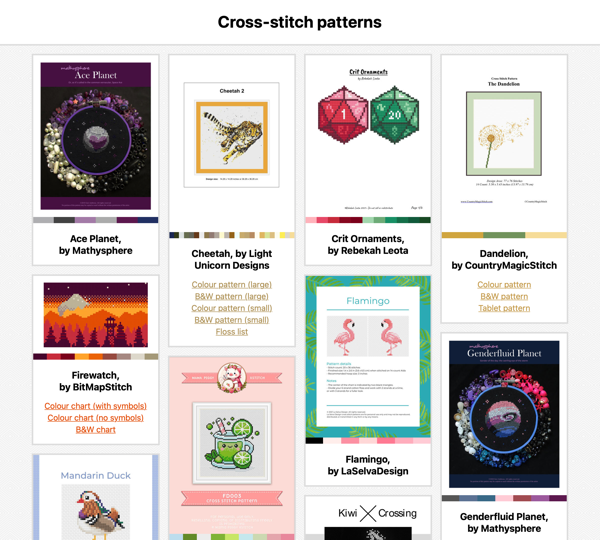
This is what it looks like:</p>
<p><img alt="A collection of cross-stitch patterns shown as a grid of cards. Each card has a thumbnail showing a picture of what the pattern looks like, then below it is the title and a list of links. There's also a stripe of colours below the thumbnail, showing the colours used in the pattern." class="screenshot" sizes="(max-width:600px)100vw,600px" src="https://alexwlchan.net/images/2026/cross-stitch-patterns_1x.png" srcset="/images/2026/cross-stitch-patterns_1x.png 600w,/images/2026/cross-stitch-patterns_2x.png 1200w,/images/2026/cross-stitch-patterns_3x.png 1800w" width="600"/></p>
<p>The patterns are arranged in a masonry layout with a preview thumbnail for each pattern, which is normally the first page of the PDF.
If a pattern has multiple files – for example, different files for colour and black-and-white printing – there’s a list of links below the thumbnail.
I can also add a source link to where I bought the pattern, if I want to find more patterns by the same author.</p>
<p>Internally, it’s structured like <a href="https://alexwlchan.net/2025/mildly-dynamic-websites/">my other static websites</a>.
The metadata for the patterns is stored in a JavaScript file, and then I have an HTML page which renders that metadata in this visual design.
My pattern collection doesn’t change very often, so I’m adding new files by hand.</p>
<p>There are no sorting or filtering options, because my collection is small enough that they’re unnecessary.
I can scroll through the entire list in less than a minute and find whatever I need.</p>
<p>I’d like to start making my own clothes soon, and I expect to copy this design to store clothing patterns.</p>
<p>This collection now sits alongside my saved bookmarks, podcasts, TV shows, and more.
I can keep all my patterns organised, and I won’t lose them in the depths of my hard drive.</p>
<h2 id="technical-tricks">Technical tricks</h2>
<p>There are a couple of technical pieces I’m quite pleased with in this process:</p>
<ol>
<li><p><strong>Masonry layout.</strong>
I love the cascading grid style of a masonry layout, and I think they’re great when you have variable-sized content – like my pattern cards.
I’ve been using them for over a decade; screenshots of my early web apps show my experiments with David Desandro’s <a href="https://masonry.desandro.com/">Masonry.js library</a>.</p>
<p>Masonry layouts are now a native feature of CSS called <a href="https://webkit.org/blog/17660/introducing-css-grid-lanes/">“Grid Lanes”</a>, which is simpler and more performant than the JavaScript approach.
I’m excited to use these layouts in even more places.</p>
</li>
<li><p><strong>Thumbnails of PDFs.</strong>
Most digital postage patterns are shipped as PDFs, and I’m creating the thumbnail images with <a href="https://alexwlchan.net/projects/create_thumbnail/">my create_thumbnail tool</a>.</p>
<p>I had to extend my tool to support PDFs, which turned out to be straightforward with the <a href="https://crates.io/crates/pdf_oxide">pdf_oxide crate</a>.
I’d not come across Oxide before, but it’s a cross-language library for working with PDFs, and I can imagine using it in future.</p>
</li>
<li><p><strong>A coloured stripe for the palette.</strong>
In the metadata for each project, I have the complete list of DMC thread colours and the pattern dimensions.
I have a lookup table that converts DMC thread colours to hex codes, and then I’m able to create a <a href="https://developer.mozilla.org/en-US/docs/Web/CSS/Reference/Values/gradient/linear-gradient">linear gradient</a> in CSS to render a coloured stripe of the pattern colours.</p>
<p>Here’s an example from a pattern with four colours:</p>
<pre class="lng-css"><code>border-bottom<span class="o">:</span> 12px solid transparent<span class="o">;</span>
border-image<span class="o">:</span>  linear-gradient<span class="o">(</span>
  to right<span class="o">,</span>
  #7a451f 0<span class="o">%,</span>
  #7a451f 25<span class="o">%,</span>
  #985e33 25<span class="o">%,</span>
  #985e33 50<span class="o">%,</span>
  #e4bb8e 50<span class="o">%,</span>
  #e4bb8e 75<span class="o">%,</span>
  #361f0e 75<span class="o">%,</span>
  #361f0e 100<span class="o">%</span>
<span class="o">)</span> 1<span class="o">;</span></code></pre>
</li>
</ol>
<p>Building the HTML, CSS, and JavaScript was very quick – I have <a href="https://alexwlchan.net/2025/mildly-dynamic-websites/">notes on how I build my media sites</a>, and I’ve done it plenty of times before.
I threw together the initial prototype in less than 15 minutes.
The longer part was finding all the PDFs scattered across my disk – but now that’s done, and I know exactly where to find my patterns.</p>

    <p>[If the formatting of this post looks odd in your feed reader, <a href="https://alexwlchan.net/2026/cross-stitch-patterns/">visit the original article</a>]</p>
    ]]>
  </content>

    <category term="Cross-stitch" />
    <category term="Static websites" />

    <summary type="html">A local static website lets me keep all my patterns in one place, so I&#39;ll never lose a pattern again.</summary>
</entry><entry>
  <title type="html">Parametrised tests in Rust with named parameters</title>
  <link
    href="https://alexwlchan.net/2026/table-driven-rust/"
    rel="alternate"
    type="text/html"
    title="Parametrised tests in Rust with named parameters"
  />
  <published>2026-09-26T09:43:00+01:00</published>
  <updated>2026-09-26T09:43:00+01:00</updated>

  <id>https://alexwlchan.net/2026/table-driven-rust/</id>

  <content type="html" xml:base="https://alexwlchan.net/2026/table-driven-rust/">
    <![CDATA[<p>I’ve been revisiting some of my small Rust utilities this week, and I wanted to improve the test suite.
There’s a lot of repetition, and I wanted to switch to parametrised tests, a pattern I use a lot in <a href="https://docs.pytest.org/en/stable/how-to/parametrize.html#pytest-mark-parametrize">Python</a> and <a href="https://go.dev/wiki/TableDrivenTests">Go</a>.
(These are also called “table-driven tests”.)</p>
<p>Parameterised tests allow you to write the test logic once, then run it with many different inputs and expected results.
This reduces repetition, highlights variation, and simplifies adding new cases.</p>
<p>For example, in my <a href="https://alexwlchan.net/projects/create_thumbnail/">thumbnail creator</a>, I want to create a thumbnail with various image formats, and check the thumbnail has the correct filename and dimensions.
Rather than copy-pasting test functions, I wanted to declare test cases with named fields, like this:</p>
<pre class="lng-rust"><code><span class="n">animated_gif</span><span class="p">:</span> <span class="p">{</span>
    img_path<span class="p">:</span>          <span class="s">"src/tests/animated_squares.gif"</span><span class="p">,</span>
    target<span class="p">:</span>            TargetDimension<span class="p">::</span>MaxWidth<span class="p">(</span><span class="mi">16</span><span class="p">),</span>
    expected_filename<span class="p">:</span> <span class="s">"animated_squares.mp4"</span><span class="p">,</span>
    expected_dims<span class="p">:</span>     <span class="p">(</span><span class="mi">16</span><span class="p">,</span> <span class="mi">16</span><span class="p">),</span>
<span class="p">},</span></code></pre>
<p>Supporting this syntax required me to create a custom Rust macro.</p>
<h2 id="existing-approaches">Existing approaches</h2>
<p>I found three existing approaches to writing this type of test in Rust:</p>
<ol>
<li><p><strong>Use a <code>for</code> loop over the test cases.</strong>
This is the simplest approach: define our test cases in an array, then iterate over them one-by-one.</p>
<pre class="lng-rust"><code>#[test]
<span class="k">fn</span> <span class="n">test_fibonacci_numbers</span><span class="p">()</span> <span class="p">{</span>
    <span class="kd">let</span> <span class="n">test_cases</span> <span class="o">=</span> <span class="p">[(</span><span class="mi">1</span><span class="p">,</span> <span class="mi">1</span><span class="p">),</span> <span class="p">(</span><span class="mi">6</span><span class="p">,</span> <span class="mi">8</span><span class="p">),</span> <span class="p">(</span><span class="mi">10</span><span class="p">,</span> <span class="mi">55</span><span class="p">)];</span>

    <span class="k">for</span> <span class="p">(</span><span class="n">input</span><span class="p">,</span> <span class="n">expected</span><span class="p">)</span> <span class="k">in</span> test_cases <span class="p">{</span>
        <span class="fm">assert_eq!</span><span class="p">(</span>fibonacci<span class="p">(</span>input<span class="p">),</span> expected<span class="p">);</span>
    <span class="p">}</span>
<span class="p">}</span></code></pre>
<p>This is easy to write and understand, but Rust’s standard assertions don’t give us test case isolation.
If one case fails, the test stops immediately and skips the rest.</p>
<p>(Go’s testing library has <a href="https://pkg.go.dev/testing#T.Error"><code>t.Error</code></a>, which marks a test as failed but allows it to continue running.
When a test fails, you often have more information than if the test had failed immediately.
I now miss this when working in other languages.)</p>
</li>
<li><p><strong>Define a macro with positional arguments.</strong>
Many guides, such as <a href="https://over-codes.github.io/rust-table-driven-tests.html">over-code’s article</a>, define custom macros with positional arguments.</p>
<pre class="lng-rust"><code>fib_test<span class="o">!</span><span class="p">(</span><span class="n">my_tests</span><span class="p">,</span>
    <span class="n">basic</span><span class="p">:</span> <span class="mi">1</span><span class="p">,</span> <span class="mi">1</span><span class="p">,</span>
    <span class="n">sixth</span><span class="p">:</span> <span class="mi">6</span><span class="p">,</span> <span class="mi">8</span><span class="p">,</span>
    <span class="n">tenth</span><span class="p">:</span> <span class="mi">10</span><span class="p">,</span> <span class="mi">55</span><span class="p">,</span>
<span class="p">);</span></code></pre>
<p>Named test cases are nice, but positional arguments hurt readability if you have more than a few parameters.</p>
</li>
<li><p><strong>Use a third-party testing library.</strong>
Crates like <a href="https://docs.rs/parameterized/latest/parameterized/">parameterized</a>, <a href="https://docs.rs/rstest/0.27.0/rstest/#creating-parametrized-tests">rstest</a>, and <a href="https://docs.rs/yare/latest/yare/">yare</a> use attributes to declare test cases.</p>
<pre class="lng-rust"><code><span class="k">use</span> <span class="n">rstest</span><span class="p">::</span><span class="n">rstest</span><span class="p">;</span>

#[rstest]
#[case(1, 1)]
#[case(6, 8)]
#[case(10, 55)]
<span class="k">fn</span> <span class="n">fibonacci_test</span><span class="p">(</span>#[case] <span class="n">input</span><span class="p">:</span> <span class="kt">u32</span><span class="p">,</span>#[case] <span class="n">expected</span><span class="p">:</span> <span class="kt">u32</span><span class="p">)</span> <span class="p">{</span>
    <span class="fm">assert_eq!</span><span class="p">(</span>expected<span class="p">,</span> fibonacci<span class="p">(</span>input<span class="p">))</span>
<span class="p">}</span></code></pre>
<p>If I was working in a larger codebase, I’d compare these libraries and pick my favourite.</p>
<p>I deliberately skipped them this time, because I only use Rust for tiny personal tools, and I write it as a learning exercise.
I’d rather write a basic version myself and learn something new, than use somebody else’s library and miss out on the lesson.</p>
</li>
</ol>
<h2 id="writing-my-own-macro">Writing my own macro</h2>
<p>Since I couldn’t find a macro that gave me named parameters, I decided to write my own.</p>
<p>Here’s the complete macro invocation for my image thumbnailer, with three test cases:</p>
<pre class="lng-rust"><code>image_thumbnail_tests<span class="o">!</span> <span class="p">{</span>
    <span class="n">animated_gif</span><span class="p">:</span> <span class="p">{</span>
        img_path<span class="p">:</span>          <span class="s">"src/tests/animated_squares.gif"</span><span class="p">,</span>
        target<span class="p">:</span>            TargetDimension<span class="p">::</span>MaxWidth<span class="p">(</span><span class="mi">16</span><span class="p">),</span>
        expected_filename<span class="p">:</span> <span class="s">"animated_squares.mp4"</span><span class="p">,</span>
        expected_dims<span class="p">:</span>     <span class="p">(</span><span class="mi">16</span><span class="p">,</span> <span class="mi">16</span><span class="p">),</span>
    <span class="p">},</span>
    <span class="n">static_gif</span><span class="p">:</span> <span class="p">{</span>
        img_path<span class="p">:</span>          <span class="s">"src/tests/yellow.gif"</span><span class="p">,</span>
        target<span class="p">:</span>            TargetDimension<span class="p">::</span>MaxWidth<span class="p">(</span><span class="mi">16</span><span class="p">),</span>
        expected_filename<span class="p">:</span> <span class="s">"yellow.gif"</span><span class="p">,</span>
        expected_dims<span class="p">:</span>     <span class="p">(</span><span class="mi">16</span><span class="p">,</span> <span class="mi">8</span><span class="p">),</span>
    <span class="p">},</span>
    <span class="n">jpeg</span><span class="p">:</span> <span class="p">{</span>
        img_path<span class="p">:</span>          <span class="s">"src/tests/noise.jpg"</span><span class="p">,</span>
        target<span class="p">:</span>            TargetDimension<span class="p">::</span>MaxWidth<span class="p">(</span><span class="mi">16</span><span class="p">),</span>
        expected_filename<span class="p">:</span> <span class="s">"noise.jpg"</span><span class="p">,</span>
        expected_dims<span class="p">:</span>     <span class="p">(</span><span class="mi">16</span><span class="p">,</span> <span class="mi">32</span><span class="p">),</span>
    <span class="p">},</span>
<span class="p">}</span></code></pre>
<p>The goal is to have clear, self-documented test cases.
You can see what the test does and how to add a new test case without reading the body of the macro.</p>
<p>Here’s the macro definition, with extra whitespace to make the structure more obvious:</p>
<pre class="lng-rust"><code><span class="fm">macro_rules!</span> <span class="n">image_thumbnail_tests</span> <span class="p">{</span>
    <span class="p">(</span>
        $(
            <span class="n">$name</span><span class="p">:</span>ident<span class="p">:</span> <span class="p">{</span>
                img_path<span class="p">:</span>          <span class="n">$img_path</span><span class="p">:</span>expr<span class="p">,</span>
                target<span class="p">:</span>            <span class="n">$target</span><span class="p">:</span>expr<span class="p">,</span>
                expected_filename<span class="p">:</span> <span class="n">$expected_filename</span><span class="p">:</span>expr<span class="p">,</span>
                expected_dims<span class="p">:</span>     <span class="n">$expected_dims</span><span class="p">:</span>expr<span class="p">,</span>
            <span class="p">},</span>
        <span class="p">)</span><span class="o">*</span>
    <span class="p">)</span>
    <span class="o">=&gt;</span>
    <span class="p">{</span>
        $(
            #[test]
            <span class="k">fn</span> <span class="n">$name</span><span class="p">()</span> <span class="p">{</span>
                <span class="kd">let</span> <span class="n">path</span> <span class="o">=</span> PathBuf<span class="p">::</span>from<span class="p">(</span>$img_path<span class="p">);</span>
                <span class="kd">let</span> <span class="n">out_dir</span> <span class="o">=</span> test_dir<span class="p">();</span>
                <span class="kd">let</span> <span class="n">thumbnail_path</span> <span class="o">=</span> create_thumbnail<span class="p">(</span><span class="o">&amp;</span>path<span class="p">,</span> <span class="o">&amp;</span>out_dir<span class="p">,</span> $target<span class="p">).</span>unwrap<span class="p">();</span>

                <span class="fm">assert_eq!</span><span class="p">(</span>thumbnail_path<span class="p">,</span> out_dir<span class="p">.</span>join<span class="p">(</span>$expected_filename<span class="p">));</span>
                <span class="fm">assert!</span><span class="p">(</span>thumbnail_path<span class="p">.</span>exists<span class="p">());</span>
                <span class="fm">assert_eq!</span><span class="p">(</span>get_dimensions<span class="p">(</span><span class="o">&amp;</span>thumbnail_path<span class="p">),</span> $expected_dims<span class="p">);</span>
            <span class="p">}</span>
        <span class="p">)</span><span class="o">*</span>
    <span class="p">}</span>
<span class="p">}</span></code></pre>
<p>If we zoom out, the structure of a declarative macro looks like a <a href="https://doc.rust-lang.org/book/ch19-03-pattern-syntax.html">match expression</a>:</p>
<pre class="lng-rust"><code><span class="fm">macro_rules!</span> <span class="n">image_thumbnail_tests</span> <span class="p">{</span>
  <span class="p">(</span> <span class="n">matcher</span> <span class="p">)</span> <span class="o">=&gt;</span> <span class="p">{</span> <span class="n">transcriber</span> <span class="p">}</span>
<span class="p">}</span></code></pre>
<p>I think of the two halves are input/output, but they’re really called matcher/transcriber:</p>
<ol>
<li><p><strong>The left-hand side (<em>matcher</em>).</strong>
The matcher defines a pattern of <a href="https://doc.rust-lang.org/reference/tokens.html">Rust tokens</a> the input code must match precisely, including commas and brackets (but ignoring whitespace).</p>
<ul>
<li><code>$(…)*</code> works like a regular expression, matching zero or more instances of the enclosed pattern.</li>
<li><code>$name:ident</code> and <code>$img_path:expr</code> match a Rust identifier and expression, respectively, and bind them to metavariables (similar to named capture groups in regexes).</li>
</ul>
<p>I deliberately designed my pattern to resemble <a href="https://doc.rust-lang.org/book/ch05-01-defining-structs.html">Rust’s struct syntax</a>.
Macro inputs don’t have to be valid Rust code, but I wanted something that would look familiar in a Rust file.</p>
</li>
<li><p><strong>The right-hand side (<em>transcriber</em>).</strong>
The transcriber is a template for Rust code, which gets substituted in at compile time, replacing metavariables with values captured by the matcher.</p>
<p>Here, the <code>$(…)*</code> iterates over the matches and creates a corresponding function with a <code>#[test]</code> attribute.
This attribute is why we need to use a macro – there’s no way to dynamically generate new test functions in Rust without macros.</p>
</li>
</ol>
<p>When compiled, the macro gets replaced with all the generated code from the transcriber, as if I’d written out the individual tests in full:</p>
<pre class="lng-rust"><code>#[test]
<span class="k">fn</span> <span class="n">animated_gif</span><span class="p">()</span> <span class="p">{</span>
    <span class="kd">let</span> <span class="n">path</span> <span class="o">=</span> PathBuf<span class="p">::</span>from<span class="p">(</span><span class="s">"src/tests/animated_squares.gif"</span><span class="p">);</span>
    <span class="kd">let</span> <span class="n">out_dir</span> <span class="o">=</span> test_dir<span class="p">();</span>
    <span class="kd">let</span> <span class="n">thumbnail_path</span> <span class="o">=</span> create_thumbnail<span class="p">(</span><span class="o">&amp;</span>path<span class="p">,</span> <span class="o">&amp;</span>out_dir<span class="p">,</span> TargetDimension<span class="p">::</span>MaxWidth<span class="p">(</span><span class="mi">16</span><span class="p">)).</span>unwrap<span class="p">();</span>

    <span class="fm">assert_eq!</span><span class="p">(</span>thumbnail_path<span class="p">,</span> out_dir<span class="p">.</span>join<span class="p">(</span><span class="s">"animated_squares.mp4"</span><span class="p">));</span>
    <span class="fm">assert!</span><span class="p">(</span>thumbnail_path<span class="p">.</span>exists<span class="p">());</span>
    <span class="fm">assert_eq!</span><span class="p">(</span>get_dimensions<span class="p">(</span><span class="o">&amp;</span>thumbnail_path<span class="p">),</span> <span class="p">(</span><span class="mi">16</span><span class="p">,</span> <span class="mi">16</span><span class="p">));</span>
<span class="p">}</span>

#[test]
<span class="k">fn</span> <span class="n">static_gif</span><span class="p">()</span> <span class="p">{</span>
    <span class="kd">let</span> <span class="n">path</span> <span class="o">=</span> PathBuf<span class="p">::</span>from<span class="p">(</span><span class="s">"src/tests/yellow.gif"</span><span class="p">);</span>
    <span class="err">…</span></code></pre>
<p>This means all of my test cases run as separate tests, so I get all the benefits of individual test functions without having to copy-paste lots of boilerplate throughout my codebase.</p>
<p>I’ve seen custom macros pop up in the few Rust codebases I’ve read, and it feels good to have a better understanding of how they work.
I used to copy-paste the same snippets thoughtlessly from project to project, but now I know what the different brackets and asterisks mean.
The next time I write a macro or read somebody else’s, I’ll know what’s going on.</p>

    <p>[If the formatting of this post looks odd in your feed reader, <a href="https://alexwlchan.net/2026/table-driven-rust/">visit the original article</a>]</p>
    ]]>
  </content>

    <category term="Rust" />
    <category term="Software testing" />

    <summary type="html">I wrote a macro that lets me define test cases with labelled inputs and outputs, so I can reduce repetition without affecting readability.</summary>
</entry><entry>
  <title type="html">Abusing ID3 chapters to turn videos into glanceable podcasts</title>
  <link
    href="https://alexwlchan.net/2026/glancecast/"
    rel="alternate"
    type="text/html"
    title="Abusing ID3 chapters to turn videos into glanceable podcasts"
  />
  <published>2026-09-15T12:04:15+01:00</published>
  <updated>2026-09-15T12:04:15+01:00</updated>

  <id>https://alexwlchan.net/2026/glancecast/</id>

  <content type="html" xml:base="https://alexwlchan.net/2026/glancecast/">
    <![CDATA[<p>I listen to a lot of podcasts, and I like how they fit around other tasks. I press play, lock my phone, and put it down.
I’m free to wash the dishes, fold the laundry, or shop for groceries.</p>
<p>Unfortunately, more and more information is only published as a video. Technical talks, conference sessions, video essays – they don’t work in an audio-only podcast app.
I could convert these videos to MP3 files, but that breaks down the moment a video isn’t pure spoken word. If a speaker says, “Look at this slide” or holds up a diagram, an audio-only file leaves me stranded.</p>
<p>I don’t want to give up the podcast player I like, nor stare at a screen for an hour – but I do want the information in these videos.</p>
<p>To solve this, I’m abusing my podcast player’s chapter support. This gives me the best of both worlds: I can listen to a video as audio-first, and glance at my lock screen if I need a moment of visual context.</p>
<h2 id="the-idea-chapters-every-few-seconds">The idea: Chapters every few seconds</h2>
<p>MP3 files can have ID3 metadata, and ID3 metadata <a href="https://id3.org/id3v2-chapters-1.0">can include chapters</a>. A chapter covers a particular time range, and it can have an associated title, description, and cover art.</p>
<p>My podcast app of choice is <a href="https://overcast.fm/">Overcast</a>, which can’t play videos, but it does have robust chapter support.
I can jump between chapters, navigate a table of contents, and see per-chapter cover art.</p>
<p>To get videos into Overcast, I’m creating MP3 files with a new chapter every few seconds, and the per-chapter cover art is a corresponding frame from the video.
As I play the file, I get a slow, stop-motion-like rendition of the original video.
If my phone is locked, I can glance at my lock screen and see the current frame in the Now Playing screen.</p>
<p>Overcast is developed by Marco Arment, and I got this idea from <a href="https://overcast.fm/forecast">Forecast</a>, his app for adding chapters to podcasts.
In particular, I was struck by its ability to create chapters that don’t display in the chapter list – ideal if I don’t want a table of contents with hundreds of entries.
As I was developing my script, I compared my output to the output from Forecast to ensure I was creating the chapters correctly.</p>
<h2 id="the-code-ffmpeg-and-mutagen">The code: FFmpeg and Mutagen</h2>
<p>There are three steps in this process:</p>
<ol>
<li>Convert a video file to an MP3</li>
<li>Extract images from the video at a fixed interval</li>
<li>Insert the images as hidden chapters in the MP3 file</li>
</ol>
<p>Let’s go through each in turn.</p>
<h3 id="1-convert-a-video-file-to-an-mp3">1. Convert a video file to an MP3</h3>
<p>Converting a video file to an MP3 is a single <a href="https://ffmpeg.org/">FFmpeg</a> command:</p>
<pre class="lng-shell"><code>ffmpeg -i video.mp4 audio.mp3</code></pre>
<p>This is consistently the slowest step of the process, and I do wonder if I could use different settings or an alternative encoder to make it go faster – but it’s not slow enough to be worth further investigation.</p>
<h3 id="2-extract-images-from-the-video-at-a-fixed-interval">2. Extract images from the video at a fixed interval</h3>
<p>Extracting images from a video needs a more complicated FFmpeg command:</p>
<pre class="lng-shell"><code>ffmpeg -i video.mp4 <span class="se">\</span>
  -vf <span class="s1">'fps=1/5,scale=iw*sar:ih,scale=min(iw\,945):min(ih\,945):force_original_aspect_ratio=decrease'</span> <span class="se">\</span>
   thumbnail_%04d.jpg</code></pre>
<p>This extracts an image every 5 seconds, downscales any image larger than 945 pixels square (while preserving the original aspect ratio), and saves the results as sequentially numbered JPEG images (<code>thumbnail_0001.png</code>, <code>thumbnail_0002.png</code>, and so on).</p>
<p>The key is the <code class="nowrap">-vf</code> flag, which defines two FFmpeg filters:</p>
<ul>
<li>The <a href="https://ffmpeg.org/ffmpeg-filters.html#fps"><code>fps</code> filter</a> selects one frame every 5 seconds (<code>fps=1/5</code>).</li>
<li>The first <a href="https://ffmpeg.org/ffmpeg-filters.html#scale"><code>scale</code> filter</a> scales the width based on the sample aspect ratio (<code>scale=iw*sar:ih</code>).
Without this filter, frames can be <a href="https://alexwlchan.net/2025/square-pixels/">stretched and distorted</a>.</li>
<li>The second <code>scale</code> filter scales the input video, preserving the original aspect ratio (<code>force_original_aspect_ratio=decrease</code>), and ensuring the output images fit within 945×945px or the size of the input video, whichever is smaller.
My limit is 945 pixels because that’s the largest size that cover art is shown on my iPhone.</li>
</ul>
<p>This filter still isn’t completely correct – it sometimes creates images from portrait videos that are smaller than I’m expecting – but it’s good enough.
These are only thumbnails for glancing at, and if I want to change it later, I can always do the image resizing outside FFmpeg.</p>
<h3 id="3-insert-the-images-as-hidden-chapters-in-the-mp3-file">3. Insert the images as hidden chapters in the MP3 file</h3>
<p>Inserting the chapters into the MP3 file is more complicated.
Although FFmpeg has basic support for ID3 metadata, as far as I know, it can’t insert chapters with per-chapter artwork. Instead, I’m going to reach for Python and the <a href="https://mutagen.readthedocs.io/en/latest/index.html">Mutagen library</a>.</p>
<p>Here’s the code to add a chapter to an MP3 file:</p>
<pre class="lng-python"><code><span class="kn">from</span> <span class="n">mutagen</span><span class="p">.</span><span class="n">id3</span> <span class="kn">import</span> <span class="n">APIC</span><span class="p">,</span> <span class="n">CHAP</span><span class="p">,</span> <span class="n">ID3</span><span class="p">,</span> <span class="n">PictureType</span>

<span class="n">audio</span> <span class="o">=</span> ID3<span class="p">(</span><span class="s2">"audio.mp3"</span><span class="p">)</span>

<span class="k">with</span> open<span class="p">(</span><span class="s2">"thumbnail_0001.jpg"</span><span class="p">,</span> <span class="s2">"rb"</span><span class="p">)</span> <span class="k">as</span> <span class="n">f</span><span class="p">:</span>
    <span class="n">img_data</span> <span class="o">=</span> f<span class="o">.</span>read<span class="p">()</span>

<span class="n">image_frame</span> <span class="o">=</span> APIC<span class="p">(</span>mime<span class="o">=</span><span class="s2">"image/jpeg"</span><span class="p">,</span> type<span class="o">=</span>PictureType<span class="o">.</span>OTHER<span class="p">,</span> data<span class="o">=</span>img_data<span class="p">)</span>

<span class="n">chapter_frame</span> <span class="o">=</span> CHAP<span class="p">(</span>
    element_id<span class="o">=</span><span class="s2">"chp1"</span><span class="p">,</span> start_time<span class="o">=</span><span class="mi">0</span><span class="p">,</span> end_time<span class="o">=</span><span class="mi">5</span> <span class="o">*</span> <span class="mi">1000</span><span class="p">,</span> sub_frames<span class="o">=</span><span class="p">[</span>image_frame<span class="p">]</span>
<span class="p">)</span>

audio<span class="o">.</span>add<span class="p">(</span>chapter_frame<span class="p">)</span>
audio<span class="o">.</span>save<span class="p">()</span></code></pre>
<p>This creates a single chapter that lasts the first 5 seconds (0 to 5000 milliseconds), and the per-chapter cover art is <code>thumbnail_0001.jpg</code>.
If we ran this in a loop, we could add images for every 5 second slice of the original video.</p>
<p>This code is inserting two frames into the ID3 metadata:</p>
<ul>
<li>The <a href="https://mutagen-specs.readthedocs.io/en/latest/id3/id3v2-chapters-1.0.html"><code>CHAP</code> (chapter) frame</a> contains the timing information, and it can have subframes for metadata like title, chapter art, or associated URL.</li>
<li>The <a href="https://mutagen-specs.readthedocs.io/en/latest/id3/id3v2.4.0-frames.html#apic"><code>APIC</code> (attached picture) subframe</a> contains information about a picture, which can either be a blob of image data or a URL to an image on the web.</li>
</ul>
<p>Normally, you’d also insert a <a href="https://mutagen-specs.readthedocs.io/en/latest/id3/id3v2-chapters-1.0.html#table-of-contents-frame">CTOC frame</a> which defines a table of contents, but I don’t want a TOC with hundreds of 5-second chapters, so I’m deliberately not doing this here.
This is allowed by the ID3 spec – you’re not required to insert a CTOC frame if you’re using chapters, and you can have chapters that aren’t listed in your table of contents.</p>
<p>To work out which frames I needed, I used Forecast to create some chapters by hand, and I inspected their frames.
In particular, loading an MP3 and calling <a href="https://mutagen.readthedocs.io/en/latest/api/id3.html#mutagen.id3.ID3Tags.pprint">Mutagen’s <code>pprint()</code> method</a> shows a human-readable list of frames, and then I could drill into the individual fields:</p>
<pre class="lng-python"><code><span class="kn">from</span> <span class="n">mutagen</span><span class="p">.</span><span class="n">id3</span> <span class="kn">import</span> <span class="n">ID3</span>

<span class="n">audio</span> <span class="o">=</span> ID3<span class="p">(</span><span class="s2">"audio.mp3"</span><span class="p">)</span>
print<span class="p">(</span>audio<span class="o">.</span>pprint<span class="p">())</span></code></pre>
<p>I wrapped all this code in a project called <a href="https://alexwlchan.net/projects/glancecast/">glancecast</a>, which allows you to convert a video file with a single command, with optional flags to set the frame length and chapter art size:</p>
<pre class="lng-console"><code><span class="gp">$</span><span class="w"> </span>python3<span class="w"> </span>glancecast.py<span class="w"> </span>interesting_talk.mp4
<span class="go">interesting_talk.mp3</span></code></pre>
<p>The process takes a minute or so to complete, most of which is spent transcoding the video file to MP3.
The resulting MP3s are usually 40 to 50 MB in size, which is very reasonable.</p>
<h2 id="the-outcome-how-it-looks-in-practice">The outcome: How it looks in practice</h2>
<p>Here’s what one of these “glanceable” podcasts looks like in Overcast and on my lock screen:</p>
<figure>
<div>
<a href="https://alexwlchan.net/images/2026/chapters-overcast.png"><picture>
<source media="(prefers-color-scheme: dark)" sizes="(max-width:300px)100vw,300px" srcset="https://alexwlchan.net/images/2026/chapters-overcast.dark_1x.png 300w, https://alexwlchan.net/images/2026/chapters-overcast.dark_2x.png 600w, https://alexwlchan.net/images/2026/chapters-overcast.dark_3x.png 900w" type="image/png"/><source sizes="(max-width:300px)100vw,300px" srcset="https://alexwlchan.net/images/2026/chapters-overcast_1x.png 300w, https://alexwlchan.net/images/2026/chapters-overcast_2x.png 600w, https://alexwlchan.net/images/2026/chapters-overcast_3x.png 900w" type="image/png"/><img alt="The Overcast now playing screen, where a significant chunk of the screen is a region for square album artwork, showing a letterboxed video frame. The left-hand of the frame shows the speaker; the right-hand shows their slide." class="screenshot dark_aware" src="https://alexwlchan.net/images/2026/chapters-overcast_1x.png" width="300"/>
</picture></a>
<a href="https://alexwlchan.net/images/2026/chapters-lockscreen.jpg"><picture>
<source media="(prefers-color-scheme: dark)" sizes="(max-width:300px)100vw,300px" srcset="https://alexwlchan.net/images/2026/chapters-lockscreen.dark_1x.jpg 300w, https://alexwlchan.net/images/2026/chapters-lockscreen.dark_2x.jpg 600w, https://alexwlchan.net/images/2026/chapters-lockscreen.dark_3x.jpg 900w" type="image/jpeg"/><source sizes="(max-width:300px)100vw,300px" srcset="https://alexwlchan.net/images/2026/chapters-lockscreen_1x.jpg 300w, https://alexwlchan.net/images/2026/chapters-lockscreen_2x.jpg 600w, https://alexwlchan.net/images/2026/chapters-lockscreen_3x.jpg 900w" type="image/jpeg"/><img alt="The lock screen now playing controls, where the same artwork is visible in a floating pane above my wallpaper." class="screenshot dark_aware" src="https://alexwlchan.net/images/2026/chapters-lockscreen_1x.jpg" width="300"/>
</picture></a>
</div>
<figcaption>
    Maggie Appleton presented this talk <a href="https://maggieappleton.com/home-cooked-software">over two years ago</a> and it’s been on my “talks to watch” list ever since.
    Once I put it in Overcast?
    I listened to it in less than a day.
  </figcaption>
</figure>
<p>It’s not a lot of extra information, but enough that I can quickly glance down and get the gist of what a speaker is saying.
Both views update with a new frame every few seconds, or I can put my phone in my pocket and ignore the screen.</p>
<p>I’ve used this approach for half a dozen videos so far, and I’m happy with the results.
I expect to keep using it, because I have a long queue of videos I’ve been meaning to watch.</p>
<p>If you’d like to try this, check out <a href="https://alexwlchan.net/projects/glancecast/">glancecast</a> for the full code and instructions.</p>

    <p>[If the formatting of this post looks odd in your feed reader, <a href="https://alexwlchan.net/2026/glancecast/">visit the original article</a>]</p>
    ]]>
  </content>

    <category term="Images and videos" />

    <summary type="html">Inserting a chapter with artwork every few seconds turns an MP3 file into an approximation of a video file. I can listen to videos as audio-first, and glance at my lock screen if I need some visual context.</summary>
</entry><entry>
  <title type="html">Why can’t you combine &lt;code&gt;.tar.gz&lt;/code&gt; files with &lt;code&gt;cat&lt;/code&gt;?</title>
  <link
    href="https://alexwlchan.net/2026/cat-confusion/"
    rel="alternate"
    type="text/html"
    title="Why can’t you combine `.tar.gz` files with `cat`?"
  />
  <published>2026-08-20T10:49:28+01:00</published>
  <updated>2026-08-20T10:49:28+01:00</updated>

  <id>https://alexwlchan.net/2026/cat-confusion/</id>

  <content type="html" xml:base="https://alexwlchan.net/2026/cat-confusion/">
    <![CDATA[<p>I’m working on a project that generates multiple <code>.tar.gz</code> archives, and I need to combine them into one final file.
I thought I could just <code>cat</code> the bytes together, but that doesn’t work.
This seemingly simple task exposed my flawed understanding of <code>tar</code> and <code>gzip</code>.</p>
<p>To my fix my code, I first had to fix my mental model – and that took me into tape drives, patent laws, and end-of-file markers.</p>
<h2 id="tar-stands-for-strong-t-strong-ape-strong-ar-strong-chive">tar stands for <strong>t</strong>ape <strong>ar</strong>chive</h2>
<p><a href="https://en.wikipedia.org/wiki/Tar_(computing)"><code>tar</code></a> is a file archiver that combines multiple files and their metadata – filenames, timestamps, directory structure – into a single file.</p>
<p>It was originally designed for <a href="https://en.wikipedia.org/wiki/Magnetic-tape_data_storage">magnetic tapes</a>, and the file structure is informed by the physical constraints of that medium:</p>
<ol>
<li><p><strong>Sequential reads.</strong>
Magnetic tapes are most efficient when you start at the beginning, and play forward to the end of the tape.</p>
</li>
<li><p><strong>Append-only writes.</strong>
Early tapes could only append data to the end of a record, not replace existing data.</p>
</li>
<li><p><strong>Fixed data sizes.</strong>
Tapes have a fixed capacity, and early tapes had fixed data block sizes.</p>
</li>
</ol>
<p>Internally, a tar archive is a sequence of files, each broken into fixed-size blocks.
Files have a header block (with metadata like filename and file size) and data blocks (the file contents).
After the files, there are two or more blocks filled entirely with zeroes.
These form an <a href="https://en.wikipedia.org/wiki/End-of-file_marker">end-of-file (EOF) marker</a> that tells a reader to disregard everything else in the archive.</p>
<svg aria-labelledby="svg_tar_structure" class="dark_aware" role="img" viewbox="0 0 272 509.0" width="270" xmlns="http://www.w3.org/2000/svg" xmlns:xlink="http://www.w3.org/1999/xlink"><title id="svg_tar_structure">Architecture diagram showing the internals of a tar archive. There are two files with a header and data blocks, two blocks of zeroes, and two ignored blocks.</title>
<defs>

</defs>
<rect class="wrapper" height="505.0" width="140" x="2" y="2"></rect>
<rect class="header" height="35.0" width="120" x="12" y="12.0"></rect>
<text class="header" x="72.0" y="31.25">header</text>
<rect class="data" height="35.0" width="120" x="12" y="57.0"></rect>
<text class="data" x="72.0" y="76.25">data</text>
<rect class="data" height="35.0" width="120" x="12" y="102.0"></rect>
<text class="data" x="72.0" y="121.25">data</text>
<rect class="header" height="35.0" width="120" x="12" y="147.0"></rect>
<text class="header" x="72.0" y="166.25">header</text>
<rect class="data" height="35.0" width="120" x="12" y="192.0"></rect>
<text class="data" x="72.0" y="211.25">data</text>
<rect class="data" height="35.0" width="120" x="12" y="237.0"></rect>
<text class="data" x="72.0" y="256.25">data</text>
<rect class="data" height="35.0" width="120" x="12" y="282.0"></rect>
<text class="data" x="72.0" y="301.25">data</text>
<rect class="zeroes" height="35.0" width="120" x="12" y="327.0"></rect>
<text class="zeroes" x="72.0" y="346.25">zeroes</text>
<rect class="zeroes" height="35.0" width="120" x="12" y="372.0"></rect>
<text class="zeroes" x="72.0" y="391.25">zeroes</text>
<rect class="ignored" height="35.0" width="120" x="12" y="417.0"></rect>
<text class="ignored" x="72.0" y="436.25">ignored</text>
<rect class="ignored" height="35.0" width="120" x="12" y="462.0"></rect>
<text class="ignored" x="72.0" y="481.25">ignored</text>
<path class="arrow_bar" d="         M 162 12.0         h 14         h -7         V 137.0         h -7         h 14         h -7         "></path>
<text class="arrow_bar" x="179.5" y="74.5">
        file 1
      </text>
<path class="arrow_bar" d="         M 162 147.0         h 14         h -7         V 317.0         h -7         h 14         h -7         "></path>
<text class="arrow_bar" x="179.5" y="232.0">
        file 2
      </text>
<path class="arrow_bar" d="         M 162 327.0         h 14         h -7         V 407.0         h -7         h 14         h -7         "></path>
<text class="arrow_bar" x="179.5" y="367.0">
        EOF marker
      </text></svg>
<p>This structure mirrors physical tape: you can read files sequentially or append new ones to the end.
That sequential design is why tar remains popular for streaming over a network – you can process incoming files immediately, without waiting to download the complete archive.</p>
<p>Knowing this structure helps me understand aspects of tar that I previously found confusing:</p>
<ul>
<li><p><strong>File sizes must be declared upfront.</strong>
You need to write the file size in the header before you write any data blocks.
When I use Python’s <a href="https://docs.python.org/3/library/tarfile.html#tarfile.TarFile.addfile"><code>TarFile.addfile</code> API</a>, I often forget to set <code>tarinfo.size</code>, so Python writes <code>0</code> to the header and creates an empty archive.</p>
</li>
<li><p><strong>Archives can contain duplicate filenames.</strong>
You can’t edit or delete existing blocks on tape, so you update a file by appending a new version with the same filename.
When you unpack the archive, the later file overwrites the earlier one.</p>
</li>
<li><p><strong>Everything after the EOF marker is ignored.</strong>
Because physical tapes have fixed capacities, the EOF marker signals where data ends and empty tape begins.
While tools like GNU tar have an <code class="nowrap">--ignore-zeros</code> flag to keep reading past EOF markers, I want to build archives that can be read with the default settings.</p>
</li>
</ul>
<p>I tried a naïve approach of <code>cat</code>-ing tar archives, but that fails because readers stop at the first EOF marker.
Instead, I’m combining archives using Python’s <a href="https://docs.python.org/3/library/tarfile.html">tarfile module</a>.
I unpack each archive, then copy its members into a new archive which will have a single EOF marker:</p>
<pre class="lng-python"><code><span class="kn">import</span> <span class="n">tarfile</span>

<span class="k">def</span> <span class="n">combine_tars</span><span class="p">(</span><span class="n">output_file</span><span class="p">,</span> <span class="n">input_files</span><span class="p">):</span>
    <span class="sd">"""</span>
<span class="sd">    Combine multiple tar archives into a single archive.</span>
<span class="sd">    """</span>
    <span class="k">with</span> tarfile<span class="o">.</span>open<span class="p">(</span>output_file<span class="p">,</span> <span class="s2">"w"</span><span class="p">)</span> <span class="k">as</span> <span class="n">out</span><span class="p">:</span>
        <span class="k">for</span> <span class="n">f</span> <span class="ow">in</span> input_files<span class="p">:</span>
            <span class="k">with</span> tarfile<span class="o">.</span>open<span class="p">(</span>f<span class="p">,</span> <span class="s2">"r"</span><span class="p">)</span> <span class="k">as</span> <span class="n">src</span><span class="p">:</span>
                <span class="k">for</span> <span class="n">member</span> <span class="ow">in</span> src<span class="o">.</span>getmembers<span class="p">():</span>
                    out<span class="o">.</span>addfile<span class="p">(</span>member<span class="p">,</span> src<span class="o">.</span>extractfile<span class="p">(</span>member<span class="p">))</span>

combine_tars<span class="p">(</span><span class="s2">"numbers.tar"</span><span class="p">,</span> <span class="p">[</span><span class="s2">"one.tar"</span><span class="p">,</span> <span class="s2">"two.tar"</span><span class="p">,</span> <span class="s2">"three.tar"</span><span class="p">])</span></code></pre>
<p>This is more code than concatenating raw bytes, but it creates a tar archive that doesn’t need special settings to read.</p>
<h2 id="gzip-compresses-a-single-stream-of-data">gzip compresses a single stream of data</h2>
<p><a href="https://en.wikipedia.org/wiki/Gzip"><code>gzip</code></a> is a stream compressor that takes a single file or data stream, and makes it smaller.
The compression is lossless, so you can reverse it to retrieve the original file.</p>
<p>Unlike tar, gzip was a response to patent laws, not physical hardware.
Reading <a href="https://datatracker.ietf.org/doc/html/rfc1952">RFC 1952</a> which defines the gzip file format, three design constraints reflect the time in which it was created:</p>
<ol>
<li><p><strong>Patent-free.</strong>
The gzip tool was written as a free software replacement for <code>compress</code>, a comprssion tool whose underlying <a href="https://en.wikipedia.org/wiki/Lempel%E2%80%93Ziv%E2%80%93Welch">LZW algorithm</a> was protected by patents at the time.</p>
</li>
<li><p><strong>Streamable.</strong>
Compressing or decompressing a gzip file must only use a small, bounded amount of memory.
In the early 1990s, when RAM was even more scarce and expensive than it is today, the ability to process data in small, continuous chunks was essential.</p>
</li>
<li><p><strong>Portable.</strong>
A gzip file should be independent of the CPU, OS, filesystem, and other aspects of the computer it was created on.
We take this sort of portability for granted today, but it wasn’t always a given.</p>
</li>
</ol>
<p>Internally, a gzip file is a sequence of one or more “members”.
Each member has a header (with metadata like original filename and modification time), the compressed data, and a trailer (with a CRC32 checksum and uncompressed size).
The file ends after the final trailer – gzip doesn’t have EOF markers.</p>
<svg aria-labelledby="svg_gzip_structure" class="dark_aware" role="img" viewbox="0 0 272 524.0" width="270" xmlns="http://www.w3.org/2000/svg" xmlns:xlink="http://www.w3.org/1999/xlink"><title id="svg_gzip_structure">Architecture diagram showing the internals of a gzip file. There are two three members, each with a header, a data block, and a trailer.</title>
<defs>

</defs>
<rect class="wrapper" height="520.0" width="140" x="2" y="2"></rect>
<rect class="header" height="35.0" width="120" x="12" y="12"></rect>
<text class="header" x="72.0" y="31.25">header</text>
<rect class="data" height="61.25" width="120" x="12" y="57.0"></rect>
<text class="data" x="72.0" y="90.6875">data</text>
<rect class="trailer" height="35.0" width="120" x="12" y="128.25"></rect>
<text class="trailer" x="72.0" y="147.5">trailer</text>
<rect class="header" height="35.0" width="120" x="12" y="173.25"></rect>
<text class="header" x="72.0" y="192.5">header</text>
<rect class="data" height="87.5" width="120" x="12" y="218.25"></rect>
<text class="data" x="72.0" y="266.375">data</text>
<rect class="trailer" height="35.0" width="120" x="12" y="315.75"></rect>
<text class="trailer" x="72.0" y="335.0">trailer</text>
<rect class="header" height="35.0" width="120" x="12" y="360.75"></rect>
<text class="header" x="72.0" y="380.0">header</text>
<rect class="data" height="61.25" width="120" x="12" y="405.75"></rect>
<text class="data" x="72.0" y="439.4375">data</text>
<rect class="trailer" height="35.0" width="120" x="12" y="477.0"></rect>
<text class="trailer" x="72.0" y="496.25">trailer</text>
<path class="arrow_bar" d="         M 162 12.0         h 14         h -7         V 163.25         h -7         h 14         h -7         "></path>
<text class="arrow_bar" x="179.5" y="87.625">
        member 1
      </text>
<path class="arrow_bar" d="         M 162 173.25         h 14         h -7         V 350.75         h -7         h 14         h -7         "></path>
<text class="arrow_bar" x="179.5" y="262.0">
        member 2
      </text>
<path class="arrow_bar" d="         M 162 360.75         h 14         h -7         V 512.0         h -7         h 14         h -7         "></path>
<text class="arrow_bar" x="179.5" y="436.375">
        member 3
      </text></svg>
<p>Conceptually, it’s tempting to see members as an analogue for files, but that’s not how gzip works.
Tools treat multiple members as part of the same data stream, and you can’t list or extract them individually.
When you uncompress a multi-member gzip file, you only get a single stream back.</p>
<p>Because members come one after another and there’s no EOF marker, you can concatenate gzip files by just <code>cat</code>-ing bytes:</p>
<pre class="lng-bash"><code>echo <span class="s2">"one uno eins"</span>    <span class="p">|</span> gzip &gt; one.gz
echo <span class="s2">"two duo zwei"</span>    <span class="p">|</span> gzip &gt; two.gz
echo <span class="s2">"three tres drei"</span> <span class="p">|</span> gzip &gt; three.gz

cat one.gz two.gz three.gz &gt; numbers.gz

gunzip --uncompress --to-stdout numbers.gz</code></pre>
<h2 id="how-do-you-combine-tar-gz-archives">How do you combine tar.gz archives?</h2>
<p>tar and gzip are firm friends.
tar combines a directory tree into a single stream; gzip makes that stream smaller.
Because they both support sequential reads, <code>.tar.gz</code> is very popular for streaming data over a network – you can start processing individual files before you download the entire archive.</p>
<p>My mistake was trying to combine <code>.tar.gz</code> files using <code>cat</code>.
gzip happily combines the compressed members into a single stream, but when tar tries to read the decompressed stream, it finds the first archive’s EOF marker and stops reading.</p>
<p>To combine <code>.tar.gz</code> files safely, I have to extract the underlying members and write them to a new file.
That means modifying my Python function above from plain read/write (<code>r</code>/<code>w</code>) to gzip-compressed read/write (<code>r:gz</code>/<code>w:gz</code>):</p>
<pre class="lng-python"><code><span class="kn">import</span> <span class="n">tarfile</span>

<span class="k">def</span> <span class="n">combine_tar_gzs</span><span class="p">(</span><span class="n">output_file</span><span class="p">,</span> <span class="n">input_files</span><span class="p">):</span>
    <span class="sd">"""</span>
<span class="sd">    Combine multiple gzip compressed tar archives into a single archive.</span>
<span class="sd">    """</span>
    <span class="k">with</span> tarfile<span class="o">.</span>open<span class="p">(</span>output_file<span class="p">,</span> <span class="s2">"w:gz"</span><span class="p">)</span> <span class="k">as</span> <span class="n">out</span><span class="p">:</span>
        <span class="k">for</span> <span class="n">f</span> <span class="ow">in</span> input_files<span class="p">:</span>
            <span class="k">with</span> tarfile<span class="o">.</span>open<span class="p">(</span>f<span class="p">,</span> <span class="s2">"r:gz"</span><span class="p">)</span> <span class="k">as</span> <span class="n">src</span><span class="p">:</span>
                <span class="k">for</span> <span class="n">member</span> <span class="ow">in</span> src<span class="o">.</span>getmembers<span class="p">():</span>
                    out<span class="o">.</span>addfile<span class="p">(</span>member<span class="p">,</span> src<span class="o">.</span>extractfile<span class="p">(</span>member<span class="p">))</span>

combine_tar_gzs<span class="p">(</span><span class="s2">"numbers.tar.gz"</span><span class="p">,</span> <span class="p">[</span><span class="s2">"one.tar.gz"</span><span class="p">,</span> <span class="s2">"two.tar.gz"</span><span class="p">,</span> <span class="s2">"three.tar.gz"</span><span class="p">])</span></code></pre>
<p>This started as a confusing bug, but it became a fun side quest.
Now I understand how these formats work, I understand why my original code doesn’t work, and I understand how I can fix it.
I can go back to my project, safe in the knowledge that I haven’t missed a secret shortcut or an obvious optimisation.</p>

    <p>[If the formatting of this post looks odd in your feed reader, <a href="https://alexwlchan.net/2026/cat-confusion/">visit the original article</a>]</p>
    ]]>
  </content>

    <category term="Computers and code" />

    <summary type="html">To combine archives safely, I had to start by understanding the `tar` and `gzip` file formats. I learnt about tape drives, patent laws, and end-of-file markers.</summary>
</entry><entry>
  <title type="html">How Tailscale tracked down a 16-year-old SQLite bug &amp;rarr;</title>
  <link
    href="https://tailscale.com/blog/sqlite-wal-reset-bug"
    rel="alternate"
    type="text/html"
    title="How Tailscale tracked down a 16-year-old SQLite bug"
  />
  <published>2026-08-13T17:14:06+01:00</published>
  <updated>2026-08-13T17:14:06+01:00</updated>

  <id>https://alexwlchan.net/2026/sqlite-wal-reset-bug/</id>

  <content type="html" xml:base="https://alexwlchan.net/2026/sqlite-wal-reset-bug/">
    <![CDATA[<p>I wrote a post for the Tailscale blog about a long-running series of corruption incidents, and how they eventually led us to find an SQLite bug that predates my entire programming career.
I’m incredibly proud of this, both the work and the blog post.</p>
<p>Before Tailscale, I was coming from smaller teams where I didn’t get to tackle problems of this scale or complexity.
This was exactly the sort of tricky, deep technical challenge I wanted to be part of (though I’d rather it hadn’t been quite so stressful)!
I’m glad I got to play a small part in these incidents, and I learnt so much from the more experienced engineers I worked with.
I never want to hear the words “SQLite corruption” again, but if I do, I’d want to have Tailscalars at my side.</p>
<p>Writing the blog post has a blast, too.
The piece transformed from a rough draft into a solid, engaging piece of writing, thanks to thoughtful feedback from many people at Tailscale.
Most of my writing is self-edited, and it’s always a pleasure to work with a dedicated editor.</p>
<p>Please check out the blog post if you haven’t read it already – I think it’s a fascinating technical story, and one readers of this site are bound to enjoy.</p>

    <p>[If the formatting of this post looks odd in your feed reader, <a href="https://alexwlchan.net/2026/sqlite-wal-reset-bug/">visit the original article</a>]</p>
    ]]>
  </content>

    <category term="SQLite" />
    <category term="Tailscale" />

    <summary type="html">We had repeated database corruption until we fixed a rare SQLite corruption bug. What does it take to find such an error?</summary>
</entry><entry>
  <title type="html">Preventing line breaks in &lt;code&gt;&amp;lt;code&amp;gt;&lt;/code&gt; elements</title>
  <link
    href="https://alexwlchan.net/2026/non-breaking-code/"
    rel="alternate"
    type="text/html"
    title="Preventing line breaks in `&lt;code&gt;` elements"
  />
  <published>2026-07-18T09:00:04+01:00</published>
  <updated>2026-07-18T09:00:04+01:00</updated>

  <id>https://alexwlchan.net/2026/non-breaking-code/</id>

  <content type="html" xml:base="https://alexwlchan.net/2026/non-breaking-code/">
    <![CDATA[<p>One of my favourite tiny details in this website is <a href="https://alexwlchan.net/2020/adding-non-breaking-spaces-with-jekyll/">my non-breaking spaces</a>.
I have code that looks for phrases like “5 cm”, “New York”, or “Objective‑C”, and inserts a non-breaking space/hyphen so they’ll never be split across multiple lines.</p>
<p>This is the sort of typographical nicety that would be handled by a professional typesetter if I was writing a printed book with a fixed layout, but that’s not how websites work.
My website is viewed at lots of different sizes, and browsers choose where to insert line breaks.
I add these <a href="https://en.wikipedia.org/wiki/Non-breaking_space">non-breaking characters</a> so browsers know to avoid awkward line breaks.</p>
<p>Previously I was only applying this detail to body text, but today I implemented something similar for <code>&lt;code&gt;</code> elements.</p>
<p>I used a lot of inline code snippets in <a href="https://alexwlchan.net/2026/byte-order-marks/">my last post</a>, and while reviewing it I noticed that several of those snippets had unhelpful line breaks.
For example, <code class="nowrap">(?-u:…)</code> was split into <code class="nowrap">(?-</code> and <code>u:…)</code>, while the flag <code class="nowrap">--multiline</code> was split with <code class="nowrap">-</code> on one line and <code class="nowrap">-multiline</code> on the other.
These line breaks make the post harder to read, with no benefit.</p>
<p>I can understand why they happened – browsers look for characters where they can break lines, and in English that includes hyphens.
It’s usually fine to split hyphenated words over multiple lines, but it’s annoying when that happens in code.</p>
<p>I could fix this by replacing the hyphen in my <code>&lt;code&gt;</code> with a non-breaking hyphen, but people copy/paste code snippets and that might change the meaning.</p>
<p>Instead, I wrote a check that looks for <code>&lt;code&gt;</code> elements which are short and contain a line-breaking character, then adds the <code>nowrap</code> CSS class.</p>
<pre class="lng-python"><code><span class="kn">import</span> <span class="n">re</span>

<span class="k">def</span> <span class="n">add_nowrap</span><span class="p">(</span><span class="n">match</span><span class="p">:</span> re<span class="o">.</span>Match<span class="p">[</span>str<span class="p">])</span> <span class="o">-&gt;</span> str<span class="p">:</span>
    <span class="sd">"""</span>
<span class="sd">    Add the `nowrap` class to a `&lt;code&gt;` element if it contains line</span>
<span class="sd">    breaking characters.</span>
<span class="sd">    """</span>
    <span class="n">contents</span> <span class="o">=</span> match<span class="o">.</span>group<span class="p">(</span><span class="s2">"contents"</span><span class="p">)</span>
    <span class="k">if</span> <span class="s2">"-"</span> <span class="ow">in</span> contents <span class="ow">or</span> <span class="s2">" "</span> <span class="ow">in</span> contents<span class="p">:</span>
        <span class="k">return</span> <span class="sa">f</span><span class="s2">"&lt;code class=</span><span class="se">\"</span><span class="s2">nowrap</span><span class="se">\"</span><span class="s2">&gt;</span><span class="si">{</span>contents<span class="si">}</span><span class="s2">&lt;/code&gt;"</span>
    <span class="k">return</span> match<span class="o">.</span>group<span class="p">(</span><span class="mi">0</span><span class="p">)</span>

<span class="n">text</span><span class="p">:</span> str

<span class="c1"># Add the `nowrap` class to &lt;code&gt; snippets which are short and</span>
<span class="c1"># contain line-breaking characters.</span>
<span class="c1">#</span>
<span class="c1"># The limit of 15 characters is arbitrary. In longer code snippets,</span>
<span class="c1"># wrapping is preferable to avoid leaving excessive whitespace on</span>
<span class="c1"># the previous line.</span>
text <span class="o">=</span> re<span class="o">.</span>sub<span class="p">(</span><span class="sa">r</span><span class="s2">"&lt;code&gt;(?P&lt;contents&gt;[^&lt;]{1,15})&lt;/code&gt;"</span><span class="p">,</span> add_nowrap<span class="p">,</span> text<span class="p">)</span></code></pre>
<p>This is paired with a CSS rule that uses the <a href="https://developer.mozilla.org/en-US/docs/Web/CSS/Reference/Properties/text-wrap"><code class="nowrap">text-wrap</code> property</a> to tell browsers not to wrap across lines:</p>
<pre class="lng-css"><code><span class="n">code</span><span class="n">.nowrap</span> <span class="p">{</span>
  <span class="k">text-wrap</span><span class="p">:</span> <span class="kc">nowrap</span><span class="p">;</span>
<span class="p">}</span></code></pre>
<p>This wasn’t necessary, but I think it makes the site slightly nicer.</p>

    <p>[If the formatting of this post looks odd in your feed reader, <a href="https://alexwlchan.net/2026/non-breaking-code/">visit the original article</a>]</p>
    ]]>
  </content>

    <category term="Blogging about blogging" />

    <summary type="html">To avoid awkward line breaks, I&#39;m adding CSS to inline code snippets that contain hyphens or spaces.</summary>
</entry><entry>
  <title type="html">Fixing a bug with byte order marks</title>
  <link
    href="https://alexwlchan.net/2026/byte-order-marks/"
    rel="alternate"
    type="text/html"
    title="Fixing a bug with byte order marks"
  />
  <published>2026-07-18T08:11:26+01:00</published>
  <updated>2026-07-18T08:11:26+01:00</updated>

  <id>https://alexwlchan.net/2026/byte-order-marks/</id>

  <content type="html" xml:base="https://alexwlchan.net/2026/byte-order-marks/">
    <![CDATA[<p>Recently I’ve been tidying up the subtitles in my local media library.
There are two popular file formats for subtitles: SRT (<a href="https://en.wikipedia.org/wiki/SubRip">SubRip Subtitle</a>) and WebVTT (<a href="https://en.wikipedia.org/wiki/WebVTT">Web Video Text Tracks</a>).</p>
<p>I’ve been standardising on WebVTT because it works with the HTML5 <code>&lt;video&gt;</code> element, and I play all my videos through the <code>&lt;video&gt;</code> element embedded in static websites.
However, lots of subtitles are only available as SRT, so I wrote <a href="https://alexwlchan.net/projects/chives/files/src/chives/media.py#:~:text=def%20convert_srt_to_vtt">a Python function</a> to convert SRT files to WebVTT.
The formats looked simple and the conversion seemed straightforward.
Famous last words!</p>
<p>When I spot checked the converted subtitles, I noticed a bug in my handling of <a href="https://en.wikipedia.org/wiki/Byte_order_mark">byte order marks (BOM)</a>, and it took several steps to fix.</p>
<h2 id="failing-to-look-for-the-utf-8-bom">Failing to look for the UTF‑8 BOM</h2>
<p>A byte order mark is a special use of the <a href="https://unicode-explorer.com/c/FEFF">zero width no-break space character</a> <code>U+FEFF</code> at the beginning of a text file, which tella a program reading the file about how the text is encoded.
It depends on the exact sequence of bytes used to encode the character.
Here are a few examples:</p>
<ul>
<li><code class="nowrap">EF BB BF</code> – the file is UTF‑8 text.
UTF‑8 always has the same byte order, so it’s just telling us about the encoding.</li>
<li><code class="nowrap">FE FF</code> – the file is UTF‑16 text, with <a href="https://en.wikipedia.org/wiki/Big-endian">big-endian</a> byte order (UTF‑16BE).</li>
<li><code class="nowrap">FF FE</code> – the file is UTF‑16 text, with <a href="https://en.wikipedia.org/wiki/Little-endian">little-endian</a> byte order (UTF‑16LE).</li>
<li><code class="nowrap">00 00 FE FF</code> – the file is UTF‑32 text, with big-endian byte order.</li>
</ul>
<p>All of my SRT input files were UTF‑8 encoded, and some of them had the UTF‑8 byte order mark, and I wasn’t handling it correctly.
For example, suppose I had this input SRT file:</p>
<pre><code><span class="c">&lt;U+FEFF&gt;</span>1
00:00:01,001 --&gt; 00:00:10,010
You have grown, Keyne.

2
00:02:00,002 --&gt; 00:20:00,020
Soon you’ll be needing another name.</code></pre>
<p>When I convert to WebVTT, I want to add the <code>WEBVTT</code> header, remove the sequence numbers, and change the timestamp format.</p>
<p>To remove sequence numbers, I was checking if a line was all digits.
Because the BOM is on the same line as the first sequence number, the line isn’t all digits, so I didn’t remove it.
Instead, I copied the entire line into the middle of the WebVTT file, BOM and all:</p>
<pre><code>WEBVTT

<span class="c">&lt;U+FEFF&gt;</span>1
00:00:01.001 --&gt; 00:00:10.010
You have grown, Keyne.

00:02:00.002 --&gt; 00:20:00.020
Soon you’ll be needing another name.</code></pre>
<p>The correct conversion would remove both the byte order mark and that first sequence number:</p>
<pre><code>WEBVTT

00:00:01.001 --&gt; 00:00:10.010
You have grown, Keyne.

00:02:00.002 --&gt; 00:20:00.020
Soon you’ll be needing another name.</code></pre>
<p>In my local media library, I can assume everything is UTF‑8.
I can safely remove the byte order marks, and my web browser will still decode my subtitles correctly.</p>
<h2 id="fixing-the-converter-with-code-encoding-quot-utf-8-sig-quot-code">Fixing the converter with <code>encoding="utf-8-sig"</code></h2>
<p>In my first fix, I tried to handle the BOM manually.
I wrote code that looked for <code>U+FEFF</code> and stripped it from the file, trying to detect it and re-insert it into the converted WebVTT file.
(This was before I realised I could just remove it entirely.)
It was a bit messy, because I was mixing low-level text encoding code with my high-level subtitle conversion steps.</p>
<p>As I was researching this article, I realised there’s a more elegant solution: if I open the SRT file with <a href="https://docs.python.org/3/library/codecs.html#module-encodings.utf_8_sig"><code>encoding="utf-8-sig"</code></a>, Python will automatically detect and skip the optional UTF‑8 encoded BOM at the start of the file.
The rest of my code doesn’t know or care that it’s there.</p>
<p>I <a href="https://alexwlchan.net/projects/chives/commits/cefb7120edd3fc233d12660bd9cd906e04ebd419/">fixed the bug in my function</a>, which means future conversions will work correctly – but what about the broken files I’ve already generated?</p>
<h2 id="detecting-the-utf-8-bom-with-ripgrep">Detecting the UTF‑8 BOM with ripgrep</h2>
<p>Initially I tried searching for <code>U+FEFF</code> with TextMate, but it crashed consistently with that search, so I turned to command-line tools.</p>
<p>I use <a href="https://github.com/burntsushi/ripgrep">ripgrep</a> for searching text.
By default it does <a href="https://github.com/BurntSushi/ripgrep/blob/master/GUIDE.md#file-encoding">“BOM sniffing”</a> on files – when it reads a file, it looks at the first few bytes, transcodes the file from its actual encoding to UTF‑8, then executes the search on the transcoded version.
This is exactly how the BOM is meant to be used, but it’s less helpful if the BOM itself is what you’re searching for!</p>
<p>Instead, we can disable ripgrep’s Unicode support and search raw bytes by using <code class="nowrap">(?-u:…)</code> in the regular expression.
(This flag comes <a href="https://docs.rs/regex/latest/regex/#opt-out-of-unicode-support">from Rust’s regex crate</a>.)
The following command looks for lines that start with the UTF‑8 BOM:</p>
<pre class="lng-console"><code><span class="gp">$</span><span class="w"> </span>rg<span class="w"> </span><span class="s1">'^(?-u:\xEF\xBB\xBF)'</span></code></pre>
<p>If you were only looking for the BOM at the start of the file, you’d also want the <code class="nowrap">--multiline</code> flag.
That changes the caret <code>^</code> to anchor to the start of the file, not the start of any line.
But since I’m looking for BOMs which are in the middle of the file, omitting <code class="nowrap">--multiline</code> is correct.</p>
<p>This search threw up dozens of files with a broken BOM.
Initially I opened the broken files in TextMate and edited them manually:</p>
<pre class="lng-console"><code><span class="gp">$</span><span class="w"> </span>rg<span class="w"> </span>--files-with-matches<span class="w"> </span>--null<span class="w"> </span><span class="s1">'^(?-u:\xEF\xBB\xBF)'</span><span class="w"> </span><span class="p">|</span><span class="w"> </span>xargs<span class="w"> </span>-0<span class="w"> </span>mate</code></pre>
<p>But I quickly realised this was too slow, so I wrote a Python script to clean up all the files at once:</p>
<pre class="lng-python"><code><span class="ch">#!/usr/bin/env python3</span>

<span class="kn">import</span> <span class="n">glob</span>

<span class="k">for</span> <span class="n">filepath</span> <span class="ow">in</span> glob<span class="o">.</span>glob<span class="p">(</span><span class="s2">"**/*.vtt"</span><span class="p">,</span> recursive<span class="o">=</span><span class="kc">True</span><span class="p">):</span>
    <span class="k">with</span> open<span class="p">(</span>filepath<span class="p">,</span> <span class="s2">"rb"</span><span class="p">)</span> <span class="k">as</span> <span class="n">f</span><span class="p">:</span>
        <span class="n">content</span> <span class="o">=</span> f<span class="o">.</span>read<span class="p">()</span>
        
    <span class="k">if</span> <span class="sa">b</span><span class="s2">"</span><span class="se">\xef\xbb\xbf</span><span class="s2">"</span> <span class="ow">in</span> content<span class="p">:</span>
        content <span class="o">=</span> content<span class="o">.</span>replace<span class="p">(</span><span class="sa">b</span><span class="s2">"</span><span class="se">\xef\xbb\xbf</span><span class="s2">"</span><span class="p">,</span> <span class="sa">b</span><span class="s2">""</span><span class="p">)</span>
        <span class="k">with</span> open<span class="p">(</span>filepath<span class="p">,</span> <span class="s2">"wb"</span><span class="p">)</span> <span class="k">as</span> <span class="n">f</span><span class="p">:</span>
            f<span class="o">.</span>write<span class="p">(</span>content<span class="p">)</span>
        print<span class="p">(</span>filepath<span class="p">)</span></code></pre>
<p>Once I’d run this script, I used my ripgrep command to check it was correct – and indeed, all the erronous BOMs had been stripped from my media collection.
I also track my subtitle files in a Git repo, so I could confirm the script didn’t introduce other changes.</p>
<p>Before this bug, I’d only vaguely heard of byte order marks, and I’d never had to tackle them in anger.
This sort of lesson is exactly why I love managing my local media archives as <a href="https://alexwlchan.net/2024/static-websites/">hand-built static websites</a> – the lo-fi approach gives me lots of opportunities to explore low-level ideas and learn how things actually work on my computer.</p>

    <p>[If the formatting of this post looks odd in your feed reader, <a href="https://alexwlchan.net/2026/byte-order-marks/">visit the original article</a>]</p>
    ]]>
  </content>

    <category term="Text and Unicode" />

    <summary type="html">I didn&#39;t know to check for UTF-8 byte order marks, so I made a mistake when converting text files. I was meant to use `encoding=&#34;utf-8-sig&#34;`.</summary>
</entry><entry>
  <title type="html">A Git hook to prevent committing directly to main</title>
  <link
    href="https://alexwlchan.net/2026/no-main-hook/"
    rel="alternate"
    type="text/html"
    title="A Git hook to prevent committing directly to main"
  />
  <published>2026-07-13T21:44:05+01:00</published>
  <updated>2026-07-13T21:44:05+01:00</updated>

  <id>https://alexwlchan.net/2026/no-main-hook/</id>

  <content type="html" xml:base="https://alexwlchan.net/2026/no-main-hook/">
    <![CDATA[<p>At work, we use a standard Git workflow: develop on a feature branch, push to GitHub, and open a pull request to <code>main</code>.
Once somebody else approves the PR, the changes get merged.</p>
<p>At least once a week, I forget to branch and commit changes directly to my local <code>main</code>.</p>
<p>I only realise my mistake when I try to push and GitHub blocks me.
To untangle myself, I have to create a new branch with my current state, push that instead, and then reset my local <code>main</code> back to origin so I can pull other people’s changes.
This isn’t difficult to fix, but it’s annoying – especially when I often forget to clean up my local <code>main</code> until the next time I try to pull.</p>
<p>To stop me getting into this state, I’ve written a Git <code class="nowrap">pre-commit</code> hook.
I saved the following shell script in <code>.git/hooks/pre-commit</code> and made it executable:</p>
<pre class="lng-bash"><code><span class="ch">#!/usr/bin/env bash</span>

set -o errexit
set -o nounset

<span class="n">branch</span><span class="o">=</span><span class="s2">"</span><span class="k">$(</span>git rev-parse --abbrev-ref HEAD<span class="k">)</span><span class="s2">"</span>

<span class="k">if</span> <span class="o">[</span> <span class="s2">"</span>$branch<span class="s2">"</span> <span class="o">=</span> <span class="s2">"main"</span> <span class="o">]</span><span class="p">;</span> <span class="k">then</span>
   echo <span class="s2">"You can't commit directly to main"</span>
   exit <span class="m">1</span>
<span class="k">fi</span></code></pre>
<p>The <a href="https://git-scm.com/docs/git-rev-parse#Documentation/git-rev-parse.txt---abbrev-refstrictloose"><code>git rev-parse command</code></a> prints the short name of the current HEAD.
If I’m on a branch, it returns the branch name; if I’m in a detached HEAD state, it returns <code>HEAD</code>.</p>
<p>If the hook detects that I’m on <code>main</code>, it exits with an error code.
This aborts the commit and prevents it being saved, serving as a friendly reminder to create a feature branch first – and leaving my local <code>main</code> completely clean.</p>
<p>Ideally I’d always remember to branch when I start a new piece of work – but since I don’t, I’m happy to let the computer remember instead.</p>

    <p>[If the formatting of this post looks odd in your feed reader, <a href="https://alexwlchan.net/2026/no-main-hook/">visit the original article</a>]</p>
    ]]>
  </content>

    <category term="Git" />

    <summary type="html">I&#39;m not supposed to commit directly to main, but I often forget, so I have the computer remember for me.</summary>
</entry><entry>
  <title type="html">Describing all my photos</title>
  <link
    href="https://alexwlchan.net/2026/describing-my-photos/"
    rel="alternate"
    type="text/html"
    title="Describing all my photos"
  />
  <published>2026-07-05T19:01:19+01:00</published>
  <updated>2026-07-05T19:01:19+01:00</updated>

  <id>https://alexwlchan.net/2026/describing-my-photos/</id>

  <content type="html" xml:base="https://alexwlchan.net/2026/describing-my-photos/">
    <![CDATA[<p>I take a lot of photos, but I only keep a fraction.</p>
<p>Every week, I go through my camera roll and sort my photos into three buckets: keep, delete, or “needs action” (pictures like paperwork or screenshots that I need to do something with, but don’t want to keep indefinitely).
This lets me filter out repetitive, blurry, or uninteresting shots.</p>
<p>A few years ago, I reviewed my entire 30,000 item library and I deleted almost a fifth of my photos, but I haven’t missed any of those photos.
If anything, browsing my photo library has been nicer, because the average quality went up.
My photo library only contains my best pictures, not just everything I’ve ever taken.</p>
<p>Recently I added a new step: <strong>I now write a description for every photo I’m keeping.</strong>
Typically the description is a sentence or two of context, like what I was doing when I took the photo, or how I felt when I did.
A lot of this context isn’t obvious from the image, and over time I forget those details.
Sometimes I can piece it together later from my calendar or journal entries, but other times I just have a mystery image and I can’t remember why it was important.</p>
<p>This slows down the review process, but it only takes a minute or so per photo, and each description makes the photo library a more useful visual record of my life.
When I revisit those photos, the memory is stronger because I recall more of the context.</p>
<p>This change has forced me to be more thoughtful about which photos I keep.
If I can’t write even a sentence or two about what this photo means to me, is it worth keeping?
Will I ever look back on it with fondness?</p>
<p>Even this minimal level of descriptive text is quite unusual.
When I was working on the <a href="https://www.flickr.org/programs/content-mobility/data-lifeboat/">Data Lifeboat project</a>, a lot of the early designs were built around rich uploader-supplied metadata, like title and description.
These designs fell short in practice, because most people leave them empty.
The vast majority of Flickr pictures don’t have a title or description, and those are photos people want to share!
(The auto-generated filename from the camera doesn’t count.)</p>
<p>I’ve already written descriptions for about 5% of my photo library, and that number will gradually ratchet up.
I’m writing a description for every new photo, and I’m slowly working backwards while the memories are still fresh.</p>
<p>I really recommend writing descriptions for some of your photos, whether that’s in a social media post, your digital photo library, or a printed album.
A sentence of context can really anchor a memory.</p>
<p>If you open your own camera roll and look at the last photo you took, do you remember how you felt in that moment – or is it already starting to slip away?</p>
<h2 id="building-it-into-blink">Building it into Blink</h2>
<p>Initially I was adding descriptions using Apple’s Photos app, but I really wanted to include them <a href="https://alexwlchan.net/2023/blink/">in Blink</a> – a tiny Mac app I wrote a few years ago to review my photos.
Blink lets me sort my library entirely using keyboard shortcuts, and I wanted to write descriptions without breaking that fast, mouse-free flow.</p>
<p>The Blink interface is intentionally sparse: there’s a horizontal thumbnail strip at the top, then the focused photo takes up most of the window.
I use arrow keys to switch between photos, and I press <code>1</code>/<code>2</code>/<code>3</code> to categorise them (keep/delete/needs action).</p>
<p>To add descriptions, I added an overlay at the bottom of the window.
It shows the current caption, or a placeholder if I haven’t set one yet:</p>
<picture>
<source media="(prefers-color-scheme: dark)" sizes="(max-width:750px)100vw,750px" srcset="https://alexwlchan.net/images/2026/blink-photo-without-caption.dark_1x.avif 750w, https://alexwlchan.net/images/2026/blink-photo-without-caption.dark_2x.avif 1500w" type="image/avif"/><source media="(prefers-color-scheme: dark)" sizes="(max-width:750px)100vw,750px" srcset="https://alexwlchan.net/images/2026/blink-photo-without-caption.dark_1x.webp 750w, https://alexwlchan.net/images/2026/blink-photo-without-caption.dark_2x.webp 1500w" type="image/webp"/><source media="(prefers-color-scheme: dark)" sizes="(max-width:750px)100vw,750px" srcset="https://alexwlchan.net/images/2026/blink-photo-without-caption.dark_1x.png 750w, https://alexwlchan.net/images/2026/blink-photo-without-caption.dark_2x.png 1500w" type="image/png"/><source sizes="(max-width:750px)100vw,750px" srcset="https://alexwlchan.net/images/2026/blink-photo-without-caption_1x.avif 750w, https://alexwlchan.net/images/2026/blink-photo-without-caption_2x.avif 1500w" type="image/avif"/><source sizes="(max-width:750px)100vw,750px" srcset="https://alexwlchan.net/images/2026/blink-photo-without-caption_1x.webp 750w, https://alexwlchan.net/images/2026/blink-photo-without-caption_2x.webp 1500w" type="image/webp"/><source sizes="(max-width:750px)100vw,750px" srcset="https://alexwlchan.net/images/2026/blink-photo-without-caption_1x.png 750w, https://alexwlchan.net/images/2026/blink-photo-without-caption_2x.png 1500w" type="image/png"/><img alt="Photo reviewing app. There's a horizontal row of thumbnails across the top of the window, then a focused photo filling most of the window. At the bottom of the photo is a black overlay 'Add a caption…'" class="dark_aware" src="https://alexwlchan.net/images/2026/blink-photo-without-caption_1x.png" width="750"/>
</picture>
<p>If I press space, the overlay switches to a text field where I can enter a new description, or edit the existing description:</p>
<picture>
<source media="(prefers-color-scheme: dark)" sizes="(max-width:750px)100vw,750px" srcset="https://alexwlchan.net/images/2026/blink-photo-with-caption.dark_1x.avif 750w, https://alexwlchan.net/images/2026/blink-photo-with-caption.dark_2x.avif 1500w" type="image/avif"/><source media="(prefers-color-scheme: dark)" sizes="(max-width:750px)100vw,750px" srcset="https://alexwlchan.net/images/2026/blink-photo-with-caption.dark_1x.webp 750w, https://alexwlchan.net/images/2026/blink-photo-with-caption.dark_2x.webp 1500w" type="image/webp"/><source media="(prefers-color-scheme: dark)" sizes="(max-width:750px)100vw,750px" srcset="https://alexwlchan.net/images/2026/blink-photo-with-caption.dark_1x.png 750w, https://alexwlchan.net/images/2026/blink-photo-with-caption.dark_2x.png 1500w" type="image/png"/><source sizes="(max-width:750px)100vw,750px" srcset="https://alexwlchan.net/images/2026/blink-photo-with-caption_1x.avif 750w, https://alexwlchan.net/images/2026/blink-photo-with-caption_2x.avif 1500w" type="image/avif"/><source sizes="(max-width:750px)100vw,750px" srcset="https://alexwlchan.net/images/2026/blink-photo-with-caption_1x.webp 750w, https://alexwlchan.net/images/2026/blink-photo-with-caption_2x.webp 1500w" type="image/webp"/><source sizes="(max-width:750px)100vw,750px" srcset="https://alexwlchan.net/images/2026/blink-photo-with-caption_1x.png 750w, https://alexwlchan.net/images/2026/blink-photo-with-caption_2x.png 1500w" type="image/png"/><img alt="The same app, but now the caption has been replaced with a text field where I’ve typed 'Picking thread colours for my next cross-stitch ‘The Stitches of Titan’." class="dark_aware" src="https://alexwlchan.net/images/2026/blink-photo-with-caption_1x.png" width="750"/>
</picture>
<p>When I press ⌘+Enter, the description is saved to the “caption” field in my photo library.
I never have to take my hands off the keyboard, so this doesn’t introduce much friction to my workflow.</p>
<p>Adding this to Blink was a fun exercise in revisiting old code.</p>
<h2 id="returning-to-an-untouched-app">Returning to an untouched app</h2>
<p>Blink is written as a Swift app using SwiftUI, and this was my first time working with Blink and SwiftUI since September 2023.
I’ve written short command-line scripts in Swift in the interim, but not a GUI app.</p>
<p>It took a while to get comfortable working in the Blink codebase again.
As always, I wish I’d left more comments and documentation when I wrote this code.
Names like <code>FocusedImage</code> or <code>AssetHelpers</code> clearly meant something three years ago, but I’d forgotten the meaning and had to relearn it.</p>
<p>Comments are something I can always get better at.
I was fortunate to start my career at a company that had a very verbose commenting style, so I learnt some good habits early, but then I cycled through a few jobs where the standards were more lax, and my comments suffered.
I was in the middle of that period in 2023, and the Blink code reflects that.
My current workplace has a much stronger commenting culture, and I can feel that muscle strengthening again.</p>
<p>If you read <a href="https://alexwlchan.net/projects/blink-photo-reviewer/commits/ee6f05d88710791e905820daf5aa6a18ff0c403b/">my patch to add captions</a>, you’ll notice it has much more commentary!</p>
<h2 id="intensely-personal-software">Intensely personal software</h2>
<p>I consider Blink to be a tremendous success.
I’ve used it to review thousands of photos since 2023, transforming my photo library from a digital dumping ground to a curated collection of highlights.</p>
<p>I initially wrote Blink as an experiment to learn SwiftUI and Mac development.
I’d have been happy if I never used the code, but instead, it’s become an app I use every week.</p>
<p>As far as I know, nobody else has ever used it.
The source code lives <a href="https://alexwlchan.net/projects/blink-photo-reviewer/">in a public repo</a>, but it’s for educational interest rather than distribution.
(The code is so tied to my machine that it crashes if pointed at anybody else’s photo library.)</p>
<p>I’ve considered cleaning it up, packaging it, and turning it into a “proper” app that other people could use, but that’s a lot of work I don’t find exciting, and it’s unclear if there’s any interest among people who aren’t me.</p>
<p>For now, Blink will continue to have exactly one user.
That user doesn’t need an onboarding flow, a settings screen, or cloud syncing.
They just want a keyboard-driven app to curate their photos, and write down the context before the memories disappear.
For that user, it’s a five-star app.</p>

    <p>[If the formatting of this post looks odd in your feed reader, <a href="https://alexwlchan.net/2026/describing-my-photos/">visit the original article</a>]</p>
    ]]>
  </content>

    <category term="Photo management" />

    <summary type="html">When I save a photo, I write a sentence or two of descriptive context. It helps me remember what&#39;s in a photo, why I took it, and how I felt when I did.</summary>
</entry><entry>
  <title type="html">I don’t want to repeat repeat myself</title>
  <link
    href="https://alexwlchan.net/2026/repeating-myself/"
    rel="alternate"
    type="text/html"
    title="I don&#39;t want to repeat repeat myself"
  />
  <published>2026-07-03T16:52:05+01:00</published>
  <updated>2026-07-03T16:52:05+01:00</updated>

  <id>https://alexwlchan.net/2026/repeating-myself/</id>

  <content type="html" xml:base="https://alexwlchan.net/2026/repeating-myself/">
    <![CDATA[<p>Yesterday at work, a customer spotted a typo in our UI: “you can <strong>use the use the</strong> Tailscale CLI”.
After the typo was fixed, I wanted to find other cases of accidentally repeated words or phrases.
I used two regular expressions to search every codebase for unnecessary repetition.</p>
<p>The first regex finds repeated words:</p>
<pre class="wrap"><code><span class="c">\b([A-Za-z]+) \1\b</span>

Backfill product data <strong>from from</strong> Stripe
Learn more <strong>about about</strong> inviting users
Argument must <strong>be be</strong> one of host name, IP set name, IP prefix, or IP
</code></pre>
<p>There’s a capturing group for a single word made up of letters <code class="nowrap">([A-Za-z]+)</code>, a space, then a backreference to the group.
I used <code class="nowrap">[A-Za-z]</code> rather than the word metacharacter <code>\w</code> because I didn’t want to include numbers, which would dramatically increase the number of matches in a codebase.
This skips repetitions which include accented characters, but that’s fine because those are rare in my writing.</p>
<p>That expression is surrounded by word boundary assertions <code>\b</code>, which check that I’m at the start/end of a word – this avoids finding repeated character sequences within longer words, like “wi<strong>th th</strong>e reason”.</p>
<p>The second regex finds repeated phrases:</p>
<pre class="wrap"><code><span class="c">\b([A-Za-z]+ [A-Za-z]+) \1\b</span>

Follow the steps <strong>in the in the</strong> "How to" section
Log <strong>in to in to</strong> your account
To configure <strong>federated identities federated identities</strong> using the Go SDK</code></pre>
<p>I’ve changed the capturing group, so now it looks for two words separated by a space.</p>
<p>Sometimes repetition is useful, like when I really really want to emphasise a point, but often it’s just a typo.
Cleaning up these mistakes has been a fun Friday cleanup task.</p>

    <p>[If the formatting of this post looks odd in your feed reader, <a href="https://alexwlchan.net/2026/repeating-myself/">visit the original article</a>]</p>
    ]]>
  </content>

    <category term="Regular expressions" />

    <summary type="html">I wrote a pair of regular expressions to find repeated words and phrases in my source code.</summary>
</entry><entry>
  <title type="html">Rebuilding the computer room</title>
  <link
    href="https://alexwlchan.net/2026/computer-room/"
    rel="alternate"
    type="text/html"
    title="Rebuilding the computer room"
  />
  <published>2026-06-29T09:28:13+01:00</published>
  <updated>2026-06-29T09:28:13+01:00</updated>

  <id>https://alexwlchan.net/2026/computer-room/</id>

  <content type="html" xml:base="https://alexwlchan.net/2026/computer-room/">
    <![CDATA[<p>One of my distinct memories of childhood is the “computer room”.
When I was young, computers weren’t a ubiquitous feature of our lives; they were bulky appliances with a fixed location, and you had to go somewhere to use them.</p>
<p>At home, it was my parents’ study.
The first computer I remember using is their iMac G3, which is about as portable as a small tree.</p>
<p>At my grandparents’ house, it was their office in the corner of the house.
Their desktop PC was far from the kitchen, bedrooms, and living room, sandwiched between the coat rack and the washing machine.</p>
<p>At school, it was classrooms with computers shoved in haphazardly, maximising the number of screens above all else.
Outside the IT department, computers had their own desks.
If a teacher wanted to use the computer in their classroom, they’d get up from their regular desk and move to the computer chair.</p>
<p>Even in buildings which didn’t have a dedicated room, computers still had a fixed location.
If you wanted to use a computer, you had to go to it – whereas today, computers follow us around.</p>
<p>The laptop was the first device to test the walls of the computer room.
Early laptops were limited compared to desktop computers – they were slower, battery-constrained, satellite devices to your main machine.
If you wanted files on your desktop to be available on your laptop, you had to copy them manually using a floppy disk or a flash drive.
You could use them to work from the sofa or the kitchen table, but they were so compromised that it was rarely your first choice.</p>
<p>Over time, laptops got better.
They got faster processors, better battery life, and wireless networking.
Laptops became more convenient for more types of task, and soon they were good enough to be your primary computing device.</p>
<p>Laptops promised a previously unknown level of computing freedom, the idea that you could now work from anywhere – a beach, a coffee shop, a couch.
We welcomed the change, because the physical constraints of a desktop computer suddenly felt like an unnecessary friction.</p>
<p>Yet, some physical restrictions remained – laptops were still heavy and bulky objects.
They were something you had to carry in bags, and not something you’d take out casually.
There were lots of places where you’d never see or use a laptop.</p>
<p>Smartphones followed a similar trajectory to laptops.
Early models were compromised, limited, and companion devices to “real” computers.
I still remember what a big deal it was when Apple announced that iOS 5 would allow you to set up an iPhone without plugging it into a computer first – something we take for granted today.
Over time, smartphones evolved in capability and performance, and for many people a smartphone is now their primary computing device.</p>
<p>The smartphone could go places the laptop never could – pockets, bathrooms, bedrooms.
The compact size meant they could be carried anywhere, and in previously computer-free spaces it became easy to glance down at your phone.
Computers had well and truly escaped the boundaries of the “computer room”, and could go with us practically anywhere.</p>
<p>The miniaturisation required for smartphones allowed tech companies to take this even further, and is now used in wearable devices like watches, glasses, and pins, allowing computers to maintain a permanent physical presence in our lives.</p>
<h2 id="the-cost-of-convenience">The cost of convenience</h2>
<p>Unlike many trends in consumer technology, the shift towards portable computing wasn’t forced upon us by tech companies; it was something we actively welcomed.
We fell in love with the convenience.
The ability to work from a coffee shop, watch TV in bed, or answer messages on. a packed commuter train made computers more useful.</p>
<p>The smartphone tooked this further, pairing portability with consolidation.
A single multipurpose device could fulfil the functions of a dozen single-use gadgets.
The logic seemed sound: why carry a separate iPod, camera, dictaphone and notebook when one pocket-sized device could do all that, and more?</p>
<p>I don’t want to underplay these benefits – these changes have made computing more affordable, accessible, and useful.
It would be disingenuous to argue that things were better when I was younger, or to suggest that we all go back to desktop towers.
But this trend isn’t all good, and recently I’ve been more aware of the downsides.</p>
<p>Making computers more portable didn’t just make it easier for us to get to digital services; it made it easier for digital services to get to <em>us</em>.</p>
<p>Mediated by the smartphone, apps and websites now have a permanent, physical presence in our lives.
A notification can reach us at any time, in any place – a phantom tap on the shoulder, distracting us from the physical world.
These surfaces have become weaponised, and enormous resources are spent on designing addictive environments to maximise the time we spend within them.</p>
<p>I see the effects of this in my own behaviour.
I check my phone every few minutes, not because I’m expecting a message, but because I’m waiting for that next dopamine hit.
It’s become a reflex, a digital itch I’ve been trained to scratch, whether or not there’s anything worth seeing.
When nothing arrives, I fill the silence with scrolling.
I cycle repeatedly through the same few sites, looking for something new, glancing at content for seconds before moving on.</p>
<p>We’ve never found ourselves in a more aggressive information environment, and the physical proximity of our devices makes it hard to escape.
This assault on our attention is not something our brains have evolved to cope with.</p>
<p>I don’t want to deny the benefits of portable computers, or the freedom of unshackling ourselves from a desk – but increasingly I find myself wishing for the walls of my childhood computer room.
I long for the boundaries it once enforced, and the physical restrictions it put on the competition for my attention.</p>
<h2 id="rebuilding-the-walls">Rebuilding the walls</h2>
<p>Over the last year, I’ve been trying to re-introduce those boundaries in my own life.</p>
<p>I’ve always been very strict about what apps can send me notifications – only things that really demand my attention.
That includes messages from people I really care about, on-call pages from work, and extreme weather warnings.
Breaking news, chatty group chats, and in-app marketing don’t make the cut.</p>
<p>I wore an Apple Watch for a while, primarily for the health features, but even with my limited notifications, it still became a distraction.
Too many quiet moments with my partner were disturbed by a gentle buzz from my wrist – tiny demands for my attention that just weren’t worth the interruption.
I’m currently trying a screenless fitness tracker, which sits silently on my wrist and never demands my attention.</p>
<p>My primary computer is now a desktop with a large monitor, and I’m fortunate to have a room I can use as an office.
I also have a laptop, but I only use it when I leave the house – otherwise, it lives in a drawer under my desk.</p>
<p>My phone lives on a charging stand in my office, and I leave it there when I sleep.
I also leave it there when I’m around the house, if I’m not waiting for something immediate like a phone call.
I’ve actually taken to wearing skirts and dresses that don’t have pockets while I’m at home, to remind me to leave my phone at my desk.</p>
<p>There’s a growing trend among Gen Z to resist the all-in-one allure of the smartphone, and go back to dedicated devices.
They’re swaping their smartphones for single-purpose tools like point-and-shoto cameras or dedicated MP3 players, devices that lack the ability to receive notifications.
I haven’t gone that far yet, but it’s something I’m considering.</p>
<p>My computers are no longer something that follow me around – they’re confined to one room, and they can only get my attention when I’m in that room and working at my desk.
The rest of the time, they can ping as loudly as they like, but I won’t hear it.</p>
<p>Since I started making these changes, I’ve felt calmer and more relaxed, especially when I’m at home.
I can focus on the things that actually deserve my attention – cooking a meal, reading a book, chatting with my friends, playing on the sofa.
I’m less worried about the distraction of my digital devices, or the effect it has on my life.</p>
<p>The computer room disappeared because we wanted more convenience, more ease, and less friction in our computing lives.
But after a year of rebuilding those walls, I’m reminded that friction isn’t always a bad thing – it slows me down, but it also slows down the companies competing for my attention.</p>
<p>I don’t mind the extra steps it takes to reach my computer; I’ve become grateful for the distance.
When I walk into my office and sit at my desk, I’m choosing to be there.
When I walk away, I have a door I can close, and a life outside the room that the digital world is no longer allowed to reach.</p>

    <p>[If the formatting of this post looks odd in your feed reader, <a href="https://alexwlchan.net/2026/computer-room/">visit the original article</a>]</p>
    ]]>
  </content>

    <category term="Personal thoughts" />

    <summary type="html">We traded the physical boundaries of dedicated rooms for the convenience of our always-on digital lives -- but recently I&#39;ve been building those walls back up.</summary>
</entry><entry>
  <title type="html">What can wonky APIs tell us about the web?</title>
  <link
    href="https://alexwlchan.net/2026/wonky-web-apis/"
    rel="alternate"
    type="text/html"
    title="What can wonky APIs tell us about the web?"
  />
  <published>2026-06-21T15:29:21+01:00</published>
  <updated>2026-06-21T15:29:21+01:00</updated>

  <id>https://alexwlchan.net/2026/wonky-web-apis/</id>

  <content type="html" xml:base="https://alexwlchan.net/2026/wonky-web-apis/">
    <![CDATA[<p>A few days ago, Misty posted something that caught my eye:</p>


<blockquote class="embed embed_mastodon">
<div class="header">
<a class="author" href="https://digipres.club/@misty">

<span class="display_name">Misty</span>
<span class="handle">@misty@digipres.club</span>
</a>
</div><div class="body">
<p class="text">Finding myself asking if there's ever been a wonkier official browser API than canPlayType</p>
</div><p class="timestamp">
<a href="https://digipres.club/@misty/116772382932474870"><time datetime="2026-06-18">18 Jun 2026 at 17:52</time></a>
</p>
</blockquote>
<p>The <a href="https://developer.mozilla.org/en-US/docs/Web/API/HTMLMediaElement/canPlayType"><code>HTMLMediaElement.canPlayType</code> API</a> tells you how likely it is that a browser can play media with a given MIME type, but the response is unusual.
The word “likely” is important here, because it’s not a simple yes/no answer.
The possible responses are:</p>
<ul>
<li><code>""</code> – no, the browser can’t play the media</li>
<li><code>"probably"</code> – the browser can probably play the media</li>
<li><code>"maybe"</code> – there isn’t enough information to determine if the media is playable.</li>
</ul>
<p>A ternary, probabilistic response is already a bit weird; the return values double down on the weirdness.
A clearer set of return values would be <code>"no"</code>, <code>"probably"</code> and <code>"unknown"</code>.</p>
<p>But when thinking of wonky web APIs, my mind went somewhere else: to <a href="https://developer.mozilla.org/en-US/docs/Web/API/History/pushState"><code>History.pushState()</code></a> and <a href="https://developer.mozilla.org/en-US/docs/Web/API/History/replaceState"><code>replaceState()</code></a>.
These APIs are for manipulating your browser history, and take an <code>unused</code> parameter which you have to pass but do absolutely nothing.</p>
<p>Here’s the description of <code>pushState</code> from MDN (emphasis mine):</p>
<blockquote>
<p>The <code>pushState()</code> method of the <a href="https://developer.mozilla.org/en-US/docs/Web/API/History"><code>History</code></a> interface adds an entry to the browser’s session history stack.</p>
<p>Syntax:</p>
<pre class="lng-javascript"><code>    pushState<span class="p">(</span>state<span class="p">,</span> unused<span class="p">)</span>
    pushState<span class="p">(</span>state<span class="p">,</span> unused<span class="p">,</span> url<span class="p">)</span></code></pre>
<p>Parameters:</p>
<ul>
<li><code>state</code> – The <code>state</code> object is a JavaScript object which is associated with the new history entry created by <code>pushState()</code>. […]</li>
<li><code>unused</code> – <strong>This parameter exists for historical reasons, and cannot be omitted; passing an empty string is safe against future changes to the method.</strong></li>
<li><code>url</code> – The new history entry’s URL.</li>
</ul>
</blockquote>
<p>This begs the question: what historical reasons?
Why does an API supported by every major browser have a parameter that nobody uses?</p>
<p>The <a href="https://developer.mozilla.org/en-US/docs/Web/API/History_API/Working_with_the_History_API">History API</a> was designed for use with <a href="https://developer.mozilla.org/en-US/docs/Glossary/SPA">single-page applications (SPAs)</a> – sites that only load a single page, then use JavaScript to update the contents of a page, rather than loading a new page every time something changes.
Using SPAs can make a site faster, because they only have to load the part of a page that’s changed, but they also break the behaviour of the browser’s “back” and “forward” buttons.</p>
<p>From the user’s point of view, they click links and the page changes, so if they click the “back” button, they expect to go back to their previous state.</p>
<p>But the browser only records a single history event, when the user first loads the SPA – all the in-page updates using JavaScript don’t register as new pages.
When the user clicks the “back” button, the browser will take them to whatever page they were looking at before they opened the SPA.</p>
<p>Using <code>pushState()</code> and <code>replaceState()</code> allows an app to create synthetic history entries, so the “back” and “forward” buttons can step the user through the pages they’ve seen within the SPA.</p>
<p>The <code>pushState()</code> API first appeared <a href="https://www.w3.org/TR/2008/WD-html5-20080122/#pushstate">in a draft HTML5 spec</a> in January 2008, with three parameters:</p>
<ul>
<li>The <code>state</code> object would be attached to the history event, and if the user clicked the “back” or “forward” buttons, your app would get a <a href="https://developer.mozilla.org/en-US/docs/Web/API/Window/popstate_event"><code>popstate</code> event</a> with the state value associated with the history event they’d selected.</li>
<li>The <code>title</code> parameter allowed apps to set a title for the entry saved in the browser’s session history, which could be different to the title shown in the browser window.</li>
<li>The <code>url</code> parameter allowed apps to set a URL for the history entry, which could be different to the URL shown in the browser window.
If omitted, the browser would use the current URL.</li>
</ul>
<p>The <code>title</code> parameter was always “advisory”, and in practice most browsers completely ignored the parameter, to avoid the confusion of mismatched titles in the browser UI and session history.</p>
<p>It soon became clear that the <code>title</code> parameter was pointless, but it was already too late to change.
Lots of sites were built as single-page applications and already using the new <code>pushState</code> and <code>replaceState</code> APIs, and breaking those sites was unacceptable.</p>
<p>The argument could be neither removed nor made optional.
If you removed it, you’d break sites that used the three-parameter <code>pushState(state, title, url)</code>.
If you made it optional, its position in the middle of the signature would leave browsers unable to distinguish between <code>pushState(state, url)</code> and <code>pushState(state, title)</code>.</p>
<p>Instead, the spec was updated to rename the parameter to <code>unused</code> and clarify it has no effect.</p>
<p>This wonky API reflects the challenge of designing for the web: it’s difficult to design APIs without seeing how they’re used on real world websites, but then it’s too late to make changes in response to feedback.
The web goes to incredible lengths to preserve backward compatibility, and it’s the ultimate form of “anything described as a prototype will get shipped in production”.</p>
<p>The longevity of vanilla web technology is why I <a href="https://alexwlchan.net/2024/static-websites/">keep using static websites</a> for my media archives – more than anything else in my career in tech, web technology is what lasts.</p>

    <p>[If the formatting of this post looks odd in your feed reader, <a href="https://alexwlchan.net/2026/wonky-web-apis/">visit the original article</a>]</p>
    ]]>
  </content>

    <category term="JavaScript" />

    <summary type="html">An API with an explicitly unused parameter is a testament to the web&#39;s commitment to backward compatibility.</summary>
</entry><entry>
  <title type="html">Using the Screen Capture API to record a browser window</title>
  <link
    href="https://alexwlchan.net/2026/record-browser-video/"
    rel="alternate"
    type="text/html"
    title="Using the Screen Capture API to record a browser window"
  />
  <published>2026-06-07T09:03:45+01:00</published>
  <updated>2026-06-07T09:03:45+01:00</updated>

  <id>https://alexwlchan.net/2026/record-browser-video/</id>

  <content type="html" xml:base="https://alexwlchan.net/2026/record-browser-video/">
    <![CDATA[<p>I was on the Lego website recently, and I enjoyed their animation on their age picker – rather than a plain text field, the numbers are made of Lego bricks that animate into view, accompanied by the sound of bricks snapping together:</p>

<figure>
<video class="screenshot" poster="/files/2026/lego_age_picker.png" src="/files/2026/lego_age_picker.mp4"></video>
<figcaption>
    Recorded from <a href="https://identity.lego.com/en-GB/age">identity.lego.com/en-GB/age</a>, 6 June 2026.
    Lego was founded in 1932 by Ole Kirk Christiansen.
    He purchased the first plastic moulding machine in 1947, and patented the stud-and-tube coupling system in 1958.
  </figcaption>
</figure>
<p>I don’t know if this age picker is visible everywhere, or if it’s specifically to deal with <a href="https://en.wikipedia.org/wiki/Online_age_verification_in_the_United_Kingdom">online age verification laws in the UK</a>; whatever the purpose, I thought it was cute.</p>
<p>I wanted to save a copy of it, and because it has animation and audio, a static screenshot wouldn’t be enough.
It took me a couple of attempts to record it as a video, and in doing so I learnt several new web APIs.</p>
<h2 id="rejected-option-1-use-quicktime-screen-recording">Rejected option #1: use QuickTime screen recording</h2>
<p>On macOS, QuickTime Player can <a href="https://support.apple.com/en-gb/guide/quicktime-player/qtp97b08e666/mac">make a video recording of your screen</a>.
You can select the entire screen, a single window, or a specific area of the screen.
I’ve used this a couple of times for bug reports and quick videos, and it works pretty well.</p>
<p>Unfortunately, QuickTime Player isn’t able to record the audio, so it only creates a silent version of the animation.
The sounds of bricks snapping together is half the fun!</p>
<p>A quick search suggests there are ways to record screen audio in QuickTime Player, but they all require installing third-party plugins to make my Mac’s audio available as a pseudo-microphone.
I’m very picky about what I install, and making a fun video doesn’t justify a new app.</p>

<aside class="update" id="update-2026-06-13" role="note">
<p><strong>Update, <time datetime="2026-06-13">13 June 2026</time>:</strong> <a href="https://social.alexwlchan.net/@venkatasg@mastodon.social/116720968719109038">Venkat pointed out</a> that Apple is adding system audio capture in macOS 27 Golden Gate, which was announced the day after I published this post.
This has always felt like a weird limitation, and I’ll be excited to use this in QuickTime Player when I upgrade to the public release.</p>
</aside>
<h2 id="rejected-option-2-use-playwright-video-recording">Rejected option #2: use Playwright video recording</h2>
<p>One tool I have installed already is <a href="https://playwright.dev/">Playwright</a>, a framework for automating browsers.
I use it to <a href="https://alexwlchan.net/2024/scheduled-screenshots/">take screenshots</a> and <a href="https://alexwlchan.net/2026/playwright/">test my websites</a>, and it turns out you can also use it to <a href="https://playwright.dev/docs/videos">record videos</a>.</p>
<p>To record a video, you create a new browser context which sets a video directory, interact with the page as normal, then close the context to save the video.
Here’s an example <a href="https://playwright.dev/python/docs/videos">using Playwright’s Python library</a> to open my list of articles, then scrolls three times:</p>
<pre class="lng-python"><code><span class="kn">from</span> <span class="n">playwright</span><span class="p">.</span><span class="n">sync_api</span> <span class="kn">import</span> <span class="n">sync_playwright</span>
<span class="kn">import</span> <span class="n">time</span>

<span class="k">with</span> sync_playwright<span class="p">()</span> <span class="k">as</span> <span class="n">p</span><span class="p">:</span>
    <span class="n">browser</span> <span class="o">=</span> p<span class="o">.</span>chromium<span class="o">.</span>launch<span class="p">()</span>
    
    <span class="c1"># Create a new context that sets a video directory</span>
    <span class="n">context</span> <span class="o">=</span> browser<span class="o">.</span>new_context<span class="p">(</span>record_video_dir<span class="o">=</span><span class="s2">"videos/"</span><span class="p">)</span>

    <span class="c1"># Open my list of articles, then scroll down the page three times</span>
    <span class="n">page</span> <span class="o">=</span> context<span class="o">.</span>new_page<span class="p">()</span>
    page<span class="o">.</span>goto<span class="p">(</span><span class="s2">"https://alexwlchan.net/articles/"</span><span class="p">)</span>
    
    <span class="k">for</span> _ <span class="ow">in</span> range<span class="p">(</span><span class="mi">3</span><span class="p">):</span>
        time<span class="o">.</span>sleep<span class="p">(</span><span class="mf">0.5</span><span class="p">)</span>
        page<span class="o">.</span>mouse<span class="o">.</span>wheel<span class="p">(</span><span class="mi">0</span><span class="p">,</span> <span class="mi">250</span><span class="p">)</span>
        time<span class="o">.</span>sleep<span class="p">(</span><span class="mf">0.5</span><span class="p">)</span>

    <span class="c1"># Close the context, which causes the video to be saved</span>
    context<span class="o">.</span>close<span class="p">()</span></code></pre>
<p>When you run this script, you get a video in the <code>videos/</code> directory.</p>
<p>I can imagine this might be useful in a large test suite, especially in a complex multi-step test.
When a test fails, you can watch a screen recording of the browser during the test, which could be more informative than a textual log.
(Indeed, Playwright has a <code>video=retain-on-failure</code> option which only preserves videos created during failing tests, for precisely this use case.)</p>
<p>I ran into two problems with this approach: like QuickTime, you <a href="https://github.com/microsoft/playwright/issues/4870#issuecomment-1006801012">can’t record screen audio</a>; and you can <a href="https://github.com/microsoft/playwright/issues/37701">only record videos at 1× pixel density</a>, which makes a very low-resolution and blurry-looking video on modern screens.</p>
<h2 id="option-3-use-the-web-s-screen-capture-api">Option #3: use the web’s Screen Capture API</h2>
<p>Once again I am reminded that modern web tech is amazing, and web browsers are incredibly capable.</p>
<p>There’s a <a href="https://developer.mozilla.org/en-US/docs/Web/API/Screen_Capture_API/Using_Screen_Capture">Screen Capture API</a> to record the screen.
You can select a tab, a window, or the entire screen.
The feature has limited browser support so I don’t think I’d use it in a big web app, but it’s fine for a one-off screen recording.
(I wonder how browser-based video conference apps like Google Meet do screen sharing?
Do they use this API, or do they use something with wider support?)</p>
<p>To record video, first we call <a href="https://developer.mozilla.org/en-US/docs/Web/API/MediaDevices/getDisplayMedia"><code>getDisplayMedia()</code></a> to get the contents of a tab as a <a href="https://developer.mozilla.org/en-US/docs/Web/API/MediaStream"><code>MediaStream</code></a>.
Using the example from the MDN docs:</p>
<pre class="lng-javascript"><code><span class="k">async</span> <span class="kd">function</span> <span class="n">startCapture</span><span class="p">(</span><span class="n">displayMediaOptions</span><span class="p">)</span> <span class="p">{</span>
  <span class="kd">let</span> <span class="n">captureStream</span><span class="p">;</span>

  <span class="k">try</span> <span class="p">{</span>
    captureStream <span class="o">=</span>
      <span class="k">await</span> navigator<span class="p">.</span>mediaDevices<span class="p">.</span>getDisplayMedia<span class="p">(</span>displayMediaOptions<span class="p">);</span>
  <span class="p">}</span> <span class="k">catch</span> <span class="p">(</span><span class="n">err</span><span class="p">)</span> <span class="p">{</span>
    console<span class="p">.</span>error<span class="p">(</span><span class="sb">`Error: </span><span class="si">${</span>err<span class="si">}</span><span class="sb">`</span><span class="p">);</span>
  <span class="p">}</span>
  <span class="k">return</span> captureStream<span class="p">;</span>
<span class="p">}</span>

<span class="kd">const</span> <span class="n">displayMediaOptions</span> <span class="o">=</span> <span class="p">{</span>
  <span class="c1">// Only allow the user to select a single browser tab</span>
  video<span class="o">:</span> <span class="p">{</span> displaySurface<span class="o">:</span> <span class="s1">'browser'</span> <span class="p">},</span>
  
  <span class="c1">// Include the audio from the tab</span>
  audio<span class="o">:</span> <span class="kc">true</span><span class="p">,</span>
  
  <span class="c1">// Offer the current tab as the default capture source</span>
  preferCurrentTab<span class="o">:</span> <span class="kc">true</span><span class="p">,</span>
<span class="p">};</span>

<span class="kd">const</span> <span class="n">stream</span> <span class="o">=</span> <span class="k">await</span> startCapture<span class="p">(</span>displayMediaOptions<span class="p">);</span></code></pre>
<p>When you run this in the DevTools console, it triggers a permissions dialog to confirm you want to start recording the contents of the tab.
The JavaScript is running on the current page, so it’s theoretically able to see the stream you’re creating.
You have to confirm you’re willing to share the website with itself:</p>
<picture>
<source media="(prefers-color-scheme: dark)" sizes="(max-width:600px)100vw,600px" srcset="https://alexwlchan.net/images/2026/chrome-screencapture-perms.dark_1x.png 600w, https://alexwlchan.net/images/2026/chrome-screencapture-perms.dark_2x.png 1200w" type="image/png"/><source sizes="(max-width:600px)100vw,600px" srcset="https://alexwlchan.net/images/2026/chrome-screencapture-perms_1x.png 600w, https://alexwlchan.net/images/2026/chrome-screencapture-perms_2x.png 1200w" type="image/png"/><img alt="Permissions dialog in Chrome titled 'Allow identity.lego.com to see this tab?' Below the title is a preview of the tab and a toggle to allow tab audio." class="screenshot dark_aware" src="https://alexwlchan.net/images/2026/chrome-screencapture-perms_1x.png" width="600"/>
</picture>
<p>If we didn’t set <code>displaySurface: 'browser'</code>, this would offer other options like sharing an arbitrary window or the entire screen.
On my Mac, that delegates to an OS-level interface for choosing what to share.</p>
<p>Next, we have to pass the output of the stream to a <a href="https://developer.mozilla.org/en-US/docs/Web/API/MediaRecorder"><code>MediaRecorder</code></a>:</p>
<pre class="lng-javascript"><code><span class="kd">const</span> <span class="n">mediaRecorder</span> <span class="o">=</span> <span class="ow">new</span> MediaRecorder<span class="p">(</span>stream<span class="p">,</span> <span class="p">{</span> mimeType<span class="o">:</span> <span class="s1">'video/mp4'</span> <span class="p">});</span></code></pre>
<p>To store the video data, we create an array, and append to it as we receive <a href="https://developer.mozilla.org/en-US/docs/Web/API/MediaRecorder/dataavailable_event"><code>dataavailable</code> events</a>:</p>
<pre class="lng-javascript"><code><span class="kd">let</span> <span class="n">videoChunks</span> <span class="o">=</span> <span class="p">[];</span>

<span class="n">mediaRecorder</span><span class="p">.</span>addEventListener<span class="p">(</span><span class="s2">"dataavailable"</span><span class="p">,</span> <span class="p">(</span><span class="n">ev</span><span class="p">)</span> <span class="p">=&gt;</span> <span class="p">{</span>
  <span class="k">if</span> <span class="p">(</span>ev<span class="p">.</span>data<span class="p">.</span>size <span class="o">&gt;</span> <span class="mf">0</span><span class="p">)</span> videoChunks<span class="p">.</span>push<span class="p">(</span>ev<span class="p">.</span>data<span class="p">);</span>
<span class="p">})</span></code></pre>
<p>Now the <code>MediaRecorder</code> is set up, we call the <code>start()</code> method to start writing data to <code>videoChunks</code>.
We click and scroll in the browser window to capture whatever it is we want to record.
When we’re done, we call <code>stop()</code> to finish the recording:</p>
<pre class="lng-javascript"><code>mediaRecorder<span class="p">.</span>start<span class="p">();</span>

<span class="c1">// Do stuff in the browser tab that we want to record</span>

mediaRecorder<span class="p">.</span>stop<span class="p">();</span></code></pre>
<p>To extract the recorded video data, we can concatenate the video chunks with a <a href="https://developer.mozilla.org/en-US/docs/Web/API/Blob/Blob"><code>Blob</code> object</a>, then use <a href="https://developer.mozilla.org/en-US/docs/Web/API/FileReader/FileReader"><code>FileReader</code></a> to output the result as a base64-encoded <a href="https://developer.mozilla.org/en-US/docs/Web/URI/Reference/Schemes/data">data URL</a>:</p>
<pre class="lng-javascript"><code><span class="kd">function</span> <span class="n">printDataURL</span><span class="p">(</span><span class="n">chunks</span><span class="p">,</span> <span class="n">mimeType</span><span class="p">)</span> <span class="p">{</span>
  <span class="kd">const</span> <span class="n">blob</span> <span class="o">=</span> <span class="ow">new</span> Blob<span class="p">(</span>chunks<span class="p">,</span> <span class="p">{</span> type<span class="o">:</span> mimeType <span class="p">});</span>
  <span class="kd">const</span> <span class="n">reader</span> <span class="o">=</span> <span class="ow">new</span> FileReader<span class="p">();</span>
  reader<span class="p">.</span>readAsDataURL<span class="p">(</span>blob<span class="p">);</span>
  reader<span class="p">.</span>addEventListener<span class="p">(</span><span class="s2">"loadend"</span><span class="p">,</span> <span class="p">()</span> <span class="p">=&gt;</span> <span class="p">{</span>
    console<span class="p">.</span>log<span class="p">(</span>reader<span class="p">.</span>result<span class="p">);</span>
  <span class="p">});</span>
<span class="p">}</span>

printDataURL<span class="p">(</span>videoChunks<span class="p">,</span> mediaRecorder<span class="p">.</span>mimeType<span class="p">);</span>
<span class="c1">// data:video/mp4;codecs=avc1,opus;base64,AAAAJGZ0eX…</span></code></pre>
<p>I copy this base64-encoded string out of my DevTools console, save it to an MP4 file, and voila, I have a recording of this Lego age picker – complete with animation and audio.</p>
<p>As I was writing this post, I realised there’s an even smoother method, that saves you copying and base64-decoding the <code>data:</code> URL.
Rather than reading the blob using a <code>FileReader</code>, we can create a <a href="https://developer.mozilla.org/en-US/docs/Web/API/URL/createObjectURL_static">blob URL</a> that points to the object, then construct and click an <code>&lt;a&gt;</code> tag that downloads the blob:</p>
<pre class="lng-javascript"><code><span class="kd">function</span> <span class="n">downloadVideo</span><span class="p">(</span><span class="n">chunks</span><span class="p">,</span> <span class="n">mimeType</span><span class="p">)</span> <span class="p">{</span>
  <span class="c1">// Construct the blob</span>
  <span class="kd">const</span> <span class="n">blob</span> <span class="o">=</span> <span class="ow">new</span> Blob<span class="p">(</span>chunks<span class="p">,</span> <span class="p">{</span> type<span class="o">:</span> mimeType <span class="p">});</span>
  
  <span class="c1">// Create a blob URL</span>
  <span class="kd">const</span> <span class="n">url</span> <span class="o">=</span> URL<span class="p">.</span>createObjectURL<span class="p">(</span>blob<span class="p">);</span>
  
  <span class="c1">// Create an &lt;a&gt; tag that points to the blob</span>
  <span class="kd">const</span> <span class="n">a</span> <span class="o">=</span> document<span class="p">.</span>createElement<span class="p">(</span><span class="s2">"a"</span><span class="p">);</span>
  a<span class="p">.</span>href <span class="o">=</span> url<span class="p">;</span>
  a<span class="p">.</span>download <span class="o">=</span> <span class="s2">"recording.mp4"</span><span class="p">;</span>
  
  <span class="c1">// Click the &lt;a&gt; tag</span>
  a<span class="p">.</span>click<span class="p">();</span>
  
  <span class="c1">// Wait a second for the download to complete, then release the blob URL</span>
  setTimeout<span class="p">(()</span> <span class="p">=&gt;</span> URL<span class="p">.</span>revokeObjectURL<span class="p">(</span>url<span class="p">),</span> <span class="mf">1000</span><span class="p">);</span>
<span class="p">}</span>

downloadVideo<span class="p">(</span>videoChunks<span class="p">,</span> mediaRecorder<span class="p">.</span>mimeType<span class="p">);</span></code></pre>
<p>When I run this code, the video gets downloaded as an MP4 file directly to my Downloads folder.</p>
<p>It’s worth noting that when you call <a href="https://developer.mozilla.org/en-US/docs/Web/API/MediaRecorder/stop"><code>MediaRecorder.stop()</code></a>, it emits a final <code>dataavailable</code> event and then a <code>stop</code> event.
If you’re doing this interactively in the DevTools console, the delay between you typing <code>mediaRecorder.stop()</code> and <code>downloadVideo()</code> is plenty for the final chunk to be written to <code>videoChunks</code>.
If you’re doing it programatically, you should only download the video when you see the <code>stop</code> event.</p>
<p>To create the video at the top of the post, I wrapped everything in a Python script that used Playwright to <a href="https://playwright.dev/python/docs/evaluating">run JavaScript on the page</a>, so I’d get consistent timing for the key strokes.
The recording isn’t perfect – in particular, there’s a subtle glitch in the appearance of the final “6” – but it’s plenty good enough for a quick video.</p>
<p>I’d also like to work out how this animation works, but that’s a question for another day.</p>

    <p>[If the formatting of this post looks odd in your feed reader, <a href="https://alexwlchan.net/2026/record-browser-video/">visit the original article</a>]</p>
    ]]>
  </content>

    <category term="Computers and code" />

    <summary type="html">When I saw a cool animation, I used the browser&#39;s native screen capture API to get a high-quality screen recording, audio included.</summary>
</entry><entry>
  <title type="html">Using Pytester to test my Playwright fixtures</title>
  <link
    href="https://alexwlchan.net/2026/pytester/"
    rel="alternate"
    type="text/html"
    title="Using Pytester to test my Playwright fixtures"
  />
  <published>2026-06-05T09:14:37+01:00</published>
  <updated>2026-06-05T09:14:37+01:00</updated>

  <id>https://alexwlchan.net/2026/pytester/</id>

  <content type="html" xml:base="https://alexwlchan.net/2026/pytester/">
    <![CDATA[<p>A month ago, I wrote about <a href="https://alexwlchan.net/2026/playwright/">my Playwright fixture</a> for testing static websites in a browser.
I’ve been copying that fixture from project-to-project, but recently I decided to add it to <a href="https://alexwlchan.net/projects/chives/">chives</a>, the utility library I use for all my static websites (or tiny ar<em>chives</em>).</p>
<p>One of my rules for chives is that everything in it has to be tested – but how do you test a pytest fixture?
Test code is just code, and it isn’t immune to bugs.
<a href="https://en.wikipedia.org/wiki/Quis_custodiet_ipsos_custodes%3F">Who tests the tests?</a></p>
<p>Enter <a href="https://docs.pytest.org/en/stable/reference/reference.html#pytester">Pytester</a>, a tool designed for <a href="https://docs.pytest.org/en/stable/how-to/writing_plugins.html#testing-plugins">testing pytest plugins</a>.
Pytester allows you to run isolated test suites, make assertions about the outcomes, and verify the behaviour of custom fixtures.
In your top-level test suite, you always want everything to be passing, but with Pytester you can write a mixture of passing and failing tests, and check the results are what you expect.</p>
<p>Pytester is disabled by default, so you first enable it in your top-level <a href="https://stackoverflow.com/a/34520971"><code>conftest.py</code> file</a> (the pytest configuration file where you configure plugins and fixtures):</p>
<pre class="lng-python"><code><span class="c1"># conftest.py</span>
<span class="n">pytest_plugins</span> <span class="o">=</span> <span class="p">[</span><span class="s2">"pytester"</span><span class="p">]</span></code></pre>
<p>Here’s an example of using Pytester where we create a test suite with two tests and check that one passes, one fails:</p>
<pre class="lng-python"><code><span class="kn">from</span> <span class="n">pytest</span> <span class="kn">import</span> <span class="n">Pytester</span>


<span class="k">def</span> <span class="n">test_with_pytester</span><span class="p">(</span><span class="n">pytester</span><span class="p">:</span> Pytester<span class="p">):</span>
    <span class="sd">"""</span>
<span class="sd">    Run an isolated test suite with pytester.</span>
<span class="sd">    """</span>
    <span class="c1"># Make a temporary pytest test file</span>
    pytester<span class="o">.</span>makepyfile<span class="p">(</span>
        <span class="sd">"""</span>
<span class="sd">        def test_arithmetic():</span>
<span class="sd">            assert 2 + 2 == 4</span>

<span class="sd">        def test_list_inclusion():</span>
<span class="sd">            assert "yellow" in ["red", "green", "blue"]</span>
<span class="sd">        """</span>
    <span class="p">)</span>

    <span class="c1"># Run the isolated test suite with pytest</span>
    <span class="n">result</span> <span class="o">=</span> pytester<span class="o">.</span>runpytest<span class="p">()</span>

    <span class="c1"># Check that one test passed, one failed</span>
    result<span class="o">.</span>assert_outcomes<span class="p">(</span>passed<span class="o">=</span><span class="mi">1</span><span class="p">,</span> failed<span class="o">=</span><span class="mi">1</span><span class="p">)</span></code></pre>
<p>I can imagine creating something similar with some complicated collection of nested functions, <a href="https://docs.python.org/3/library/functions.html#exec"><code>exec()</code></a> and <a href="https://docs.pytest.org/en/stable/reference/reference.html#pytest-raises"><code>pytest.raises</code></a>, but using Pytester is a cleaner interface than what I’d build.</p>
<p>Under the hood, Pytester creates a temporary directory, writes specified files into it, then runs a fresh <code>pytest</code> subprocess against it.
It has helper functions for writing files, including Python files (<a href="https://docs.pytest.org/en/stable/reference/reference.html#pytest.Pytester.makepyfile"><code>makepyfile</code></a>), a <code>conftest.py</code> file (<a href="https://docs.pytest.org/en/stable/reference/reference.html#pytest.Pytester.makeconftest"><code>makeconftest</code></a>), and plain text files (<a href="https://docs.pytest.org/en/stable/reference/reference.html#pytest.Pytester.maketxtfile"><code>maketxtfile</code></a>).</p>
<p>When we’re testing a fixture, we can create a <code>conftest.py</code> file that imports that fixture, then reference it in the tests.
Here’s a more complicated example, where we import one of my Playwright fixtures in my <code>conftest.py</code>, write an HTML file into the temporary directory, then use them both in the test:</p>
<pre class="lng-python"><code><span class="kn">from</span> <span class="n">pytest</span> <span class="kn">import</span> <span class="n">Pytester</span>


<span class="k">def</span> <span class="n">test_browser_fixture</span><span class="p">(</span><span class="n">pytester</span><span class="p">:</span> Pytester<span class="p">):</span>
    <span class="sd">"""</span>
<span class="sd">    Try testing the browser fixture with pytester.</span>
<span class="sd">    """</span>
    <span class="c1"># Make a conftest.py file</span>
    pytester<span class="o">.</span>makeconftest<span class="p">(</span><span class="s2">"""</span>
<span class="s2">        from chives.browser_fixtures import browser</span>
<span class="s2">    """</span><span class="p">)</span>

    <span class="c1"># Make an HTML file</span>
    <span class="p">(</span>pytester<span class="o">.</span>path <span class="o">/</span> <span class="s2">"greeting.html"</span><span class="p">)</span><span class="o">.</span>write_text<span class="p">(</span><span class="s2">"""</span>
<span class="s2">        &lt;p&gt;Hello world!&lt;/p&gt;</span>
<span class="s2">    """</span><span class="p">)</span>

    <span class="c1"># Make a temporary pytest test file</span>
    pytester<span class="o">.</span>makepyfile<span class="p">(</span>
        <span class="sd">"""</span>
<span class="sd">        from chives.browser_fixtures import file_uri</span>
<span class="sd">        from playwright.sync_api import Browser, expect</span>

<span class="sd">        def test_browser_fixture(browser: Browser) -&gt; None:</span>
<span class="sd">            uri = file_uri("greeting.html")</span>

<span class="sd">            p = browser.new_page()</span>
<span class="sd">            p.goto(uri)</span>
<span class="sd">            expect(p.get_by_text("Hello world!")).to_be_visible()</span>
<span class="sd">        """</span>
    <span class="p">)</span>

    <span class="c1"># Run the isolated test suite with pytest</span>
    <span class="n">result</span> <span class="o">=</span> pytester<span class="o">.</span>runpytest<span class="p">()</span>

    <span class="c1"># Check that one test passed</span>
    result<span class="o">.</span>assert_outcomes<span class="p">(</span>passed<span class="o">=</span><span class="mi">1</span><span class="p">)</span></code></pre>
<p>This pattern is sufficient for many fixtures, but it doesn’t work for Playwright – if you run this test, the isolated test suite gives an error rather than a passing test.
Playwright needs you to install a web browser to work (for example, <code>playwright install webkit</code>), and Pytester runs in a sufficiently isolated environment that Playwright can’t find the browsers you already have installed.</p>
<p>We could run the install command inside the temporary directory, but that would be slow and inefficient – it would be better if we could tell Playwright to look for the already-installed browsers elsewhere.
If we set the <a href="https://playwright.dev/docs/browsers"><code>PLAYWRIGHT_BROWSERS_PATH</code> environment variable</a> inside our isolated test suite, Playwright will look there for browsers.</p>
<p>First, we need to work out where browsers are installed – we could hard-code the location, or we could inspect the <a href="https://playwright.dev/python/docs/api/class-browsertype#browser-type-executable-path"><code>executable_path</code> property</a> property on a browser:</p>
<pre class="lng-python"><code><span class="kn">from</span> <span class="n">pathlib</span> <span class="kn">import</span> <span class="n">Path</span>
<span class="kn">from</span> <span class="n">playwright</span><span class="p">.</span><span class="n">sync_api</span> <span class="kn">import</span> <span class="n">sync_playwright</span>
<span class="kn">import</span> <span class="n">pytest</span>


@pytest<span class="o">.</span>fixture<span class="p">(</span>scope<span class="o">=</span><span class="s2">"session"</span><span class="p">)</span>
<span class="k">def</span> <span class="n">playwright_browsers_path</span><span class="p">()</span> <span class="o">-&gt;</span> str<span class="p">:</span>
    <span class="sd">"""</span>
<span class="sd">    Return the cache directory where Playwright browsers are installed.</span>
<span class="sd">    """</span>
    <span class="k">with</span> sync_playwright<span class="p">()</span> <span class="k">as</span> <span class="n">p</span><span class="p">:</span>
        <span class="c1"># In my local builds, this returns a path like:</span>
        <span class="c1">#</span>
        <span class="c1">#    ~/Library/Caches/ms-playwright/webkit-2272/pw_run.sh</span>
        <span class="c1">#</span>
        <span class="c1"># Unwrap two levels to get to the `ms-playwright` folder.</span>
        <span class="k">return</span> str<span class="p">(</span>Path<span class="p">(</span>p<span class="o">.</span>webkit<span class="o">.</span>executable_path<span class="p">)</span><span class="o">.</span>parent<span class="o">.</span>parent<span class="p">)</span></code></pre>
<p>Then we need to set this as an environment variable inside the Pytester test suite.
I couldn’t find an easy way to set an environment variable; the best approach I came up with was to modify <code>os.environ</code> inside the <code>conftest.py</code> file.
(Perhaps we could <a href="https://github.com/pytest-dev/pytest/blob/0a465c8a716f37aca0ce456eb34614699ecd701f/src/_pytest/pytester.py#L701-L713">access the <code>MonkeyPatch</code> object</a> and set more environment variables, but using private attributes is icky.)</p>
<p>Here’s how the new test starts:</p>
<pre class="lng-python"><code><span class="k">def</span> <span class="n">test_browser_fixture</span><span class="p">(</span><span class="n">pytester</span><span class="p">:</span> Pytester<span class="p">,</span> <span class="n">playwright_browsers_path</span><span class="p">:</span> str<span class="p">):</span>
    <span class="sd">"""</span>
<span class="sd">    Test the browser fixture with pytester.</span>
<span class="sd">    """</span>
    <span class="c1"># Make a conftest.py file</span>
    pytester<span class="o">.</span>makeconftest<span class="p">(</span><span class="sa">f</span><span class="s2">"""</span>
<span class="s2">        from chives.browser_fixtures import browser</span>
<span class="s2">        import os</span>

<span class="s2">        os.environ["PLAYWRIGHT_BROWSERS_PATH"] = </span><span class="si">{</span>playwright_browsers_path<span class="si">!r}</span>
<span class="s2">    """</span><span class="p">)</span>

    <span class="o">...</span></code></pre>
<p>and now the overall test passes.
Here’s the complete code for the new test:</p>
<details>
<summary><code>test_browser_fixture.py</code></summary>
<pre class="lng-python"><code><span class="kn">from</span> <span class="n">pathlib</span> <span class="kn">import</span> <span class="n">Path</span>
<span class="kn">from</span> <span class="n">playwright</span><span class="p">.</span><span class="n">sync_api</span> <span class="kn">import</span> <span class="n">sync_playwright</span>
<span class="kn">import</span> <span class="n">pytest</span>
<span class="kn">from</span> <span class="n">pytest</span> <span class="kn">import</span> <span class="n">Pytester</span>


@pytest<span class="o">.</span>fixture<span class="p">(</span>scope<span class="o">=</span><span class="s2">"session"</span><span class="p">)</span>
<span class="k">def</span> <span class="n">playwright_browsers_path</span><span class="p">()</span> <span class="o">-&gt;</span> str<span class="p">:</span>
    <span class="sd">"""</span>
<span class="sd">    Return the cache directory where Playwright browsers are installed.</span>
<span class="sd">    """</span>
    <span class="k">with</span> sync_playwright<span class="p">()</span> <span class="k">as</span> <span class="n">p</span><span class="p">:</span>
        <span class="c1"># In my local builds, this returns a path like:</span>
        <span class="c1">#</span>
        <span class="c1">#    ~/Library/Caches/ms-playwright/webkit-2272/pw_run.sh</span>
        <span class="c1">#</span>
        <span class="c1"># Unwrap two levels to get to the `ms-playwright` folder.</span>
        <span class="k">return</span> str<span class="p">(</span>Path<span class="p">(</span>p<span class="o">.</span>webkit<span class="o">.</span>executable_path<span class="p">)</span><span class="o">.</span>parent<span class="o">.</span>parent<span class="p">)</span>


<span class="k">def</span> <span class="n">test_browser_fixture</span><span class="p">(</span><span class="n">pytester</span><span class="p">:</span> Pytester<span class="p">,</span> <span class="n">playwright_browsers_path</span><span class="p">:</span> str<span class="p">):</span>
    <span class="sd">"""</span>
<span class="sd">    Test the browser fixture with pytester.</span>
<span class="sd">    """</span>
    <span class="c1"># Make a conftest.py file</span>
    pytester<span class="o">.</span>makeconftest<span class="p">(</span><span class="sa">f</span><span class="s2">"""</span>
<span class="s2">        from chives.browser_fixtures import browser</span>
<span class="s2">        import os</span>

<span class="s2">        os.environ["PLAYWRIGHT_BROWSERS_PATH"] = </span><span class="si">{</span>playwright_browsers_path<span class="si">!r}</span>
<span class="s2">    """</span><span class="p">)</span>

    <span class="c1"># Make an HTML file</span>
    <span class="p">(</span>pytester<span class="o">.</span>path <span class="o">/</span> <span class="s2">"greeting.html"</span><span class="p">)</span><span class="o">.</span>write_text<span class="p">(</span><span class="s2">"""</span>
<span class="s2">        &lt;p&gt;Hello world!&lt;/p&gt;</span>
<span class="s2">    """</span><span class="p">)</span>

    <span class="c1"># Make a temporary pytest test file</span>
    pytester<span class="o">.</span>makepyfile<span class="p">(</span>
        <span class="sd">"""</span>
<span class="sd">        from chives.browser_fixtures import file_uri</span>
<span class="sd">        from playwright.sync_api import Browser, expect</span>

<span class="sd">        def test_browser_fixture(browser: Browser) -&gt; None:</span>
<span class="sd">            uri = file_uri("greeting.html")</span>

<span class="sd">            p = browser.new_page()</span>
<span class="sd">            p.goto(uri)</span>
<span class="sd">            expect(p.get_by_text("Hello world!")).to_be_visible()</span>
<span class="sd">        """</span>
    <span class="p">)</span>

    <span class="c1"># Run the isolated test suite with pytest</span>
    <span class="n">result</span> <span class="o">=</span> pytester<span class="o">.</span>runpytest<span class="p">()</span>

    <span class="c1"># Check that one test passed</span>
    result<span class="o">.</span>assert_outcomes<span class="p">(</span>passed<span class="o">=</span><span class="mi">1</span><span class="p">)</span></code></pre>
</details>
<p>The <a href="https://alexwlchan.net/projects/chives/files/tests/python/test_browser_fixtures.py">full test suite</a> is more extensive, and checks that certain scenarios fail or error – will the fixtures spot the mistakes I expect them to?
For example, my <code>Page</code> fixture is meant to load a page and fail the test if there are any console warnings or errors; does it actually fail the test correctly?</p>
<p>I don’t expect to use Pytester very often, because it’s rare for me to write fixtures complex enough to need their own test suite – but sometimes I do, and it’s good to know how to create another layer of safety net.</p>

    <p>[If the formatting of this post looks odd in your feed reader, <a href="https://alexwlchan.net/2026/pytester/">visit the original article</a>]</p>
    ]]>
  </content>

    <category term="Software testing" />
    <category term="Python" />

    <summary type="html">Who tests the tests? Test code isn&#39;t immune to bugs, so I&#39;m using pytest&#39;s Pytester plugin to ensure my Playwright fixture is behaving correctly.</summary>
</entry><entry>
  <title type="html">Rendering a chat thread in CSS and JavaScript</title>
  <link
    href="https://alexwlchan.net/2026/css-chat/"
    rel="alternate"
    type="text/html"
    title="Rendering a chat thread in CSS and JavaScript"
  />
  <published>2026-05-29T08:51:28+01:00</published>
  <updated>2026-05-29T08:51:28+01:00</updated>

  <id>https://alexwlchan.net/2026/css-chat/</id>

  <content type="html" xml:base="https://alexwlchan.net/2026/css-chat/">
    <![CDATA[<p>The first iteration of my <a href="https://alexwlchan.net/2025/social-media-scrapbook/">scrapbook of social media</a> only had posts from public or semi-public social media sites – Twitter, Instagram, Tumblr, and so on.
Every post is saved as JSON metadata, and rendered as HTML in my web browser.</p>
<p>For a while now, I’ve wanted to add support for text conversations.
I don’t care about saving my texts en masse, but there are moments which stand out and which I’d like to save.
I thought this would be quite straightforward, but I ran into trouble rendering chat bubbles in CSS.
I got it working once I walked through it carefully, and I wanted to explain how it works – so I understand it now, and so I remember it later.</p>
<p>Let’s start with some semantic HTML which represents a group chat with three participants, based on characters from Terry Pratchett’s <em>Monstrous Regiment</em>:</p>
<pre class="lng-html"><code><span class="p">&lt;</span><span class="nt">div</span> <span class="na">class</span><span class="o">=</span><span class="s">"conversation"</span><span class="p">&gt;</span>
  <span class="p">&lt;</span><span class="nt">div</span> <span class="na">class</span><span class="o">=</span><span class="s">"message-group"</span> <span class="na">data-sender</span><span class="o">=</span><span class="s">"Wazzer"</span><span class="p">&gt;</span>
    <span class="p">&lt;</span><span class="nt">blockquote</span><span class="p">&gt;</span>The Duchess says your path takes you further<span class="p">&lt;/</span><span class="nt">blockquote</span><span class="p">&gt;</span>
    <span class="p">&lt;</span><span class="nt">cite</span><span class="p">&gt;</span>Wazzer<span class="p">&lt;/</span><span class="nt">cite</span><span class="p">&gt;</span>
  <span class="p">&lt;/</span><span class="nt">div</span><span class="p">&gt;</span>
  <span class="p">&lt;</span><span class="nt">div</span> <span class="na">class</span><span class="o">=</span><span class="s">"message-group"</span> <span class="na">data-sender</span><span class="o">=</span><span class="s">"Jackrum"</span><span class="p">&gt;</span>
    <span class="p">&lt;</span><span class="nt">blockquote</span><span class="p">&gt;</span>Oh yeah? And where’s that, then? Somewhere with a good pub, I hope!<span class="p">&lt;/</span><span class="nt">blockquote</span><span class="p">&gt;</span>
    <span class="p">&lt;</span><span class="nt">cite</span><span class="p">&gt;</span>Jackrum<span class="p">&lt;/</span><span class="nt">cite</span><span class="p">&gt;</span>
  <span class="p">&lt;/</span><span class="nt">div</span><span class="p">&gt;</span>
  <span class="p">&lt;</span><span class="nt">div</span> <span class="na">class</span><span class="o">=</span><span class="s">"message-group"</span> <span class="na">data-sender</span><span class="o">=</span><span class="s">"Wazzer"</span><span class="p">&gt;</span>
    <span class="p">&lt;</span><span class="nt">blockquote</span><span class="p">&gt;</span>The Duchess says<span class="p">&lt;/</span><span class="nt">blockquote</span><span class="p">&gt;</span>
    <span class="p">&lt;</span><span class="nt">blockquote</span><span class="p">&gt;</span>um<span class="p">&lt;/</span><span class="nt">blockquote</span><span class="p">&gt;</span>
    <span class="p">&lt;</span><span class="nt">blockquote</span><span class="p">&gt;</span>it should lead to the town of Scritz<span class="p">&lt;/</span><span class="nt">blockquote</span><span class="p">&gt;</span>
    <span class="p">&lt;</span><span class="nt">cite</span><span class="p">&gt;</span>Wazzer<span class="p">&lt;/</span><span class="nt">cite</span><span class="p">&gt;</span>
  <span class="p">&lt;/</span><span class="nt">div</span><span class="p">&gt;</span>
  <span class="p">&lt;</span><span class="nt">div</span> <span class="na">class</span><span class="o">=</span><span class="s">"message-group"</span> <span class="na">data-sender</span><span class="o">=</span><span class="s">"Jackrum"</span><span class="p">&gt;</span>
    <span class="p">&lt;</span><span class="nt">blockquote</span><span class="p">&gt;</span>Scritz? Nothing there<span class="p">&lt;/</span><span class="nt">blockquote</span><span class="p">&gt;</span>
    <span class="p">&lt;</span><span class="nt">blockquote</span><span class="p">&gt;</span>Dull town<span class="p">&lt;/</span><span class="nt">blockquote</span><span class="p">&gt;</span>
    <span class="p">&lt;</span><span class="nt">cite</span><span class="p">&gt;</span>Jackrum<span class="p">&lt;/</span><span class="nt">cite</span><span class="p">&gt;</span>
  <span class="p">&lt;/</span><span class="nt">div</span><span class="p">&gt;</span>
  <span class="p">&lt;</span><span class="nt">div</span> <span class="na">class</span><span class="o">=</span><span class="s">"message-group"</span> <span class="na">data-sender</span><span class="o">=</span><span class="s">"Polly"</span><span class="p">&gt;</span>
    <span class="p">&lt;</span><span class="nt">blockquote</span><span class="p">&gt;</span>…<span class="p">&lt;/</span><span class="nt">blockquote</span><span class="p">&gt;</span>
    <span class="p">&lt;</span><span class="nt">cite</span><span class="p">&gt;</span>Polly<span class="p">&lt;/</span><span class="nt">cite</span><span class="p">&gt;</span>
  <span class="p">&lt;/</span><span class="nt">div</span><span class="p">&gt;</span>
<span class="p">&lt;/</span><span class="nt">div</span><span class="p">&gt;</span></code></pre>
<p>I’m using a <code>&lt;div class="conversation"&gt;</code> for the conversation as a whole, then a <code>&lt;div class="message-group"&gt;</code> to group consecutive messages from each sender.
Each message is a <code>&lt;blockquote&gt;</code>, and the sender is shown in a <code>&lt;cite&gt;</code> element.
The sender is also in a <code class="nowrap">data-sender</code> attribute on each message group – this will allow us to apply different styles based on the sender.</p>
<p>When rendered with the browser’s default stylesheet, this doesn’t look anything like a text message conversation, but it’s also not unreadable:</p>
<p><img alt="Black text on a white background showing the message thread. Each message is indented from the left, and below each message is the sender's name in italic text." class="screenshot" sizes="(max-width:600px)100vw,600px" src="https://alexwlchan.net/images/2026/css-chat1_1x.png" srcset="/images/2026/css-chat1_1x.png 600w,/images/2026/css-chat1_2x.png 1200w" width="600"/></p>
<p>I always try to use semantic HTML when I can, and lean on the browser’s default styles – they’re a solid baseline and give me a bare minimum even if my CSS breaks.
I dislike the approach of many CSS frameworks to reset the browser styles and rebuild them from scratch.</p>
<p>Let’s start by adding some CSS that makes the messages look more like chat bubbles, tweak the spacing so it’s clearer who sent which message, and clamp the width.
Let’s suppose this conversation is told from Sergeant Jackrum’s perspective, so we’ll colour his messages differently:</p>
<pre class="lng-css"><code><span class="n">.conversation</span> <span class="p">{</span>
  <span class="k">width</span><span class="p">:</span> <span class="mi">450px</span><span class="p">;</span>
  <span class="k">padding</span><span class="p">:</span> <span class="mi">1em</span><span class="p">;</span>
  
  <span class="n">.message-group</span> <span class="p">{</span>
    <span class="err">&amp;:not(:last-child)</span> <span class="p">{</span>
      <span class="k">margin-bottom</span><span class="p">:</span> <span class="mf">1.5em</span><span class="p">;</span>
    <span class="p">}</span>
    
    <span class="n">blockquote</span> <span class="p">{</span>
      <span class="k">border</span><span class="p">:</span> <span class="mi">2px</span> <span class="kc">solid</span> <span class="kc">green</span><span class="p">;</span>
      <span class="k">background</span><span class="p">:</span> <span class="kc">palegreen</span><span class="p">;</span>
      <span class="k">margin</span><span class="p">:</span> <span class="mi">0</span><span class="p">;</span>
      <span class="k">border-radius</span><span class="p">:</span> <span class="mi">15px</span><span class="p">;</span>
      <span class="k">margin-bottom</span><span class="p">:</span>  <span class="mi">4px</span><span class="p">;</span>
      <span class="k">padding</span><span class="p">:</span>        <span class="mi">7px</span><span class="p">;</span>
    <span class="p">}</span>
    
    <span class="o">&amp;[</span>data-sender<span class="o">=</span><span class="s2">"Jackrum"</span><span class="o">]</span> <span class="n">blockquote</span> <span class="p">{</span>
      <span class="k">border</span><span class="p">:</span> <span class="mi">2px</span> <span class="kc">solid</span> <span class="kc">grey</span><span class="p">;</span>
      <span class="k">background</span><span class="p">:</span> <span class="kc">lightgrey</span><span class="p">;</span>
    <span class="p">}</span>
  <span class="p">}</span>
<span class="p">}</span></code></pre>
<p>There are a couple of neat tricks in here: I’m using <a href="https://developer.mozilla.org/en-US/docs/Web/CSS/Guides/Nesting/Using">CSS nesting</a> to keep the CSS tidy, along with the <a href="https://developer.mozilla.org/en-US/docs/Web/CSS/Reference/Selectors/Nesting_selector"><code>&amp;</code> nesting selector</a>.
These are two features that were previously only available in preprocessors like Sass, but are now widely supported by vanilla CSS.
Then I’m using an <a href="https://developer.mozilla.org/en-US/docs/Web/CSS/Reference/Selectors/Attribute_selectors">attribute selector</a> with the <code class="nowrap">data-sender</code> attribute to apply styles to messages sent by Jackrum.</p>
<p>Here’s what it looks like:</p>
<p><img alt="The same chat conversation, but now each message is shown in full-width grey/green bubbles, and all the messages from each person are grouped together." class="screenshot" sizes="(max-width:500px)100vw,500px" src="https://alexwlchan.net/images/2026/css-chat2_1x.png" srcset="/images/2026/css-chat2_1x.png 500w,/images/2026/css-chat2_2x.png 1000w" width="500"/></p>
<p>This already looks a bit like a messaging app!
So far, so easy – these are all CSS properties I’m comfortable with.
The colours and spacing are all arbitrary; I just wanted enough to prove the basic idea before moving on to the tricky part – right-sizing and right-aligning the bubbles.
In the real scrapbook, I match the colours to the messaging app where the conversation took place – light blue for iMessage, dark blue for Signal, green for SMS, and so on.</p>
<p>Messaging apps usually resize their text bubbles so they’re only as large as the text, rather than filling the width of the screen.
We can do a first pass at this with three rules:</p>
<pre class="lng-css"><code><span class="n">blockquote</span> <span class="p">{</span>
  <span class="k">width</span><span class="p">:</span> max-content<span class="p">;</span>
  <span class="k">max-width</span><span class="p">:</span> <span class="mi">100%</span><span class="p">;</span>
  <span class="k">box-sizing</span><span class="p">:</span> <span class="kc">border-box</span><span class="p">;</span>
<span class="p">}</span></code></pre>
<p>The <a href="https://developer.mozilla.org/en-US/docs/Web/CSS/Reference/Values/max-content"><code class="nowrap">max-content</code> keyword</a> is a new one for me – it expands the element to the maximum size required to show its contents, without any soft wrapping.</p>
<p>For short messages, this shrinks the bubble so it’s only as wide as needed for the text.</p>
<p>For long messages, I need the <code class="nowrap">max-width</code> property to avoid the bubble expanding beyond the width of the conversation, and <code>box-sizing: border-box</code> ensures that width applies to the entire element (padding and borders included), not just the text inside.
Without them, the bubbles would expand beyond the right edge of the conversation.</p>
<p>Here’s what it looks like now:</p>
<p><img alt="The same chat conversation, but now the message bubbles are sized to fit the text they contain. Shorter messages only have small bubbles." class="screenshot" sizes="(max-width:500px)100vw,500px" src="https://alexwlchan.net/images/2026/css-chat3_1x.png" srcset="/images/2026/css-chat3_1x.png 500w,/images/2026/css-chat3_2x.png 1000w" width="500"/></p>
<p>The next change is to make Jackrum’s messages appear on the right-hand side of the screen.</p>
<p>Initially I tried adding <code>margin-left: auto</code> to the message group, but the message bubbles didn’t budge – the message group still takes up the full width of the screen, even if the individual messages don’t.
Then I tried playing with <a href="https://developer.mozilla.org/en-US/docs/Web/CSS/Guides/Flexible_box_layout/Basic_concepts">flexbox layouts</a>, which I’m less familiar with but I did get working.
These flex properties achieve the desired effect:</p>
<pre class="lng-css"><code><span class="n">.message-group</span> <span class="p">{</span>
  <span class="k">display</span><span class="p">:</span> <span class="kc">flex</span><span class="p">;</span>
  <span class="k">flex-direction</span><span class="p">:</span> <span class="kc">column</span><span class="p">;</span>
  <span class="k">align-items</span><span class="p">:</span> <span class="kc">flex-start</span><span class="p">;</span>

  <span class="err">&amp;[data-sender="Jackrum"]</span> <span class="p">{</span>
    <span class="k">align-items</span><span class="p">:</span> <span class="kc">flex-end</span><span class="p">;</span>
  <span class="p">}</span>
<span class="p">}</span></code></pre>
<p>But flexbox is an area of CSS I don’t know that well, and while I can understand it, I need to refer to the documentation every time.</p>
<p>After thinking some more, I realised that I could apply <code>margin-left: auto</code> to the blockquote elements rather than the message group.
This has a similar effect, but now it’s using CSS properties I understand:</p>
<pre class="lng-css"><code><span class="n">.message-group</span><span class="o">[</span>data-sender<span class="o">=</span><span class="s2">"Jackrum"</span><span class="o">]</span> <span class="p">{</span>
  <span class="n">blockquote</span> <span class="p">{</span> 
    <span class="k">margin-left</span><span class="p">:</span> <span class="kc">auto</span><span class="p">;</span>
  <span class="p">}</span>

  <span class="n">cite</span> <span class="p">{</span>
    <span class="k">display</span><span class="p">:</span> <span class="kc">block</span><span class="p">;</span>
    <span class="k">text-align</span><span class="p">:</span> <span class="kc">right</span><span class="p">;</span>
  <span class="p">}</span>
<span class="p">}</span></code></pre>
<p>I’m going to use the margin approach because I understand it better and this is only a personal project, but I can see reasons for preferring flex.
For example, if some of the messages are written right-to-left and you want to flip the order of the bubbles, the flexbox approach will automatically do the right thing <a href="https://developer.mozilla.org/en-US/docs/Web/HTML/Reference/Global_attributes/dir">if you set <code>dir="rtl"</code></a> – whereas the margins need to be manually specified.</p>
<p>This looks pretty close to what I want:</p>
<p><img alt="The same chat conversation, but now Jackrum's grey messages are now flush with the right-hand side of the conversation." class="screenshot" sizes="(max-width:500px)100vw,500px" src="https://alexwlchan.net/images/2026/css-chat4_1x.png" srcset="/images/2026/css-chat4_1x.png 500w,/images/2026/css-chat4_2x.png 1000w" width="500"/></p>
<p>Next, let’s square off the corner of the last message in each group, and limit the width of the message bubbles so they don’t fill the entire width of the screen.
Here are the CSS rules:</p>
<pre class="lng-css"><code><span class="n">blockquote</span> <span class="p">{</span>
  <span class="k">max-width</span><span class="p">:</span> <span class="mi">60%</span><span class="p">;</span>
<span class="p">}</span>

<span class="n">.message-group</span><span class="p">:</span>not<span class="o">([</span>data-sender<span class="o">=</span><span class="s2">"Jackrum"</span><span class="o">])</span> <span class="p">{</span>
  <span class="n">blockquote</span><span class="p">:</span>has<span class="p">(</span><span class="o">+</span> cite<span class="p">)</span> <span class="p">{</span>
    <span class="k">border-bottom-left-radius</span><span class="o">:</span> <span class="mi">0</span><span class="p">;</span>
  <span class="p">}</span>
<span class="p">}</span>

<span class="n">.message-group</span><span class="o">[</span>data-sender<span class="o">=</span><span class="s2">"Jackrum"</span><span class="o">]</span> <span class="p">{</span>
  <span class="n">blockquote</span><span class="p">:</span>has<span class="p">(</span><span class="o">+</span> cite<span class="p">)</span> <span class="p">{</span>
    <span class="k">border-bottom-right-radius</span><span class="o">:</span> <span class="mi">0</span><span class="p">;</span>
  <span class="p">}</span>
<span class="p">}</span></code></pre>
<p>The choice of <code class="nowrap">max-width: 60%</code> is arbitrary; I just want the bubbles to avoid filling the whole conversation.</p>
<p>To round off the corner of the last message bubble in each conversation, I’m targeting the final message by using the <a href="https://developer.mozilla.org/en-US/docs/Web/CSS/Reference/Selectors/:has"><code>:has()</code> pseudo-class</a> to find a <code>blockquote</code> which is immediately followed by a <code>cite</code> element.
Then I set a custom border radius, depending on whether the message is on the left/right of the screen.</p>
<p>Here’s what the conversation looks like now:</p>
<p><img alt="The chat, but now the last message of each group has a squared-off corner." class="screenshot" sizes="(max-width:500px)100vw,500px" src="https://alexwlchan.net/images/2026/css-chat5_1x.png" srcset="/images/2026/css-chat5_1x.png 500w,/images/2026/css-chat5_2x.png 1000w" width="500"/></p>
<p>The last issue is that sometimes the message bubbles have extra whitespace – notice how Jackrum’s first message has unnecessary padding on the right-hand side.
The bubble could shrink slightly without affecting the text, and it would look better.</p>
<p>I don’t think you can do a “shrink-wrap” layout in pure CSS, but we can do it with a bit of JavaScript.
In particular, we can use a <a href="https://developer.mozilla.org/en-US/docs/Web/API/Range"><code>Range</code> object</a> to get all the text and nodes in each <code>blockquote</code>, use the <a href="https://developer.mozilla.org/en-US/docs/Web/API/Range/getBoundingClientRect"><code>getBoundingClientRect()</code> method</a> to work out how much space that takes up on the page, then resize the <code>blockquote</code> to fit:</p>
<pre class="lng-javascript"><code><span class="kd">function</span> <span class="n">shrinkWrap</span><span class="p">(</span><span class="n">elem</span><span class="p">)</span> <span class="p">{</span>
  <span class="kd">const</span> <span class="n">range</span> <span class="o">=</span> document<span class="p">.</span>createRange<span class="p">();</span>
  range<span class="p">.</span>selectNodeContents<span class="p">(</span>elem<span class="p">);</span>

  <span class="kd">const</span> <span class="n">bbox</span> <span class="o">=</span> range<span class="p">.</span>getBoundingClientRect<span class="p">();</span>
  elem<span class="p">.</span>style<span class="p">.</span>width <span class="o">=</span> <span class="sb">`</span><span class="si">${</span>bbox<span class="p">.</span>width<span class="si">}</span><span class="sb">px`</span><span class="p">;</span>
  elem<span class="p">.</span>style<span class="p">.</span>boxSizing <span class="o">=</span> <span class="s2">"content-box"</span><span class="p">;</span>
<span class="p">}</span>

window<span class="p">.</span>addEventListener<span class="p">(</span><span class="s2">"load"</span><span class="p">,</span> <span class="p">()</span> <span class="p">=&gt;</span>
  document
    <span class="p">.</span>querySelectorAll<span class="p">(</span><span class="s2">".message-group blockquote"</span><span class="p">)</span>
    <span class="p">.</span>forEach<span class="p">(</span>shrinkWrap<span class="p">)</span>
<span class="p">);</span></code></pre>
<p>We set the <code>width</code> to an exact pixel count, and reset <code class="nowrap">box-sizing</code> to the default <code class="nowrap">content-box</code> – this means the width is applied to the text in the bubble, and then the padding and borders are added after.
If we stuck to <code>box-sizing: border-box</code>, the content would be narrower than the width and be wrapped incorrectly.</p>
<p>This only runs on <a href="https://developer.mozilla.org/en-US/docs/Web/API/Window/load_event">page load</a> – after the <code>blockquote</code> elements have been drawn for the first time.
You could also run it <a href="https://developer.mozilla.org/en-US/docs/Web/API/Window/resize_event">when the window is resized</a> to make the bubbles reflow when the screen width changes, but I haven’t missed that in my scrapbook.</p>
<p>We can complement this with <a href="https://developer.mozilla.org/en-US/docs/Web/CSS/Reference/Properties/text-wrap#balance"><code>text-wrap: balance</code></a> on the <code>blockquote</code> elements, which balances the number of characters on each line.
This gives a tighter fit within the bubble, because each line is about the same length.</p>
<p>Here’s the final result:</p>
<p><img alt="The chat, but now there's no extra whitespace on the right-hand side of the message bubbles." class="screenshot" sizes="(max-width:500px)100vw,500px" src="https://alexwlchan.net/images/2026/css-chat6_1x.png" srcset="/images/2026/css-chat6_1x.png 500w,/images/2026/css-chat6_2x.png 1000w" width="500"/></p>
<p>Notice that Wazzer’s first message now fills the bubble better, and there’s no extra space on the right-hand side of Jackrum’s first message.</p>
<p>I’m happy with this as a visual representation of a text conversation.</p>
<p>The other thing I considered is some sort of visual flourish on the corner above the sender’s name.
The simple right angle is fine, but the new CSS <a href="https://developer.mozilla.org/en-US/docs/Web/CSS/Reference/Properties/corner-shape"><code class="nowrap">corner-shape</code></a> and <a href="https://una.im/border-shape"><code class="nowrap">border-shape</code> properties</a> look like they might allow more interesting shapes here.
Perhaps at some point I could add a nice-looking tail to the message bubbles?
It’s only experimental so I haven’t tried it yet, but I’ve got an eye on it for the future.</p>
<p>Putting it all together, here’s my final CSS:</p>
<pre class="lng-css"><code><span class="n">.conversation</span> <span class="p">{</span>
  <span class="k">width</span><span class="p">:</span> <span class="mi">450px</span><span class="p">;</span>
  <span class="k">padding</span><span class="p">:</span> <span class="mi">1em</span><span class="p">;</span>
  
  <span class="n">.message-group</span> <span class="p">{</span>
    <span class="err">&amp;:not(:last-child)</span> <span class="p">{</span>
      <span class="k">margin-bottom</span><span class="p">:</span> <span class="mf">1.5em</span><span class="p">;</span>
    <span class="p">}</span>
    
    <span class="n">blockquote</span> <span class="p">{</span>
      <span class="k">border</span><span class="p">:</span> <span class="mi">2px</span> <span class="kc">solid</span> <span class="kc">green</span><span class="p">;</span>
      <span class="k">background</span><span class="p">:</span> <span class="kc">palegreen</span><span class="p">;</span>
      
      <span class="k">margin</span><span class="p">:</span> <span class="mi">0</span><span class="p">;</span>
      <span class="k">border-radius</span><span class="p">:</span> <span class="mi">15px</span><span class="p">;</span>
      <span class="k">margin-bottom</span><span class="p">:</span>  <span class="mi">4px</span><span class="p">;</span>
      <span class="k">padding</span><span class="p">:</span>        <span class="mi">7px</span><span class="p">;</span>
      
      <span class="k">width</span><span class="p">:</span> max-content<span class="p">;</span>
      <span class="k">max-width</span><span class="p">:</span> <span class="mi">60%</span><span class="p">;</span>
      <span class="k">box-sizing</span><span class="p">:</span> <span class="kc">border-box</span><span class="p">;</span>
      
      <span class="k">text-wrap</span><span class="p">:</span> <span class="kc">balance</span><span class="p">;</span>
    <span class="p">}</span>
    
    <span class="o">&amp;</span><span class="p">:</span>not<span class="o">([</span>data-sender<span class="o">=</span><span class="s2">"Jackrum"</span><span class="o">])</span> <span class="p">{</span>
      <span class="n">blockquote</span><span class="p">:</span>has<span class="p">(</span><span class="o">+</span> cite<span class="p">)</span> <span class="p">{</span>
        <span class="k">border-bottom-left-radius</span><span class="o">:</span> <span class="mi">0</span><span class="p">;</span>
      <span class="p">}</span>
    <span class="p">}</span>
    
    <span class="o">&amp;[</span>data-sender<span class="o">=</span><span class="s2">"Jackrum"</span><span class="o">]</span> <span class="p">{</span>
      <span class="n">blockquote</span> <span class="p">{</span>
        <span class="k">border</span><span class="p">:</span> <span class="mi">2px</span> <span class="kc">solid</span> <span class="kc">grey</span><span class="p">;</span>
        <span class="k">background</span><span class="p">:</span> <span class="kc">lightgrey</span><span class="p">;</span>
        
        <span class="k">margin-left</span><span class="p">:</span> <span class="kc">auto</span><span class="p">;</span>
      <span class="p">}</span>
      
      <span class="n">blockquote</span><span class="p">:</span>has<span class="o">(+</span> cite<span class="o">)</span> <span class="p">{</span>
        <span class="k">border-bottom-right-radius</span><span class="p">:</span> <span class="mi">0</span><span class="p">;</span>
      <span class="p">}</span>
      
      <span class="n">cite</span> <span class="p">{</span>
        <span class="k">display</span><span class="p">:</span> <span class="kc">block</span><span class="p">;</span>
        <span class="k">text-align</span><span class="p">:</span> <span class="kc">right</span><span class="p">;</span>
      <span class="p">}</span>
    <span class="p">}</span>
  <span class="p">}</span>
<span class="p">}</span></code></pre>
<p>I’m really pleased with the final effect, and it’s a great addition to my scrapbook.</p>
<p>My mistake, as always, was trying to build this by editing the CSS for the existing project – rather than developing it as a standalone component first.
CSS is tricky and difficult to reason about, and trying to rush a fix is never the optimal outcome.</p>
<p>This may not be a perfect chat UI, but it’s pretty close, and I understand exactly how it works.
I’m happy with that.</p>

    <p>[If the formatting of this post looks odd in your feed reader, <a href="https://alexwlchan.net/2026/css-chat/">visit the original article</a>]</p>
    ]]>
  </content>

    <category term="CSS" />

    <summary type="html">I thought rendering chat bubbles would be straightforward, but I found it tricky to get the CSS right and make the bubbles &#34;shrink-wrap&#34; to fit the text.</summary>
</entry><entry>
  <title type="html">Waiting for website changes in the browser</title>
  <link
    href="https://alexwlchan.net/2026/livereload-in-browser/"
    rel="alternate"
    type="text/html"
    title="Waiting for website changes in the browser"
  />
  <published>2026-05-14T08:51:01+01:00</published>
  <updated>2026-05-17T13:51:11+01:00</updated>

  <id>https://alexwlchan.net/2026/livereload-in-browser/</id>

  <content type="html" xml:base="https://alexwlchan.net/2026/livereload-in-browser/">
    <![CDATA[<p>In my <a href="https://alexwlchan.net/2026/watch-files-on-macos/">previous post</a>, I explained how I use the FSEvents API to detect changed files on macOS.
It’s part of my livereload mechanism for working on this site.
I make a change to a source file, that triggers a rebuild of the site, and then the development site automatically refreshes in my web browser.
I’m trying to build this all myself, with no third-party dependencies.</p>
<p>Once I’ve detected a changed file and rebuilt the site, how do I automatically refresh my open browser windows?
In this post, I’ll explain how I use HTTP long polling to tell pages when it’s time to reload.</p>

<nav aria-labelledby="toc-heading" class="table_of_contents">
<h3 id="toc-heading">Table of contents</h3>
<ul><li>
<a href="#http-long-polling">HTTP long polling</a><ul><li><a href="#faster-isn-t-always-better">Faster isn’t always better</a></li><li><a href="#sending-reload-events-from-a-python-web-server">Sending reload events from a Python web server</a></li><li><a href="#waiting-for-a-long-polling-server-in-javascript">Waiting for a long-polling server in JavaScript</a></li></ul></li><li>
<a href="#making-this-code-more-robust">Making this code more robust</a><ul><li><a href="#using-threading-to-support-multiple-connections">Using threading to support multiple connections</a></li><li><a href="#avoiding-default-code-fetch-code-timeouts">Avoiding default fetch() timeouts</a></li></ul></li><li>
<a href="#rejected-approaches">Rejected approaches</a></li><li>
<a href="#the-result">The result</a></li></ul>
</nav>
<h2 id="http-long-polling">HTTP long polling</h2>
<h3 id="faster-isn-t-always-better">Faster isn’t always better</h3>
<p>In most HTTP servers I’ve built, when the server sends a response to a client, I want it to return as quickly as possible.
When I’m writing HTTP clients that fetch data from servers, I expect the server to respond quickly.
The entire interaction happens within a few seconds of the request – but it doesn’t have to be that way.</p>
<p>HTTP <a href="https://en.wikipedia.org/wiki/Push_technology#Long_polling">long polling</a> is a technique where a client makes a normal HTTP request, but the server doesn’t respond immediately.
Rather than closing or timing out the connection, both sides hold it open, and the server can send more data to the client over time.</p>
<p>This mechanism can allow the server to tell the browser when it’s time to reload the page.
When the browser loads a page, it opens a long-lived HTTP connection to the server.
The server only sends data when something has changed, so the browser waits to receive data and then reloads the page.</p>
<p>This technique is used in Tailscale – clients use HTTP long polling to get network updates from the control plane.
When the <code>tailscaled</code> daemon starts, it opens a long-running connection to the control servers, and when something changes in the network, the servers send the updated network information (or “netmap”) down that connection.
Clients can hold open a connection for a long time, and receive many updates on the same connection.</p>
<h3 id="sending-reload-events-from-a-python-web-server">Sending reload events from a Python web server</h3>
<p>All the scripts for my blog are written in Python, so I want to use Python to write a web server that serves a long-lived connection and tells the browser when to reload.
For production Python web servers I’d use a proper server framework like <a href="https://gunicorn.org/">Gunicorn</a> or <a href="https://uwsgi-docs.readthedocs.io/en/latest/">uWSGI</a>, but for a small and low-traffic local server, I can just use the standard library’s <a href="https://docs.python.org/3/library/http.server.html"><code>http.server</code> module</a>.</p>
<p>To create a server, I need to create a subclass of <a href="https://docs.python.org/3/library/http.server.html#http.server.BaseHTTPRequestHandler"><code>BaseHTTPRequestHandler</code></a> that handles GET requests, then pass that to an instance of <a href="https://docs.python.org/3/library/http.server.html#http.server.HTTPServer"><code>HTTPServer</code></a>.</p>
<p>Here’s a server that receives a GET request, holds open the connection, and writes “waiting…” once every second:</p>
<pre class="lng-python"><code><span class="kn">from</span> <span class="n">http</span><span class="p">.</span><span class="n">server</span> <span class="kn">import</span> <span class="n">HTTPServer</span><span class="p">,</span> <span class="n">BaseHTTPRequestHandler</span>
<span class="kn">import</span> <span class="n">time</span>


<span class="k">class</span> <span class="n">SlowHandler</span><span class="p">(</span>BaseHTTPRequestHandler<span class="p">):</span>
    <span class="sd">"""</span>
<span class="sd">    An HTTP handler that sends "waiting..." once a second on</span>
<span class="sd">    a long-running connection.</span>
<span class="sd">    """</span>

    <span class="k">def</span> <span class="n">do_GET</span><span class="p">(</span><span class="bp">self</span><span class="p">)</span> <span class="o">-&gt;</span> <span class="kc">None</span><span class="p">:</span>
        <span class="sd">"""</span>
<span class="sd">        Handle a new GET request from a client.</span>
<span class="sd">        """</span>
        print<span class="p">(</span><span class="s2">"Client connected"</span><span class="p">)</span>
        
        <span class="c1"># Send the initial HTTP headers.</span>
        <span class="bp">self</span><span class="o">.</span>send_response<span class="p">(</span><span class="mi">200</span><span class="p">)</span>
        <span class="bp">self</span><span class="o">.</span>send_header<span class="p">(</span><span class="s2">"Content-type"</span><span class="p">,</span> <span class="s2">"text/plain"</span><span class="p">)</span>
        <span class="bp">self</span><span class="o">.</span>end_headers<span class="p">()</span>

        <span class="k">try</span><span class="p">:</span>
            <span class="k">while</span> <span class="kc">True</span><span class="p">:</span>
                <span class="bp">self</span><span class="o">.</span>wfile<span class="o">.</span>write<span class="p">(</span><span class="sa">b</span><span class="s2">"waiting...</span><span class="se">\n</span><span class="s2">"</span><span class="p">)</span>
                
                <span class="c1"># Flush to stdout to ensure the client receives the data</span>
                <span class="c1"># immediately, without buffering.</span>
                <span class="bp">self</span><span class="o">.</span>wfile<span class="o">.</span>flush<span class="p">()</span>
                
                <span class="c1"># Sleep until we're ready to write again.</span>
                time<span class="o">.</span>sleep<span class="p">(</span><span class="mi">1</span><span class="p">)</span>
              
        <span class="c1"># If the client closes the connection, we'll get a BrokenPipeError</span>
        <span class="c1"># the next time we try to write data.</span>
        <span class="k">except</span> BrokenPipeError<span class="p">:</span>
            print<span class="p">(</span><span class="s2">"Client disconnected"</span><span class="p">)</span>


<span class="n">server_address</span> <span class="o">=</span> <span class="p">(</span><span class="s2">"localhost"</span><span class="p">,</span> <span class="mi">5555</span><span class="p">)</span>
<span class="n">server</span> <span class="o">=</span> HTTPServer<span class="p">(</span>server_address<span class="p">,</span> SlowHandler<span class="p">)</span>
server<span class="o">.</span>serve_forever<span class="p">()</span></code></pre>
<p>If you run this script and make a GET request with curl, you’ll see “waiting…” printed in a loop:</p>
<pre class="lng-console"><code><span class="gp">$</span><span class="w"> </span>curl<span class="w"> </span>http://localhost:5555/
<span class="go">waiting...</span>
<span class="go">waiting...</span></code></pre>
<p>We could wire this up to check if there have been any changes in the last second, and write a different message to the connection – but that would introduce at least a second of latency into the browser getting updates.
Ideally, we’d send a response as soon as an update is ready.
How can we coordinate that within a single Python script?</p>
<p>The solution is another standard library feature I’ve not used before: <a href="https://docs.python.org/3/library/threading.html#threading.Event"><code>threading.Event</code></a>.
This allows us to track the value of a single true/false flag, and we can use <a href="https://docs.python.org/3/library/threading.html#threading.Event.wait">the <code>wait()</code> method</a> to block until the flag is set to true.</p>
<p>First I create the event:</p>
<pre class="lng-python"><code><span class="kn">import</span> <span class="n">threading</span>

<span class="n">rebuild_event</span> <span class="o">=</span> threading<span class="o">.</span>Event<span class="p">()</span></code></pre>
<p>When the site is finished rebuilding, we set the flag to true, then clear it immediately (waiting for the next rebuild):</p>
<pre class="lng-python"><code><span class="k">for</span> <span class="n">changeset</span> <span class="ow">in</span> watch_for_changed_files<span class="p">():</span>
    rebuild_site<span class="p">(</span>based_on<span class="o">=</span>changeset<span class="p">)</span>
    rebuild_event<span class="o">.</span>set<span class="p">()</span>
    rebuild_event<span class="o">.</span>clear<span class="p">()</span></code></pre>
<p>Then in the HTTP handler, we wait for the flag to be set and only then send a response:</p>
<pre class="lng-python"><code><span class="k">class</span> <span class="n">WaitForChangesHandler</span><span class="p">(</span>BaseHTTPRequestHandler<span class="p">):</span>
    <span class="sd">"""</span>
<span class="sd">    An HTTP handler that waits until the site is rebuilt to send a response.</span>
<span class="sd">    """</span>

    <span class="k">def</span> <span class="n">do_GET</span><span class="p">(</span><span class="bp">self</span><span class="p">)</span> <span class="o">-&gt;</span> <span class="kc">None</span><span class="p">:</span>
        <span class="sd">"""</span>
<span class="sd">        Handle a new GET request from a browser.</span>
<span class="sd">        """</span>
        print<span class="p">(</span><span class="s2">"Client connected"</span><span class="p">)</span>
        
        <span class="k">try</span><span class="p">:</span>
            rebuild_event<span class="o">.</span>wait<span class="p">()</span>

            <span class="bp">self</span><span class="o">.</span>send_response<span class="p">(</span><span class="mi">200</span><span class="p">)</span>
            <span class="bp">self</span><span class="o">.</span>send_header<span class="p">(</span><span class="s2">"Content-type"</span><span class="p">,</span> <span class="s2">"text/plain"</span><span class="p">)</span>
            <span class="bp">self</span><span class="o">.</span>end_headers<span class="p">()</span>

            <span class="bp">self</span><span class="o">.</span>wfile<span class="o">.</span>write<span class="p">(</span><span class="sa">b</span><span class="s2">"reload</span><span class="se">\n</span><span class="s2">"</span><span class="p">)</span>
            <span class="bp">self</span><span class="o">.</span>wfile<span class="o">.</span>flush<span class="p">()</span>
        <span class="k">except</span> BrokenPipeError<span class="p">:</span>
            print<span class="p">(</span><span class="s2">"Client disconnected"</span><span class="p">)</span></code></pre>
<p>We can also use <code>threading</code> to start the server in a background thread, and wait for file changes in the main thread:</p>
<pre class="lng-python"><code><span class="n">server_address</span> <span class="o">=</span> <span class="p">(</span><span class="s2">"localhost"</span><span class="p">,</span> <span class="mi">5555</span><span class="p">)</span>
<span class="n">server</span> <span class="o">=</span> HTTPServer<span class="p">(</span>server_address<span class="p">,</span> WaitForChangesHandler<span class="p">)</span>

threading<span class="o">.</span>Thread<span class="p">(</span>target<span class="o">=</span>server<span class="o">.</span>serve_forever<span class="p">,</span> daemon<span class="o">=</span><span class="kc">True</span><span class="p">)</span><span class="o">.</span>start<span class="p">()</span>

<span class="k">for</span> <span class="n">changeset</span> <span class="ow">in</span> watch_for_changed_files<span class="p">():</span>
    rebuild_site<span class="p">(</span>based_on<span class="o">=</span>changeset<span class="p">)</span>
    rebuild_event<span class="o">.</span>set<span class="p">()</span>
    rebuild_event<span class="o">.</span>clear<span class="p">()</span></code></pre>
<p>When we make an HTTP call to the web server, it now waits until something changes, and only then sends a response:</p>
<pre class="lng-console"><code><span class="gp">$</span><span class="w"> </span>curl<span class="w"> </span>http://localhost:5555/
<span class="go">time to reload</span></code></pre>
<p>This minimises the delay between rebuilding the site and refreshing the page, which allows for very fast reloads when I change a source file.</p>
<h3 id="waiting-for-a-long-polling-server-in-javascript">Waiting for a long-polling server in JavaScript</h3>
<p>We can use the <a href="https://developer.mozilla.org/en-US/docs/Web/API/Window/fetch">built-in <code>fetch()</code> method</a> to make a request to the server, wait for a response, and then trigger a page reload.
This only requires a few lines of JavaScript:</p>
<pre class="lng-javascript"><code><span class="k">async</span> <span class="kd">function</span> <span class="n">waitForChanges</span><span class="p">()</span> <span class="p">{</span>
  <span class="k">await</span> fetch<span class="p">(</span><span class="s1">'http://localhost:5555/wait-for-changes'</span><span class="p">);</span>
  window<span class="p">.</span>location<span class="p">.</span>reload<span class="p">();</span>
<span class="p">}</span>

window<span class="p">.</span>addEventListener<span class="p">(</span><span class="s2">"DOMContentLoaded"</span><span class="p">,</span> waitForChanges<span class="p">);</span></code></pre>
<p>This is only added to local builds, so the live site won’t fetch <code>localhost:5555</code> on your computer.</p>
<p>If the livereload server is different to the server that’s serving this JavaScript, we need to tweak the <a href="https://developer.mozilla.org/en-US/docs/Web/HTTP/Reference/Headers/Access-Control-Allow-Origin"><code>Access-Control-Allow-Origin</code> header</a> to allow the page to talk to the livereload server:</p>
<pre class="lng-python"><code><span class="bp">self</span><span class="o">.</span>send_response<span class="p">(</span><span class="mi">200</span><span class="p">)</span>
<span class="bp">self</span><span class="o">.</span>send_header<span class="p">(</span><span class="s2">"Access-Control-Allow-Origin"</span><span class="p">,</span> <span class="s2">"*"</span><span class="p">)</span>
<span class="bp">self</span><span class="o">.</span>send_header<span class="p">(</span><span class="s2">"Content-type"</span><span class="p">,</span> <span class="s2">"text/plain"</span><span class="p">)</span>
<span class="bp">self</span><span class="o">.</span>end_headers<span class="p">()</span></code></pre>
<p>For a live application we’d want to scope this more tightly than <code>*</code>, but for a server that’s only used for local development it’s fine.</p>
<h2 id="making-this-code-more-robust">Making this code more robust</h2>
<h3 id="using-threading-to-support-multiple-connections">Using threading to support multiple connections</h3>
<p>The basic <code>HTTPServer</code> can only handle one connection at a time, so if I have two browser windows open, only one of them can receive the reload event.
This is sub-optimal – when something changes, every browser window should reload.</p>
<p>We can fix this by replacing <code>HTTPServer</code> with <a href="https://docs.python.org/3/library/http.server.html#http.server.ThreadingHTTPServer"><code>ThreadingHTTPServer</code></a>, which creates a new thread for every request:</p>
<pre class="lng-python"><code><span class="kn">from</span> <span class="n">http</span><span class="p">.</span><span class="n">server</span> <span class="kn">import</span> <span class="n">ThreadingHTTPServer</span>

<span class="n">server_address</span> <span class="o">=</span> <span class="p">(</span><span class="s2">"localhost"</span><span class="p">,</span> <span class="mi">5555</span><span class="p">)</span>
<span class="n">server</span> <span class="o">=</span> ThreadingHTTPServer<span class="p">(</span>server_address<span class="p">,</span> WaitForChangesHandler<span class="p">)</span>

threading<span class="o">.</span>Thread<span class="p">(</span>target<span class="o">=</span>server<span class="o">.</span>serve_forever<span class="p">,</span> daemon<span class="o">=</span><span class="kc">True</span><span class="p">)</span><span class="o">.</span>start<span class="p">()</span></code></pre>
<p>I’m not sure how this scales for a very large number of long-running requests, but I’ll only ever have a small, single-digit number of browser windows open, and it’s plenty for that.</p>
<h3 id="avoiding-default-code-fetch-code-timeouts">Avoiding default <code>fetch()</code> timeouts</h3>
<p>Although we don’t set an explicit timeout in our <code>fetch()</code> call, browsers apply their own default timeout.
For example, a quick search suggests Firefox used to set a 30 second timeout (I couldn’t immediately find a reference about whether that’s still true).
If the server doesn’t respond in that time, the connection is closed and no more data is received.</p>
<p>That means that if I go longer than the default timeout without making changes, the browser will close the connection to the livereload server, and then it won’t be notified about further changes.</p>
<p>We can fix this by changing the server so it always responds within 20 seconds (or another timeout of our choice).
It sends a 200 OK immediately if there’s a change, or a 204 No Content if it hits the timeout before a change happens.
Then the on-page JavaScript can run in a loop, and only reload when it gets a 200 OK.</p>
<p>We can pass a <code>timeout</code> parameter to <code>rebuild_event.wait()</code>, which blocks until the flag is set or the timeout expires, and returns the current value of the flag.
Here’s the updated server:</p>
<pre class="lng-python"><code><span class="k">class</span> <span class="n">WaitForChangesHandler</span><span class="p">(</span>BaseHTTPRequestHandler<span class="p">):</span>
    <span class="sd">"""</span>
<span class="sd">    An HTTP handler that sends one of two responses:</span>
<span class="sd">    </span>
<span class="sd">    *   200 OK -- the site has changed, reload the page, or</span>
<span class="sd">    *   204 No Content -- nothing has changed recently, make a new GET request</span>
<span class="sd">    </span>
<span class="sd">    """</span>

    <span class="k">def</span> <span class="n">do_GET</span><span class="p">(</span><span class="bp">self</span><span class="p">)</span> <span class="o">-&gt;</span> <span class="kc">None</span><span class="p">:</span>
        <span class="sd">"""</span>
<span class="sd">        Handle a new GET request from a browser.</span>
<span class="sd">        """</span>                
        <span class="k">try</span><span class="p">:</span>
            <span class="n">has_changes</span> <span class="o">=</span> rebuild_event<span class="o">.</span>wait<span class="p">(</span>timeout<span class="o">=</span><span class="mi">20</span><span class="p">)</span>
            
            <span class="k">if</span> has_changes<span class="p">:</span>
                <span class="bp">self</span><span class="o">.</span>send_response<span class="p">(</span><span class="mi">200</span><span class="p">)</span>
                <span class="bp">self</span><span class="o">.</span>send_header<span class="p">(</span><span class="s2">"Access-Control-Allow-Origin"</span><span class="p">,</span> <span class="s2">"*"</span><span class="p">)</span>
                <span class="bp">self</span><span class="o">.</span>send_header<span class="p">(</span><span class="s2">"Content-type"</span><span class="p">,</span> <span class="s2">"text/plain"</span><span class="p">)</span>
                <span class="bp">self</span><span class="o">.</span>end_headers<span class="p">()</span>

                <span class="bp">self</span><span class="o">.</span>wfile<span class="o">.</span>write<span class="p">(</span><span class="sa">b</span><span class="s2">"reload</span><span class="se">\n</span><span class="s2">"</span><span class="p">)</span>
                <span class="bp">self</span><span class="o">.</span>wfile<span class="o">.</span>flush<span class="p">()</span>
            <span class="k">else</span><span class="p">:</span>
                <span class="bp">self</span><span class="o">.</span>send_response<span class="p">(</span><span class="mi">204</span><span class="p">)</span>
                <span class="bp">self</span><span class="o">.</span>end_headers<span class="p">()</span>
        <span class="k">except</span> BrokenPipeError<span class="p">:</span>
            <span class="k">pass</span></code></pre>
<p>Then in the JavaScript, we make requests in a loop, check the status code of each response, and only reload if we get a 200 OK:</p>
<pre class="lng-javascript"><code><span class="k">async</span> <span class="kd">function</span> <span class="n">waitForChanges</span><span class="p">()</span> <span class="p">{</span>
  <span class="k">while</span> <span class="p">(</span><span class="kc">true</span><span class="p">)</span> <span class="p">{</span>
    <span class="kd">const</span> <span class="n">response</span> <span class="o">=</span> <span class="k">await</span> fetch<span class="p">(</span><span class="s1">'http://localhost:5555/wait-for-changes'</span><span class="p">);</span>

    <span class="k">if</span> <span class="p">(</span>response<span class="p">.</span>status <span class="o">===</span> <span class="mf">200</span><span class="p">)</span> <span class="p">{</span>
      window<span class="p">.</span>location<span class="p">.</span>reload<span class="p">();</span>
      <span class="k">break</span><span class="p">;</span>
    <span class="p">}</span>
  <span class="p">}</span>
<span class="p">}</span></code></pre>
<p>If the <code>fetch()</code> call fails – for example, if the server gets restarted – the loop will break, and then the window will stop receiving updates.
We can fix this by wrapping the body of the loop with a <code class="nowrap">try … except</code>, and in the <code>except</code> we tell the function to wait a second before trying again:</p>
<pre class="lng-javascript"><code><span class="k">async</span> <span class="kd">function</span> <span class="n">waitForChanges</span><span class="p">()</span> <span class="p">{</span>
  <span class="k">while</span> <span class="p">(</span><span class="kc">true</span><span class="p">)</span> <span class="p">{</span>
    <span class="k">try</span> <span class="p">{</span>
      <span class="kd">const</span> <span class="n">response</span> <span class="o">=</span> <span class="k">await</span> fetch<span class="p">(</span><span class="s1">'http://localhost:5555/wait-for-changes'</span><span class="p">);</span>

      <span class="k">if</span> <span class="p">(</span>response<span class="p">.</span>status <span class="o">===</span> <span class="mf">200</span><span class="p">)</span> <span class="p">{</span>
        window<span class="p">.</span>location<span class="p">.</span>reload<span class="p">();</span>
        <span class="k">break</span><span class="p">;</span>
      <span class="p">}</span>
    <span class="p">}</span> <span class="k">catch</span> <span class="p">{</span>
      <span class="k">await</span> <span class="ow">new</span> Promise<span class="p">(</span>resolve <span class="p">=&gt;</span> setTimeout<span class="p">(</span>resolve<span class="p">,</span> <span class="mf">1000</span><span class="p">));</span>
    <span class="p">}</span>
  <span class="p">}</span>
<span class="p">}</span></code></pre>
<p>This is the code I’ve been using for several weeks now, and it’s held up well.</p>
<h2 id="rejected-approaches">Rejected approaches</h2>
<p><strong>Using third-party libraries.</strong>
Initially I was using the <a href="https://github.com/lepture/python-livereload">python-livereload library</a>, which bundles a copy of <a href="https://github.com/livereload/livereload-js">livereload-js</a>, but I wanted to write my own implementation – partly to avoid dependencies, partly to understand how it works.</p>
<p><strong>Polling the client.</strong>
I could write a timestamp to a file at the end of a build, serve that file as part of the site, and have JavaScript on the page continuously poll that file for changes.
I prefer waiting for changes, because it avoids unnecessary work and CPU cycles.</p>
<p><strong>Manipulate the browser directly.</strong>
The server and my web browser are almost always on the same machine.
Rather than have the browser trigger the reload, the rebuild script could use something like AppleScript to find matching browser windows and trigger a reload.</p>
<p>That would be the ultimate “only has to work on my machine” solution, but it might be more complicated, because I’d have to write new code for every browser I use.
(I routinely test with Safari, Firefox, and Chrome.)
It also wouldn’t work if I’m using a web browser on a different machine, for example when I’m testing how the site looks on a phone.</p>
<p><strong>Use <a href="https://developer.mozilla.org/en-US/docs/Glossary/WebSockets">WebSockets</a> to tell the web page about changes.</strong>
That’s how <a href="https://github.com/livereload/livereload-js">livereload-js</a> works, and WebSockets are a good tool for creating a persistent connection between a server and a client.
They’re capable of two-way communication – for example, Slack uses WebSockets to maintain a connection between the Slack app and their servers.</p>
<p>I didn’t use WebSockets because they’re more complicated to implement on the server (there’s no WebSockets server in the Python standard library), and I don’t need their flexibility.
My server–browser communication is strictly one-way, so HTTP long polling is fine.</p>

<aside class="update" id="update-2026-05-17" role="note">
<p><strong>Update, <time datetime="2026-05-17">17 May 2026</time>:</strong> Dion Williams <a href="https://toot.wales/@dionrhys/116574251642161508">pointed out</a> that my long polling pattern is so common, it’s been formalised as a standard:</p>


<blockquote class="embed embed_mastodon">
<div class="header">
<a class="author" href="https://toot.wales/@dionrhys">

<span class="display_name">Dion Williams</span>
<span class="handle">@dionrhys@toot.wales</span>
</a>
</div><div class="body">
<p class="text"><a href="https://social.alexwlchan.net/@alex/">@alex</a> Nice! Long polling for messaging like this has been formalised as Server-side Events for what it's worth - <a href="https://developer.mozilla.org/en-US/docs/Web/API/Server-sent_events/Using_server-sent_events">developer.mozilla.org/en-US/do…</a><br/><br/>It lets you send various messages (like "reload me please") from the server with a nice event-based client-side API. This is how esbuild's Live Reload functionality works (<a href="https://esbuild.github.io/api/#live-reload">esbuild.github.io/api/#live-re…</a>):<br/><br/>```javascript<br/>new EventSource('/esbuild').addEventListener('change', () =&gt; location.reload())<br/>```</p>
</div><p class="timestamp">
<a href="https://toot.wales/@dionrhys/116574251642161508"><time datetime="2026-05-14">14 May 2026 at 18:05</time></a>
</p>
</blockquote>
<p>I’m not going to rewrite my code to use <code>EventSource</code> given my current code works fine and I only have a single type of message, but it’s cool to know this pattern exists and is something I could use in a larger project.</p>
</aside>
<h2 id="the-result">The result</h2>
<p>Here’s a diagram which illustrates the code we’ve written: when the site is rebuilt, we call <code>rebuild_event.set()</code>, which unblocks a <code>rebuild_event.wait()</code> in the web server.
The web server sends an HTTP 200 OK to the web browser, which has been waiting for a response to <code>GET /wait-for-changes</code>.
The browser reloads the page, and the cycle starts again.
(Click for a larger version.)</p>
<figure>
<a href="https://alexwlchan.net/images/2026/livereload-in-browser.svg"><svg class="dark_aware" height="100%" id="graph-592" role="img" viewbox="0 0 980 815" width="100%" xmlns="http://www.w3.org/2000/svg">
<defs>
<marker id="graph-592-arrowhead" markerheight="12" markerunits="userSpaceOnUse" markerwidth="12" orient="auto-start-reverse" refx="7.9" refy="5">
<path d="M -1 0 L 10 5 L 0 10 z"></path>
</marker>

</defs>
<g>
<g>
<rect class="actor actor-bottom" fill="#eaeaea" height="65" name="WB" rx="3" ry="3" stroke="#666" width="150" x="478" y="492"></rect>
<text class="actor actor-box" x="553" y="524.5">
<tspan dy="0" x="553">Web browser</tspan>
</text>
</g>
<g>
<rect class="actor actor-bottom" fill="#eaeaea" height="65" name="PS" rx="3" ry="3" stroke="#666" width="177" x="208.5" y="492"></rect>
<text class="actor actor-box" x="297" y="524.5">
<tspan dy="0" x="297">Python HTTP server</tspan>
</text>
</g>
<g>
<rect class="actor actor-bottom" fill="#eaeaea" height="65" name="RB" rx="3" ry="3" stroke="#666" width="150" x="0" y="492"></rect>
<text class="actor actor-box" x="75" y="524.5">
<tspan dy="0" x="75">Rebuild script</tspan>
</text>
</g>
<g>
<line class="actor-line 200" data-et="life-line" data-id="WB" id="actor3626" name="WB" stroke="#999" stroke-width="0.5px" x1="553" x2="553" y1="65" y2="492"></line>
<g data-et="participant" data-id="WB" data-type="participant" id="root-3626">
<rect class="actor actor-top" fill="#eaeaea" height="65" name="WB" rx="3" ry="3" stroke="#666" width="150" x="478" y="0"></rect>
<text class="actor actor-box" x="553" y="32.5">
<tspan dy="0" x="553">Web browser</tspan>
</text>
</g>
</g>
<g>
<line class="actor-line 200" data-et="life-line" data-id="PS" id="actor3625" name="PS" stroke="#999" stroke-width="0.5px" x1="297" x2="297" y1="65" y2="492"></line>
<g data-et="participant" data-id="PS" data-type="participant" id="root-3625">
<rect class="actor actor-top" fill="#eaeaea" height="65" name="PS" rx="3" ry="3" stroke="#666" width="177" x="208.5" y="0"></rect>
<text class="actor actor-box" x="297" y="32.5">
<tspan dy="0" x="297">Python HTTP server</tspan>
</text>
</g>
</g>
<g>
<line class="actor-line 200" data-et="life-line" data-id="RB" id="actor3624" name="RB" stroke="#999" stroke-width="0.5px" x1="75" x2="75" y1="65" y2="492"></line>
<g data-et="participant" data-id="RB" data-type="participant" id="root-3624">
<rect class="actor actor-top" height="65" name="RB" rx="3" ry="3" width="150" x="0" y="0"></rect>
<text class="actor actor-box" x="75" y="32.5">
<tspan dy="0" x="75">Rebuild script</tspan>
</text>
</g>
</g>
<g></g>
<g data-et="note" data-id="i0">
<rect class="note" height="39" width="182" x="206" y="75"></rect>
<text class="noteText" dy="1.2em" x="297" y="80">
<tspan x="297">reload_event.wait()</tspan>
</text>
</g>
<g data-et="note" data-id="i1">
<rect class="note" height="39" width="212" x="447" y="124"></rect>
<text class="noteText" dy="1.2em" x="553" y="129">
<tspan x="553">Browser window loads</tspan>
</text>
</g>
<g data-et="note" data-id="i4">
<rect class="note" height="39" width="166" x="-8" y="221"></rect>
<text class="noteText" dy="1.2em" x="75" y="226">
<tspan x="75">Rebuild completes</tspan>
</text>
</g>
<g data-et="note" data-id="i6">
<rect class="note" height="57" width="182" x="206" y="318"></rect>
<text class="noteText" dy="1.2em" x="297" y="323">
<tspan x="297">reload_event.wait()</tspan>
</text>
<text class="noteText" dy="1.2em" x="297" y="342">
<tspan x="297">unblocks</tspan>
</text>
</g>
<g data-et="note" data-id="i9">
<rect class="note" height="39" width="221" x="442.5" y="433"></rect>
<text class="noteText" dy="1.2em" x="553" y="438">
<tspan x="553">window.location.reload()</tspan>
</text>
</g>
<text dy="1.2em" x="427" y="178">GET /wait-for-changes</text>
<line class="messageLine0" data-et="message" data-from="WB" data-id="i2" data-to="PS" marker-end="url(#graph-592-arrowhead)" stroke="none" stroke-width="2" x1="552" x2="301" y1="211" y2="211"></line>
<text dy="1.2em" x="183" y="275">reload_event.set()</text>
<line class="messageLine0" data-et="message" data-from="RB" data-id="i5" data-to="PS" marker-end="url(#graph-592-arrowhead)" stroke="none" stroke-width="2" x1="76" x2="293" y1="308" y2="308"></line>
<text dy="1.2em" x="426" y="390">HTTP 200 OK ("reload")</text>
<line class="messageLine0" data-et="message" data-from="PS" data-id="i7" data-to="WB" marker-end="url(#graph-592-arrowhead)" stroke="none" stroke-width="2" x1="298" x2="549" y1="423" y2="423"></line>
</g>
</svg></a></figure>
<p>Here’s the final Python web server:</p>
<pre class="lng-python"><code><span class="kn">from</span> <span class="n">http</span><span class="p">.</span><span class="n">server</span> <span class="kn">import</span> <span class="n">BaseHTTPRequestHandler</span><span class="p">,</span> <span class="n">ThreadingHTTPServer</span>
<span class="kn">import</span> <span class="n">threading</span>


<span class="n">rebuild_event</span> <span class="o">=</span> threading<span class="o">.</span>Event<span class="p">()</span>


<span class="k">class</span> <span class="n">WaitForChangesHandler</span><span class="p">(</span>BaseHTTPRequestHandler<span class="p">):</span>
    <span class="sd">"""</span>
<span class="sd">    An HTTP handler that sends one of two responses:</span>
<span class="sd">    </span>
<span class="sd">    *   200 OK -- the site has changed, reload the page, or</span>
<span class="sd">    *   204 No Content -- nothing has changed recently, make a new GET request</span>
<span class="sd">    </span>
<span class="sd">    """</span>

    <span class="k">def</span> <span class="n">do_GET</span><span class="p">(</span><span class="bp">self</span><span class="p">)</span> <span class="o">-&gt;</span> <span class="kc">None</span><span class="p">:</span>
        <span class="sd">"""</span>
<span class="sd">        Handle a new GET request from a browser.</span>
<span class="sd">        """</span>                
        <span class="k">try</span><span class="p">:</span>
            <span class="n">has_changes</span> <span class="o">=</span> rebuild_event<span class="o">.</span>wait<span class="p">(</span>timeout<span class="o">=</span><span class="mi">20</span><span class="p">)</span>
            
            <span class="k">if</span> has_changes<span class="p">:</span>
                <span class="bp">self</span><span class="o">.</span>send_response<span class="p">(</span><span class="mi">200</span><span class="p">)</span>
                <span class="bp">self</span><span class="o">.</span>send_header<span class="p">(</span><span class="s2">"Access-Control-Allow-Origin"</span><span class="p">,</span> <span class="s2">"*"</span><span class="p">)</span>            
                <span class="bp">self</span><span class="o">.</span>send_header<span class="p">(</span><span class="s2">"Content-type"</span><span class="p">,</span> <span class="s2">"text/plain"</span><span class="p">)</span>
                <span class="bp">self</span><span class="o">.</span>end_headers<span class="p">()</span>

                <span class="bp">self</span><span class="o">.</span>wfile<span class="o">.</span>write<span class="p">(</span><span class="sa">b</span><span class="s2">"reload</span><span class="se">\n</span><span class="s2">"</span><span class="p">)</span>
                <span class="bp">self</span><span class="o">.</span>wfile<span class="o">.</span>flush<span class="p">()</span>
            <span class="k">else</span><span class="p">:</span>
                <span class="bp">self</span><span class="o">.</span>send_response<span class="p">(</span><span class="mi">204</span><span class="p">)</span>
                <span class="bp">self</span><span class="o">.</span>send_header<span class="p">(</span><span class="s2">"Access-Control-Allow-Origin"</span><span class="p">,</span> <span class="s2">"*"</span><span class="p">)</span>            
                <span class="bp">self</span><span class="o">.</span>end_headers<span class="p">()</span>
        <span class="k">except</span> BrokenPipeError<span class="p">:</span>
            <span class="k">pass</span>


<span class="n">server_address</span> <span class="o">=</span> <span class="p">(</span><span class="s2">"localhost"</span><span class="p">,</span> <span class="mi">5555</span><span class="p">)</span>
<span class="n">server</span> <span class="o">=</span> ThreadingHTTPServer<span class="p">(</span>server_address<span class="p">,</span> WaitForChangesHandler<span class="p">)</span>

threading<span class="o">.</span>Thread<span class="p">(</span>target<span class="o">=</span>server<span class="o">.</span>serve_forever<span class="p">,</span> daemon<span class="o">=</span><span class="kc">True</span><span class="p">)</span><span class="o">.</span>start<span class="p">()</span>

<span class="k">for</span> <span class="n">changeset</span> <span class="ow">in</span> watch_for_changed_files<span class="p">():</span>
    rebuild_site<span class="p">(</span>based_on<span class="o">=</span>changeset<span class="p">)</span>
    rebuild_event<span class="o">.</span>set<span class="p">()</span>
    rebuild_event<span class="o">.</span>clear<span class="p">()</span></code></pre>
<p>and here’s the JavaScript that gets embedded in the page:</p>
<pre class="lng-javascript"><code><span class="k">async</span> <span class="kd">function</span> <span class="n">waitForChanges</span><span class="p">()</span> <span class="p">{</span>
  <span class="k">while</span> <span class="p">(</span><span class="kc">true</span><span class="p">)</span> <span class="p">{</span>
    <span class="k">try</span> <span class="p">{</span>
      <span class="kd">const</span> <span class="n">response</span> <span class="o">=</span> <span class="k">await</span> fetch<span class="p">(</span><span class="s1">'http://localhost:5555/wait-for-changes'</span><span class="p">);</span>

      <span class="k">if</span> <span class="p">(</span>response<span class="p">.</span>status <span class="o">===</span> <span class="mf">200</span><span class="p">)</span> <span class="p">{</span>
        window<span class="p">.</span>location<span class="p">.</span>reload<span class="p">();</span>
        <span class="k">break</span><span class="p">;</span>
      <span class="p">}</span>
    <span class="p">}</span> <span class="k">catch</span> <span class="p">{</span>
      <span class="k">await</span> <span class="ow">new</span> Promise<span class="p">(</span>resolve <span class="p">=&gt;</span> setTimeout<span class="p">(</span>resolve<span class="p">,</span> <span class="mf">1000</span><span class="p">));</span>
    <span class="p">}</span>
  <span class="p">}</span>
<span class="p">}</span>

window<span class="p">.</span>addEventListener<span class="p">(</span><span class="s2">"DOMContentLoaded"</span><span class="p">,</span> waitForChanges<span class="p">);</span></code></pre>
<p>Combined with the previous post, whenever I make a change to a source file, the effect is reflected near-instantly in my web browser.
Informal benchmarking shows there’s only about 150 milliseconds between saving a file in my text editor and my browser reloading with the changes, which is on par with the fastest human reaction times.</p>
<p>This makes working on the site feel incredibly smooth.
As I’m working on complex layouts or editing a tricky sentence, I can save my work and see the changes.
The rendered site looks different to monospaced code in my text editor, and I often spot new mistakes or issues that way.</p>
<p>For a long time I’d have reached for a third-party library to do this, and it’s pretty satisfying to have written my own.
The whole thing is only 150 lines of code, and I understand exactly what it’s doing.</p>

    <p>[If the formatting of this post looks odd in your feed reader, <a href="https://alexwlchan.net/2026/livereload-in-browser/">visit the original article</a>]</p>
    ]]>
  </content>

    <category term="Computers and code" />
    <category term="Blogging about blogging" />

    <summary type="html">I&#39;m using HTTP long polling and Python&#39;s threading module to tell my browser when my site has finished rebuilding. This gives me near-instant reloading, with no third-party dependencies.</summary>
</entry><entry>
  <title type="html">Watching for file changes on macOS</title>
  <link
    href="https://alexwlchan.net/2026/watch-files-on-macos/"
    rel="alternate"
    type="text/html"
    title="Watching for file changes on macOS"
  />
  <published>2026-05-11T07:41:24+01:00</published>
  <updated>2026-05-11T07:41:24+01:00</updated>

  <id>https://alexwlchan.net/2026/watch-files-on-macos/</id>

  <content type="html" xml:base="https://alexwlchan.net/2026/watch-files-on-macos/">
    <![CDATA[<p>When I’m working on this website, I want a local server with live reload.
I want to be able to open the site in my web browser, make changes to the source files, and have my browser automatically refresh the page when the site is updated.
I use this whenever I’m working on the site, and I find it helpful to see my writing in a different font/layout to my text editor; I spot lots of typos and mistakes that way.</p>
<p>When I was using Jekyll, I used the command <code>jekyll serve --livereload</code>.
Now I’ve written <a href="https://alexwlchan.net/2026/mosaic/">my own static site generator</a>, I need to build my own version.
This was a fun challenge, because it touched a number of areas I’ve not worked in before – macOS filesystem events, non-blocking I/O, and HTTP long polling.</p>
<p>In this post I’ll explain how I detect changes to source files to trigger a rebuild; in my next post I’ll explain how that automatically refreshes any open pages in my browser.
First we’re going to build a Swift script that detects changes using the FSEvents API, then we’ll get that information into a Python script.</p>

<nav aria-labelledby="toc-heading" class="table_of_contents">
<h3 id="toc-heading">Table of contents</h3>
<ul><li>
<a href="#the-macos-fsevents-api">The macOS FSEvents API</a><ul><li><a href="#setting-up-the-event-stream">Setting up the event stream</a></li><li><a href="#knowing-which-files-folders-had-changes">Knowing which files/folders had changes</a></li></ul></li><li>
<a href="#connecting-swift-to-python">Connecting Swift to Python</a><ul><li><a href="#building-a-bridge-with-stdout-and-subprocess">Building a bridge with stdout and subprocess</a></li><li><a href="#debouncing-with-non-blocking-i-o-and-selectors">Debouncing with non-blocking I/O and selectors</a></li></ul></li><li>
<a href="#rejected-approaches">Rejected approaches</a></li><li>
<a href="#the-result">The result</a></li><li>
<a href="#closing-thoughts">Closing thoughts</a></li></ul>
</nav>
<h2 id="the-macos-fsevents-api">The macOS FSEvents API</h2>
<h3 id="setting-up-the-event-stream">Setting up the event stream</h3>
<p>There are several ways to detect changes to files on macOS; I’m going to use the File System Events API (also called “FSEvents” for short).
This allows you to receive notifications about any changes to a directory tree, or files within it.
One of the main purposes of this API is to allow backup software to detect incremental changes without continuously rescanning an entire tree, but we can use it for other things.</p>
<p>Apple has a <a href="https://developer.apple.com/library/archive/documentation/Darwin/Conceptual/FSEvents_ProgGuide/UsingtheFSEventsFramework/UsingtheFSEventsFramework.html">File System Events Programming Guide</a> which explains the FSEvents API in detail, and that it’s exactly what I need: “The file system events API is designed for passively monitoring a large tree of files for changes”.
It mentions a couple of alternatives – kernel extensions for getting immediate notifications and pre-empting file changes, or kqueues for monitoring changes to a single file – but they’re not what I need, so I didn’t explore them further.</p>
<p>The guide is a little outdated, but the broad strokes are still correct.
In <a href="https://developer.apple.com/library/archive/documentation/Darwin/Conceptual/FSEvents_ProgGuide/UsingtheFSEventsFramework/UsingtheFSEventsFramework.html#//apple_ref/doc/uid/TP40005289-CH4-SW4">Using the File System Events API</a>, it explains the lifecycle of a file system events stream: create a stream, start listening, receive notifications, trigger a callback you provide, stop listening, release the stream.</p>
<p>Let’s start with a script that prints a static message whenever it sees a change – we don’t care about what file it was yet, for now we just want to know when <em>any</em> file changed.</p>
<p>Here are the steps:</p>
<ol>
<li><p>Create a file systems event stream using <a href="https://developer.apple.com/documentation/coreservices/1443980-fseventstreamcreate"><code>FSEventStreamCreate</code></a>.
This function takes a lot of arguments and you can’t use named arguments, so I found it helpful to define each argument as a variable, then pass those variables into the function.
I wrapped my <code>FSEventStreamCreate</code> call in another function:</p>
<pre class="lng-swift"><code><span class="kd">import</span> <span class="n">Foundation</span>

<span class="c1">/// Create a new file system events stream that watches for changes</span>
<span class="c1">/// in the given directories.</span>
<span class="kd">func</span> <span class="n">createFSEventStream</span><span class="p">(</span><span class="p">_</span> <span class="n">pathsToWatch</span><span class="p">:</span> <span class="p">[</span>String<span class="p">])</span> <span class="p">-&gt;</span> FSEventStreamRef <span class="p">{</span>
  <span class="kd">let</span> <span class="n">callback</span><span class="p">:</span> FSEventStreamCallback <span class="p">=</span> <span class="p">{</span> <span class="p">(</span><span class="p">_</span><span class="p">,</span> <span class="p">_</span><span class="p">,</span> <span class="p">_</span><span class="p">,</span> <span class="p">_</span><span class="p">,</span> <span class="p">_</span><span class="p">,</span> <span class="p">_</span><span class="p">)</span> <span class="k">in</span>
    <span class="bp">print</span><span class="p">(</span><span class="s">"Detected file change!"</span><span class="p">)</span>

    <span class="c1">// Flush stdout to ensure it's printed immediately</span>
    fflush<span class="p">(</span>stdout<span class="p">)</span>
  <span class="p">}</span>

  <span class="kd">let</span> <span class="n">context</span><span class="p">:</span> UnsafeMutablePointer<span class="p">&lt;</span>FSEventStreamContext<span class="p">&gt;?</span> <span class="p">=</span> <span class="kc">nil</span>
  <span class="kd">let</span> <span class="n">sinceWhen</span> <span class="p">=</span> FSEventStreamEventId<span class="p">(</span>kFSEventStreamEventIdSinceNow<span class="p">)</span>
  <span class="kd">let</span> <span class="n">latency</span> <span class="p">=</span> <span class="mf">0.01</span>
  <span class="kd">let</span> <span class="n">flags</span> <span class="p">=</span> FSEventStreamCreateFlags<span class="p">()</span>

  <span class="k">guard</span> <span class="kd">let</span> <span class="n">eventStream</span> <span class="p">=</span> FSEventStreamCreate<span class="p">(</span>
    kCFAllocatorDefault<span class="p">,</span> callback<span class="p">,</span> context<span class="p">,</span> pathsToWatch <span class="k">as</span> CFArray<span class="p">,</span> sinceWhen<span class="p">,</span> latency<span class="p">,</span> flags
  <span class="p">)</span> <span class="k">else</span> <span class="p">{</span>
    <span class="bp">fatalError</span><span class="p">(</span><span class="s">"Failed to create FSEventStream: check your paths or permissions."</span><span class="p">)</span>
  <span class="p">}</span>

  <span class="k">return</span> eventStream
<span class="p">}</span></code></pre>
<p>The <code>callback</code> function is an instance of <a href="https://developer.apple.com/documentation/coreservices/fseventstreamcallback"><code>FSEventStreamCallback</code></a>, which will be called whenever a file changes.
The arguments contain information about the file which just changed.
For now we ignore all of that information, and just print a static message.</p>
<p>The <code>context</code> argument allows us to attach some context to the stream.
I’m not sure what it’s for – perhaps for applications that have multiple event streams, and need to distinguish between them in the callback?
I don’t think I need this, and the docs say I can pass NULL, so that’s what I’ve done.</p>
<p>The <code>sinceWhen</code> argument asks for events that happened after a given event ID.
I imagine this is useful for long-running applications like backup software – it means they can resume an event stream if the app is quit and relaunched, without rescanning the tree on every app launch.
I just need events from when the script started running, so I can use the <code>kFSEventStreamEventIdSinceNow</code> constant.</p>
<p>The <code>latency</code> argument is how long the OS will wait to coalesce rapid-fire events into a single event.
A shorter latency means you get notifications faster, but you’ll get more of them.
I’ll implement my own event coalescing later, so I set this quite low and accept the stream.</p>
<p>The <code>flags</code> modify the behaviour of the event stream.
We’re using the defaults for now; we’ll come back and add some more later.</p>
<p>Finally, we create the event stream by using <a href="https://developer.apple.com/documentation/coreservices/1443980-fseventstreamcreate"><code>FSEventStreamCreate</code></a>.
This returns an <code>Optional</code> value which can be <code>nil</code> if the stream wasn’t created successfully; for example, if you try to watch a directory that doesn’t exist or which you don’t have permission to read.</p>
</li>
<li><p>Choose the folders you want to watch.
For this initial script, we’ll use two folders that should be present on every Mac: the user’s Desktop and Documents folder.</p>
<pre class="lng-swift"><code><span class="kd">let</span> <span class="n">home</span> <span class="p">=</span> URL<span class="p">(</span>fileURLWithPath<span class="p">:</span> NSHomeDirectory<span class="p">())</span>
<span class="kd">let</span> <span class="n">pathsToWatch</span> <span class="p">=</span> <span class="p">[</span>
  home<span class="p">.</span>appendingPathComponent<span class="p">(</span><span class="s">"Desktop"</span><span class="p">).</span>path<span class="p">,</span>
  home<span class="p">.</span>appendingPathComponent<span class="p">(</span><span class="s">"Documents"</span><span class="p">).</span>path
<span class="p">]</span></code></pre>
</li>
<li><p>Schedule the event stream and start listening for changes.</p>
<p>The FS Events Guide tells you to use <a href="https://developer.apple.com/documentation/coreservices/1447824-fseventstreamschedulewithrunloop"><code>FSEventStreamScheduleWithRunLoop</code></a>, but that function has been deprecated for several years.
The recommended replacement is <a href="https://developer.apple.com/documentation/coreservices/1444164-fseventstreamsetdispatchqueue"><code>FSEventStreamSetDispatchQueue</code></a>:</p>
<pre class="lng-swift"><code><span class="kd">let</span> <span class="n">queue</span> <span class="p">=</span> DispatchQueue<span class="p">(</span>label<span class="p">:</span> <span class="s">"net.alexwlchan.watch_file_changes"</span><span class="p">)</span>
FSEventStreamSetDispatchQueue<span class="p">(</span>eventStream<span class="p">,</span> queue<span class="p">)</span>
FSEventStreamStart<span class="p">(</span>eventStream<span class="p">)</span>

<span class="bp">print</span><span class="p">(</span><span class="s">"Listening for changes in </span><span class="si">\(</span>pathsToWatch<span class="p">.</span>joined<span class="si">(</span>separator<span class="p">:</span> <span class="s">", "</span><span class="si">))</span><span class="s">"</span><span class="p">)</span>

dispatchMain<span class="p">()</span></code></pre>
</li>
<li><p>Clean up the event stream when we’re done.
In a simple script like mine that might not be necessary – the system probably cleans up an event stream if it’s not used for a while – but it’s good hygiene and ensures my Mac doesn’t start tracking dozens of redundant event streams.</p>
<p>First, here’s a function to call the <code>FSEventStream</code> methods that stop, invalidate, and release references to the stream:</p>
<pre class="lng-swift"><code><span class="c1">/// Stop a file system events stream, invalidate it, and release our</span>
<span class="c1">/// reference to it.</span>
<span class="kd">func</span> <span class="n">cleanupEventStream</span><span class="p">(</span><span class="p">_</span> <span class="n">eventStream</span><span class="p">:</span> FSEventStreamRef<span class="p">)</span> <span class="p">{</span>
  FSEventStreamStop<span class="p">(</span>eventStream<span class="p">)</span>
  FSEventStreamInvalidate<span class="p">(</span>eventStream<span class="p">)</span>
  FSEventStreamRelease<span class="p">(</span>eventStream<span class="p">)</span>
<span class="p">}</span></code></pre>
<p>Then, a function to create <a href="https://developer.apple.com/documentation/dispatch/dispatchsource/makesignalsource(signal:queue:)">dispatch source objects</a> that watch for a termination signal (<code>SIGINT</code>, <code>SIGTERM</code>, <code>SIGHUP</code>) and runs our cleanup function.
We have to disable the default handlers, or they can terminate the script before we run our cleanup code:</p>
<pre class="lng-swift"><code><span class="c1">/// Register cleanup handlers for SIGINT, SIGTERM and SIGHUP that</span>
<span class="c1">/// clean up the event stream when the script exits.</span>
<span class="c1">///</span>
<span class="c1">/// Returns an array of `DispatchSourceSignal`; the caller must hold</span>
<span class="c1">/// a reference to these in a global variable, or they will be cancelled.</span>
<span class="kd">func</span> <span class="n">registerCleanup</span><span class="p">(</span><span class="p">_</span> <span class="n">eventStream</span><span class="p">:</span> FSEventStreamRef<span class="p">)</span> <span class="p">-&gt;</span> <span class="p">[</span>DispatchSourceSignal<span class="p">]</span> <span class="p">{</span>
  <span class="kd">let</span> <span class="n">signals</span> <span class="p">=</span> <span class="p">[</span>SIGINT<span class="p">,</span> SIGTERM<span class="p">,</span> SIGHUP<span class="p">]</span>
  <span class="kd">var</span> <span class="n">sources</span><span class="p">:</span> <span class="p">[</span>DispatchSourceSignal<span class="p">]</span> <span class="p">=</span> <span class="p">[]</span>

  <span class="k">for</span> <span class="n">sig</span> <span class="k">in</span> signals <span class="p">{</span>
    <span class="kd">let</span> <span class="n">signalSource</span> <span class="p">=</span> DispatchSource<span class="p">.</span>makeSignalSource<span class="p">(</span>signal<span class="p">:</span> sig<span class="p">,</span> queue<span class="p">:</span> <span class="p">.</span>main<span class="p">)</span>
    signalSource<span class="p">.</span>setEventHandler <span class="p">{</span>
      <span class="bp">print</span><span class="p">(</span><span class="s">"</span><span class="se">\n</span><span class="s">Stopping listener..."</span><span class="p">)</span>
      cleanupEventStream<span class="p">(</span>eventStream<span class="p">)</span>
      exit<span class="p">(</span><span class="mi">0</span><span class="p">)</span>
    <span class="p">}</span>

    signal<span class="p">(</span>sig<span class="p">,</span> SIG_IGN<span class="p">)</span>
    signalSource<span class="p">.</span>activate<span class="p">()</span>
    sources<span class="p">.</span>append<span class="p">(</span>signalSource<span class="p">)</span>
  <span class="p">}</span>

  <span class="k">return</span> sources
<span class="p">}</span></code></pre>
<p>Finally, we call this function and hold a reference to the dispatch sources – if not, Swift will deallocate them as unused, and then our cleanup code won’t run.</p>
<pre class="lng-swift"><code><span class="kd">let</span> <span class="n">cleanup</span> <span class="p">=</span> registerCleanup<span class="p">(</span>eventStream<span class="p">)</span></code></pre>
</li>
</ol>
<p>Here’s the complete script:</p>
<details>
<summary><code>watch_for_changes.swift</code></summary>
<pre class="lng-swift"><code><span class="ch">#!/usr/bin/env swift</span>
<span class="c1">/// Watch for changed files in a directory, and print a message when</span>
<span class="c1">/// something changes.</span>
<span class="c1">///</span>
<span class="c1">/// Example:</span>
<span class="c1">///</span>
<span class="c1">///     $ swift scripts/watch_for_changed_files.swift ~/Desktop/ ~/Documents/</span>
<span class="c1">///     Listening for changes in /Users/alexwlchan/Desktop/, /Users/alexwlchan/Documents/</span>
<span class="c1">///     Detected file change!</span>
<span class="c1">///</span>

<span class="kd">import</span> <span class="n">Foundation</span>

<span class="c1">/// Create a new file system events stream that watches for changes</span>
<span class="c1">/// in the given directories.</span>
<span class="kd">func</span> <span class="n">createFSEventStream</span><span class="p">(</span><span class="p">_</span> <span class="n">pathsToWatch</span><span class="p">:</span> <span class="p">[</span>String<span class="p">])</span> <span class="p">-&gt;</span> FSEventStreamRef <span class="p">{</span>
  <span class="kd">let</span> <span class="n">callback</span><span class="p">:</span> FSEventStreamCallback <span class="p">=</span> <span class="p">{</span> <span class="p">(</span><span class="p">_</span><span class="p">,</span> <span class="p">_</span><span class="p">,</span> <span class="p">_</span><span class="p">,</span> <span class="p">_</span><span class="p">,</span> <span class="p">_</span><span class="p">,</span> <span class="p">_</span><span class="p">)</span> <span class="k">in</span>
    <span class="bp">print</span><span class="p">(</span><span class="s">"Detected file change!"</span><span class="p">)</span>
    
    <span class="c1">// Flush stdout to ensure it's printed immediately</span>
    fflush<span class="p">(</span>stdout<span class="p">)</span>
  <span class="p">}</span>

  <span class="kd">let</span> <span class="n">context</span><span class="p">:</span> UnsafeMutablePointer<span class="p">&lt;</span>FSEventStreamContext<span class="p">&gt;?</span> <span class="p">=</span> <span class="kc">nil</span>
  <span class="kd">let</span> <span class="n">sinceWhen</span> <span class="p">=</span> FSEventStreamEventId<span class="p">(</span>kFSEventStreamEventIdSinceNow<span class="p">)</span>
  <span class="kd">let</span> <span class="n">latency</span> <span class="p">=</span> <span class="mf">0.01</span>
  <span class="kd">let</span> <span class="n">flags</span> <span class="p">=</span> FSEventStreamCreateFlags<span class="p">()</span>

  <span class="k">guard</span> <span class="kd">let</span> <span class="n">eventStream</span> <span class="p">=</span> FSEventStreamCreate<span class="p">(</span>
    kCFAllocatorDefault<span class="p">,</span> callback<span class="p">,</span> context<span class="p">,</span> pathsToWatch <span class="k">as</span> CFArray<span class="p">,</span> sinceWhen<span class="p">,</span> latency<span class="p">,</span> flags
  <span class="p">)</span> <span class="k">else</span> <span class="p">{</span>
    <span class="bp">fatalError</span><span class="p">(</span><span class="s">"Failed to create FSEventStream: check your paths or permissions."</span><span class="p">)</span>
  <span class="p">}</span>

  <span class="k">return</span> eventStream
<span class="p">}</span>

<span class="c1">/// Stop a file system events stream, invalidate it, and release our</span>
<span class="c1">/// reference to it.</span>
<span class="kd">func</span> <span class="n">cleanupEventStream</span><span class="p">(</span><span class="p">_</span> <span class="n">eventStream</span><span class="p">:</span> FSEventStreamRef<span class="p">)</span> <span class="p">{</span>
  FSEventStreamStop<span class="p">(</span>eventStream<span class="p">)</span>
  FSEventStreamInvalidate<span class="p">(</span>eventStream<span class="p">)</span>
  FSEventStreamRelease<span class="p">(</span>eventStream<span class="p">)</span>
<span class="p">}</span>

<span class="c1">/// Register cleanup handlers for SIGINT, SIGTERM and SIGHUP that</span>
<span class="c1">/// clean up the event stream when the script exits.</span>
<span class="c1">///</span>
<span class="c1">/// Returns an array of `DispatchSourceSignal`; the caller must hold</span>
<span class="c1">/// a reference to these in a global variable, or they will be cancelled.</span>
<span class="kd">func</span> <span class="n">registerCleanup</span><span class="p">(</span><span class="p">_</span> <span class="n">eventStream</span><span class="p">:</span> FSEventStreamRef<span class="p">)</span> <span class="p">-&gt;</span> <span class="p">[</span>DispatchSourceSignal<span class="p">]</span> <span class="p">{</span>
  <span class="kd">let</span> <span class="n">signals</span> <span class="p">=</span> <span class="p">[</span>SIGINT<span class="p">,</span> SIGTERM<span class="p">,</span> SIGHUP<span class="p">]</span>
  <span class="kd">var</span> <span class="n">sources</span><span class="p">:</span> <span class="p">[</span>DispatchSourceSignal<span class="p">]</span> <span class="p">=</span> <span class="p">[]</span>

  <span class="k">for</span> <span class="n">sig</span> <span class="k">in</span> signals <span class="p">{</span>
    <span class="kd">let</span> signalSource <span class="p">=</span> DispatchSource<span class="p">.</span>makeSignalSource<span class="p">(</span>signal<span class="p">:</span> sig<span class="p">,</span> queue<span class="p">:</span> <span class="p">.</span>main<span class="p">)</span>
    signalSource<span class="p">.</span>setEventHandler <span class="p">{</span>
      <span class="bp">print</span><span class="p">(</span><span class="s">"</span><span class="se">\n</span><span class="s">Stopping listener..."</span><span class="p">)</span>
      cleanupEventStream<span class="p">(</span>eventStream<span class="p">)</span>
      exit<span class="p">(</span><span class="mi">0</span><span class="p">)</span>
    <span class="p">}</span>

    signal<span class="p">(</span>sig<span class="p">,</span> SIG_IGN<span class="p">)</span>
    signalSource<span class="p">.</span>activate<span class="p">()</span>
    sources<span class="p">.</span>append<span class="p">(</span>signalSource<span class="p">)</span>
  <span class="p">}</span>

  <span class="k">return</span> sources
<span class="p">}</span>

<span class="c1">// Choose which folders to watch.</span>
<span class="kd">let</span> <span class="n">home</span> <span class="p">=</span> URL<span class="p">(</span>fileURLWithPath<span class="p">:</span> NSHomeDirectory<span class="p">())</span>
<span class="kd">let</span> <span class="n">pathsToWatch</span> <span class="p">=</span> <span class="p">[</span>
  home<span class="p">.</span>appendingPathComponent<span class="p">(</span><span class="s">"Desktop"</span><span class="p">).</span>path<span class="p">,</span>
  home<span class="p">.</span>appendingPathComponent<span class="p">(</span><span class="s">"Documents"</span><span class="p">).</span>path
<span class="p">]</span>

<span class="c1">// Create the event stream.</span>
<span class="kd">let</span> <span class="n">eventStream</span> <span class="p">=</span> createFSEventStream<span class="p">(</span>pathsToWatch<span class="p">)</span>

<span class="c1">// Register cleanup handlers that will run when the script exits.</span>
<span class="kd">let</span> <span class="n">cleanup</span> <span class="p">=</span> registerCleanup<span class="p">(</span>eventStream<span class="p">)</span>

<span class="c1">// Schedule the event stream and start listening for changes.</span>
<span class="kd">let</span> <span class="n">queue</span> <span class="p">=</span> DispatchQueue<span class="p">(</span>label<span class="p">:</span> <span class="s">"net.alexwlchan.watch_file_changes"</span><span class="p">)</span>
FSEventStreamSetDispatchQueue<span class="p">(</span>eventStream<span class="p">,</span> queue<span class="p">)</span>
FSEventStreamStart<span class="p">(</span>eventStream<span class="p">)</span>

<span class="bp">print</span><span class="p">(</span><span class="s">"Listening for changes in </span><span class="si">\(</span>pathsToWatch<span class="p">.</span>joined<span class="si">(</span>separator<span class="p">:</span> <span class="s">", "</span><span class="si">))</span><span class="s">"</span><span class="p">)</span>

dispatchMain<span class="p">()</span></code></pre>
</details>
<p>When you run this script, you should see it print <code>Detected file change!</code> every time you change a file on your Desktop.
Stop the script with ^C.</p>
<pre class="lng-console"><code><span class="gp">$</span><span class="w"> </span>swift<span class="w"> </span>watch_for_changes.swift
<span class="go">Listening for changes in /Users/alexwlchan/Desktop, /Users/alexwlchan/Documents</span>
<span class="go">Detected file change!</span>
<span class="go">^C</span>
<span class="go">Stopping listener...</span></code></pre>
<p>This alone is enough to know I should kick off a site rebuild, but a full rebuild takes 10–15s.
If I know which file had changed, I can do an incremental rebuild that would be much faster.
Let’s tackle that next.</p>
<h3 id="knowing-which-files-folders-had-changes">Knowing which files/folders had changes</h3>
<p>If we want to know which file changed, and not merely that a file changed, we need to customise the <code>FSEventStreamCallback</code>.
This callback takes six parameters, and the fourth parameter <code>eventPaths</code> is an array of paths where changes occurred.</p>
<p>The type is a bit gnarly: by default it’s a raw C array of raw C strings, or we can set the <a href="https://developer.apple.com/documentation/coreservices/kfseventstreamcreateflagusecftypes"><code>kFSEventStreamCreateFlagUseCFTypes</code> flag</a> to get a <code>CFArrayRef</code> of <code>CFStringRef</code> objects.
(Here <code>CF</code> stands for Core Foundation, one of Apple’s low-level frameworks.)
I started by setting the flag, and writing a function to converts the CFArrayRef into a vanilla Swift array:</p>
<pre class="lng-swift"><code><span class="kd">let</span> <span class="n">flags</span> <span class="p">=</span> FSEventStreamCreateFlags<span class="p">(</span>kFSEventStreamCreateFlagUseCFTypes<span class="p">)</span>

<span class="c1">/// Convert a raw pointer from an FSEvent callback into a Swift String.</span>
<span class="c1">///</span>
<span class="c1">/// FSEventStream must be created with 'kFSEventStreamCreateFlagUseCFTypes'</span>
<span class="kd">func</span> <span class="n">convertFSEventPaths</span><span class="p">(</span><span class="p">_</span> <span class="n">eventPaths</span><span class="p">:</span> UnsafeRawPointer<span class="p">)</span> <span class="p">-&gt;</span> <span class="p">[</span>String<span class="p">]</span> <span class="p">{</span>
  <span class="kd">let</span> <span class="n">cfArray</span> <span class="p">=</span> Unmanaged<span class="p">&lt;</span>CFArray<span class="p">&gt;.</span>fromOpaque<span class="p">(</span>eventPaths<span class="p">)</span>
  <span class="k">return</span> cfArray<span class="p">.</span>takeUnretainedValue<span class="p">()</span> <span class="k">as</span><span class="p">!</span> <span class="p">[</span>String<span class="p">]</span>
<span class="p">}</span></code></pre>
<p>I can imagine that if you’re working in a very performance-sensitive application, you might skip this step and operate on the C types directly, but that’s not necessary for me.</p>
<p>Then I modified the callback to parse the event paths, and print them one-by-one:</p>
<pre class="lng-swift"><code><span class="kd">let</span> <span class="n">callback</span><span class="p">:</span> FSEventStreamCallback <span class="p">=</span> <span class="p">{</span> <span class="p">(</span><span class="p">_</span><span class="p">,</span> <span class="p">_</span><span class="p">,</span> <span class="p">_</span><span class="p">,</span> <span class="n">eventPaths</span><span class="p">,</span> <span class="p">_</span><span class="p">,</span> <span class="p">_</span><span class="p">)</span> <span class="k">in</span>
  <span class="k">for</span> <span class="n">p</span> <span class="k">in</span> convertFSEventPaths<span class="p">(</span>eventPaths<span class="p">)</span> <span class="p">{</span>
    <span class="bp">print</span><span class="p">(</span><span class="s">"Detected change in </span><span class="si">\(</span>p<span class="si">)</span><span class="s">"</span><span class="p">)</span>
  <span class="p">}</span>
  
  <span class="c1">// Flush stdout to ensure it's printed immediately</span>
  fflush<span class="p">(</span>stdout<span class="p">)</span>
<span class="p">}</span></code></pre>
<p>If we add these modifications to our script, it now prints the folder in which a change occurred – for example, if I edit a file <code>/Users/alexwlchan/books/Reading List.txt</code>, it prints the parent folder <code>/Users/alexwlchan/Desktop/books</code>.</p>
<pre class="lng-console"><code><span class="gp">$</span><span class="w"> </span>swift<span class="w"> </span>watch_for_changed_folders.swift
<span class="go">Listening for changes in /Users/alexwlchan/Desktop, /Users/alexwlchan/Documents</span>
<span class="go">Detected change in /Users/alexwlchan/Desktop/</span>
<span class="go">Detected change in /Users/alexwlchan/Desktop/books/</span>
<span class="go">Detected change in /Users/alexwlchan/Documents/My notes/</span>
<span class="go">^C</span>
<span class="go">Stopping listener...</span></code></pre>
<p>One thing I noticed is that a single operation can sometimes emit multiple filesystem events – for example, if I save a file in my text editor, that emits two events.
I’m guessing that’s one event to write the contents of the file, one event to update the metadata, but I’m not sure.</p>
<p>Because I don’t need fine-grained resolution of filesystem events, I use a <code>Set(…)</code> to de-duplicate events:</p>
<pre class="lng-swift"><code><span class="kd">let</span> <span class="n">callback</span><span class="p">:</span> FSEventStreamCallback <span class="p">=</span> <span class="p">{</span> <span class="p">(</span><span class="p">_</span><span class="p">,</span> <span class="p">_</span><span class="p">,</span> <span class="p">_</span><span class="p">,</span> <span class="n">eventPaths</span><span class="p">,</span> <span class="p">_</span><span class="p">,</span> <span class="p">_</span><span class="p">)</span> <span class="k">in</span>
  <span class="k">for</span> <span class="n">p</span> <span class="k">in</span> Set<span class="p">(</span>convertFSEventPaths<span class="p">(</span>eventPaths<span class="p">))</span> <span class="p">{</span>
    <span class="bp">print</span><span class="p">(</span><span class="s">"Detected change in </span><span class="si">\(</span>p<span class="si">)</span><span class="s">"</span><span class="p">)</span>
  <span class="p">}</span>
  
  <span class="c1">// Flush stdout to ensure it's printed immediately</span>
  fflush<span class="p">(</span>stdout<span class="p">)</span>
<span class="p">}</span></code></pre>
<p>If we’re interested in the individual files rather than the directories, we can use the <a href="https://developer.apple.com/documentation/coreservices/1455376-fseventstreamcreateflags/kfseventstreamcreateflagfileevents"><code>kFSEventStreamCreateFlagFileEvents</code> flag</a>:</p>
<pre class="lng-swift"><code><span class="kd">let</span> <span class="n">flags</span> <span class="p">=</span> FSEventStreamCreateFlags<span class="p">(</span>
  kFSEventStreamCreateFlagFileEvents <span class="o">|</span> kFSEventStreamCreateFlagUseCFTypes
<span class="p">)</span></code></pre>
<p>This shows us every file which is changing, and often reveals clues about how our computers work under the hood – for example, when I took a screenshot, we can see it got saved to a hidden file first (<code>.Screenshot</code>), before being moved into its final location.</p>
<pre class="lng-console"><code><span class="gp">$</span><span class="w"> </span>swift<span class="w"> </span>watch_for_changed_files.swift
<span class="go">Listening for changes in /Users/alexwlchan/Desktop, /Users/alexwlchan/Documents</span>
<span class="go">Detected change in /Users/alexwlchan/Desktop/greeting.txt</span>
<span class="go">Detected change in /Users/alexwlchan/Desktop/.Screenshot 2026-05-09 at 10.45.42.png</span>
<span class="go">Detected change in /Users/alexwlchan/Desktop/Screenshot 2026-05-09 at 10.45.42.png</span>
<span class="go">Detected change in /Users/alexwlchan/Desktop/.DS_Store</span></code></pre>
<p>Here’s the complete script:</p>
<details>
<summary><code>watch_for_changed_files.swift</code></summary>
<pre class="lng-swift"><code><span class="ch">#!/usr/bin/env swift</span>
<span class="c1">/// Watch for changed files in a directory, and print the paths of</span>
<span class="c1">/// changed files.</span>
<span class="c1">///</span>
<span class="c1">/// Example:</span>
<span class="c1">///</span>
<span class="c1">///     $ swift scripts/watch_for_changed_files.swift ~/Desktop/ ~/Documents/</span>
<span class="c1">///     Listening for changes in /Users/alexwlchan/Desktop/, /Users/alexwlchan/Documents/</span>
<span class="c1">///     Detected change in /Users/alexwlchan/Desktop/greeting.txt</span>
<span class="c1">///     Detected change in /Users/alexwlchan/Desktop/booktracker/index.html</span>
<span class="c1">///     Detected change in /Users/alexwlchan/Documents/proposal.pdf</span>
<span class="c1">///</span>

<span class="kd">import</span> <span class="n">Foundation</span>

<span class="c1">/// Convert a raw pointer from an FSEvent callback into a Swift String.</span>
<span class="c1">///</span>
<span class="c1">/// FSEventStream must be created with 'kFSEventStreamCreateFlagUseCFTypes'</span>
<span class="kd">func</span> <span class="n">convertFSEventPaths</span><span class="p">(</span><span class="p">_</span> <span class="n">eventPaths</span><span class="p">:</span> UnsafeRawPointer<span class="p">)</span> <span class="p">-&gt;</span> <span class="p">[</span>String<span class="p">]</span> <span class="p">{</span>
  <span class="kd">let</span> <span class="n">cfArray</span> <span class="p">=</span> Unmanaged<span class="p">&lt;</span>CFArray<span class="p">&gt;.</span>fromOpaque<span class="p">(</span>eventPaths<span class="p">)</span>
  <span class="k">return</span> cfArray<span class="p">.</span>takeUnretainedValue<span class="p">()</span> <span class="k">as</span><span class="p">!</span> <span class="p">[</span>String<span class="p">]</span>
<span class="p">}</span>

<span class="c1">/// Create a new file system events stream that watches for changes</span>
<span class="c1">/// in the given directories.</span>
<span class="kd">func</span> <span class="n">createFSEventStream</span><span class="p">(</span><span class="p">_</span> <span class="n">pathsToWatch</span><span class="p">:</span> <span class="p">[</span>String<span class="p">])</span> <span class="p">-&gt;</span> FSEventStreamRef <span class="p">{</span>
  <span class="kd">let</span> <span class="n">callback</span><span class="p">:</span> FSEventStreamCallback <span class="p">=</span> <span class="p">{</span> <span class="p">(</span><span class="p">_</span><span class="p">,</span> <span class="p">_</span><span class="p">,</span> <span class="p">_</span><span class="p">,</span> eventPaths<span class="p">,</span> <span class="p">_</span><span class="p">,</span> <span class="p">_</span><span class="p">)</span> <span class="k">in</span>
    <span class="k">for</span> <span class="n">p</span> <span class="k">in</span> Set<span class="p">(</span>convertFSEventPaths<span class="p">(</span>eventPaths<span class="p">))</span> <span class="p">{</span>
      <span class="bp">print</span><span class="p">(</span><span class="s">"Detected change in </span><span class="si">\(</span>p<span class="si">)</span><span class="s">"</span><span class="p">)</span>
    <span class="p">}</span>
    
    fflush<span class="p">(</span>stdout<span class="p">)</span>
  <span class="p">}</span>

  <span class="kd">let</span> <span class="n">context</span><span class="p">:</span> UnsafeMutablePointer<span class="p">&lt;</span>FSEventStreamContext<span class="p">&gt;?</span> <span class="p">=</span> <span class="kc">nil</span>
  <span class="kd">let</span> <span class="n">sinceWhen</span> <span class="p">=</span> FSEventStreamEventId<span class="p">(</span>kFSEventStreamEventIdSinceNow<span class="p">)</span>
  <span class="kd">let</span> <span class="n">latency</span> <span class="p">=</span> <span class="mf">0.01</span>
  <span class="kd">let</span> <span class="n">flags</span> <span class="p">=</span> FSEventStreamCreateFlags<span class="p">(</span>
    kFSEventStreamCreateFlagFileEvents <span class="o">|</span> kFSEventStreamCreateFlagUseCFTypes
  <span class="p">)</span>

  <span class="k">guard</span> <span class="kd">let</span> <span class="n">eventStream</span> <span class="p">=</span> FSEventStreamCreate<span class="p">(</span>
    kCFAllocatorDefault<span class="p">,</span> callback<span class="p">,</span> context<span class="p">,</span> pathsToWatch <span class="k">as</span> CFArray<span class="p">,</span> sinceWhen<span class="p">,</span> latency<span class="p">,</span> flags
  <span class="p">)</span> <span class="k">else</span> <span class="p">{</span>
    <span class="bp">fatalError</span><span class="p">(</span><span class="s">"Failed to create FSEventStream: check your paths or permissions."</span><span class="p">)</span>
  <span class="p">}</span>

  <span class="k">return</span> eventStream
<span class="p">}</span>

<span class="c1">/// Stop a file system events stream, invalidate it, and release our</span>
<span class="c1">/// reference to it.</span>
<span class="kd">func</span> <span class="n">cleanupEventStream</span><span class="p">(</span><span class="p">_</span> <span class="n">eventStream</span><span class="p">:</span> FSEventStreamRef<span class="p">)</span> <span class="p">{</span>
  FSEventStreamStop<span class="p">(</span>eventStream<span class="p">)</span>
  FSEventStreamInvalidate<span class="p">(</span>eventStream<span class="p">)</span>
  FSEventStreamRelease<span class="p">(</span>eventStream<span class="p">)</span>
<span class="p">}</span>

<span class="c1">/// Register cleanup handlers for SIGINT, SIGTERM and SIGHUP that</span>
<span class="c1">/// clean up the event stream when the script exits.</span>
<span class="c1">///</span>
<span class="c1">/// Returns an array of `DispatchSourceSignal`; the caller must hold</span>
<span class="c1">/// a reference to these in a global variable, or they will be cancelled.</span>
<span class="kd">func</span> <span class="n">registerCleanup</span><span class="p">(</span><span class="p">_</span> <span class="n">eventStream</span><span class="p">:</span> FSEventStreamRef<span class="p">)</span> <span class="p">-&gt;</span> <span class="p">[</span>DispatchSourceSignal<span class="p">]</span> <span class="p">{</span>
  <span class="kd">let</span> <span class="n">signals</span> <span class="p">=</span> <span class="p">[</span>SIGINT<span class="p">,</span> SIGTERM<span class="p">,</span> SIGHUP<span class="p">]</span>
  <span class="kd">var</span> <span class="n">sources</span><span class="p">:</span> <span class="p">[</span>DispatchSourceSignal<span class="p">]</span> <span class="p">=</span> <span class="p">[]</span>

  <span class="k">for</span> <span class="n">sig</span> <span class="k">in</span> signals <span class="p">{</span>
    <span class="kd">let</span> signalSource <span class="p">=</span> DispatchSource<span class="p">.</span>makeSignalSource<span class="p">(</span>signal<span class="p">:</span> sig<span class="p">,</span> queue<span class="p">:</span> <span class="p">.</span>main<span class="p">)</span>
    signalSource<span class="p">.</span>setEventHandler <span class="p">{</span>
      <span class="bp">print</span><span class="p">(</span><span class="s">"</span><span class="se">\n</span><span class="s">Stopping listener..."</span><span class="p">)</span>
      cleanupEventStream<span class="p">(</span>eventStream<span class="p">)</span>
      exit<span class="p">(</span><span class="mi">0</span><span class="p">)</span>
    <span class="p">}</span>

    signal<span class="p">(</span>sig<span class="p">,</span> SIG_IGN<span class="p">)</span>
    signalSource<span class="p">.</span>activate<span class="p">()</span>
    sources<span class="p">.</span>append<span class="p">(</span>signalSource<span class="p">)</span>
  <span class="p">}</span>

  <span class="k">return</span> sources
<span class="p">}</span>

<span class="c1">// Choose which folders to watch.</span>
<span class="kd">let</span> <span class="n">home</span> <span class="p">=</span> URL<span class="p">(</span>fileURLWithPath<span class="p">:</span> NSHomeDirectory<span class="p">())</span>
<span class="kd">let</span> <span class="n">pathsToWatch</span> <span class="p">=</span> <span class="p">[</span>
  home<span class="p">.</span>appendingPathComponent<span class="p">(</span><span class="s">"Desktop"</span><span class="p">).</span>path<span class="p">,</span>
  home<span class="p">.</span>appendingPathComponent<span class="p">(</span><span class="s">"Documents"</span><span class="p">).</span>path
<span class="p">]</span>

<span class="c1">// Create the event stream.</span>
<span class="kd">let</span> <span class="n">eventStream</span> <span class="p">=</span> createFSEventStream<span class="p">(</span>pathsToWatch<span class="p">)</span>

<span class="c1">// Register cleanup handlers that will run when the script exits.</span>
<span class="kd">let</span> <span class="n">cleanup</span> <span class="p">=</span> registerCleanup<span class="p">(</span>eventStream<span class="p">)</span>

<span class="c1">// Schedule the event stream and start listening for changes.</span>
<span class="kd">let</span> <span class="n">queue</span> <span class="p">=</span> DispatchQueue<span class="p">(</span>label<span class="p">:</span> <span class="s">"net.alexwlchan.watch_file_changes"</span><span class="p">)</span>
FSEventStreamSetDispatchQueue<span class="p">(</span>eventStream<span class="p">,</span> queue<span class="p">)</span>
FSEventStreamStart<span class="p">(</span>eventStream<span class="p">)</span>

<span class="bp">print</span><span class="p">(</span><span class="s">"Listening for changes in </span><span class="si">\(</span>pathsToWatch<span class="p">.</span>joined<span class="si">(</span>separator<span class="p">:</span> <span class="s">", "</span><span class="si">))</span><span class="s">"</span><span class="p">)</span>

dispatchMain<span class="p">()</span></code></pre>
</details>
<p>This is great if I’m writing a Swift app – but my static site generator is written in Python, so I’d really like to know about these changes in Python.
How can I pass this information to a Python script?</p>
<h2 id="connecting-swift-to-python">Connecting Swift to Python</h2>
<h3 id="building-a-bridge-with-stdout-and-subprocess">Building a bridge with stdout and subprocess</h3>
<p>I want my Python code to invoke the Swift script as a new process, specify what directories it wants to watch, and read lines from stdout to see which files changed.</p>
<p>This means I have to change the Swift script in three ways:</p>
<ol>
<li>Allow passing a list of directories to watch as command-line arguments;</li>
<li>Write the <code>Listening for changes</code> and <code>Stopping listener</code> messages to stderr;</li>
<li>Change the <code class="nowrap">Detected change</code> message to print just the path of the changed file.</li>
</ol>
<p>What’s nice is that there’s nothing Python-specific about this mechanism; you could use this to expose a stream of changed files in any language.
(Although in practice I’ll only use it in Python, which I use for the majority of my recreational coding.)</p>
<p>I briefly considered trying to create some Python-Swift bridge, similar to what I did with <a href="https://alexwlchan.net/2025/cloning-with-python/"><code>clonefile()</code> last year</a>, but I couldn’t work out how to do it without bringing in more dependencies.
Plus, it would have been a Python-only solution.</p>
<p>Here’s the updated Swift script:</p>
<details>
<summary><code>watch_for_changed_files.swift [DIRS...]</code></summary>
<pre class="lng-swift"><code><span class="ch">#!/usr/bin/env swift</span>
<span class="c1">/// Watch for changed files in a directory, and print the paths of</span>
<span class="c1">/// changed files to stdout.</span>
<span class="c1">///</span>
<span class="c1">/// Example:</span>
<span class="c1">///</span>
<span class="c1">///     $ swift scripts/watch_for_changed_files.swift ~/Desktop/ ~/Documents/</span>
<span class="c1">///     Listening for changes in /Users/alexwlchan/Desktop/, /Users/alexwlchan/Documents/</span>
<span class="c1">///     /Users/alexwlchan/Desktop/greeting.txt</span>
<span class="c1">///     /Users/alexwlchan/Desktop/booktracker/index.html</span>
<span class="c1">///     /Users/alexwlchan/Documents/proposal.pdf</span>
<span class="c1">///</span>

<span class="kd">import</span> <span class="n">Foundation</span>

<span class="c1">/// Convert a raw pointer from an FSEvent callback into a Swift String.</span>
<span class="c1">///</span>
<span class="c1">/// FSEventStream must be created with 'kFSEventStreamCreateFlagUseCFTypes'</span>
<span class="kd">func</span> <span class="n">convertFSEventPaths</span><span class="p">(</span><span class="p">_</span> <span class="n">eventPaths</span><span class="p">:</span> UnsafeRawPointer<span class="p">)</span> <span class="p">-&gt;</span> <span class="p">[</span>String<span class="p">]</span> <span class="p">{</span>
  <span class="kd">let</span> <span class="n">cfArray</span> <span class="p">=</span> Unmanaged<span class="p">&lt;</span>CFArray<span class="p">&gt;.</span>fromOpaque<span class="p">(</span>eventPaths<span class="p">)</span>
  <span class="k">return</span> cfArray<span class="p">.</span>takeUnretainedValue<span class="p">()</span> <span class="k">as</span><span class="p">!</span> <span class="p">[</span>String<span class="p">]</span>
<span class="p">}</span>

<span class="c1">/// Create a new file system events stream that watches for changes</span>
<span class="c1">/// in the given directories.</span>
<span class="kd">func</span> <span class="n">createFSEventStream</span><span class="p">(</span><span class="p">_</span> <span class="n">pathsToWatch</span><span class="p">:</span> <span class="p">[</span>String<span class="p">])</span> <span class="p">-&gt;</span> FSEventStreamRef <span class="p">{</span>
  <span class="kd">let</span> <span class="n">callback</span><span class="p">:</span> FSEventStreamCallback <span class="p">=</span> <span class="p">{</span> <span class="p">(</span><span class="p">_</span><span class="p">,</span> <span class="p">_</span><span class="p">,</span> <span class="p">_</span><span class="p">,</span> eventPaths<span class="p">,</span> <span class="p">_</span><span class="p">,</span> <span class="p">_</span><span class="p">)</span> <span class="k">in</span>
    <span class="k">for</span> <span class="n">p</span> <span class="k">in</span> Set<span class="p">(</span>convertFSEventPaths<span class="p">(</span>eventPaths<span class="p">))</span> <span class="p">{</span>
      <span class="bp">print</span><span class="p">(</span>p<span class="p">)</span>
    <span class="p">}</span>
    
    fflush<span class="p">(</span>stdout<span class="p">)</span>
  <span class="p">}</span>

  <span class="kd">let</span> <span class="n">context</span><span class="p">:</span> UnsafeMutablePointer<span class="p">&lt;</span>FSEventStreamContext<span class="p">&gt;?</span> <span class="p">=</span> <span class="kc">nil</span>
  <span class="kd">let</span> <span class="n">sinceWhen</span> <span class="p">=</span> FSEventStreamEventId<span class="p">(</span>kFSEventStreamEventIdSinceNow<span class="p">)</span>
  <span class="kd">let</span> <span class="n">latency</span> <span class="p">=</span> <span class="mf">0.01</span>
  <span class="kd">let</span> <span class="n">flags</span> <span class="p">=</span> FSEventStreamCreateFlags<span class="p">(</span>
    kFSEventStreamCreateFlagFileEvents <span class="o">|</span> kFSEventStreamCreateFlagUseCFTypes
  <span class="p">)</span>

  <span class="k">guard</span> <span class="kd">let</span> <span class="n">eventStream</span> <span class="p">=</span> FSEventStreamCreate<span class="p">(</span>
    kCFAllocatorDefault<span class="p">,</span> callback<span class="p">,</span> context<span class="p">,</span> pathsToWatch <span class="k">as</span> CFArray<span class="p">,</span> sinceWhen<span class="p">,</span> latency<span class="p">,</span> flags
  <span class="p">)</span> <span class="k">else</span> <span class="p">{</span>
    <span class="bp">fatalError</span><span class="p">(</span><span class="s">"Failed to create FSEventStream: check your paths or permissions."</span><span class="p">)</span>
  <span class="p">}</span>

  <span class="k">return</span> eventStream
<span class="p">}</span>

<span class="c1">/// Stop a file system events stream, invalidate it, and release our</span>
<span class="c1">/// reference to it.</span>
<span class="kd">func</span> <span class="n">cleanupEventStream</span><span class="p">(</span><span class="p">_</span> <span class="n">eventStream</span><span class="p">:</span> FSEventStreamRef<span class="p">)</span> <span class="p">{</span>
  FSEventStreamStop<span class="p">(</span>eventStream<span class="p">)</span>
  FSEventStreamInvalidate<span class="p">(</span>eventStream<span class="p">)</span>
  FSEventStreamRelease<span class="p">(</span>eventStream<span class="p">)</span>
<span class="p">}</span>

<span class="c1">/// Register cleanup handlers for SIGINT, SIGTERM and SIGHUP that</span>
<span class="c1">/// clean up the event stream when the script exits.</span>
<span class="c1">///</span>
<span class="c1">/// Returns an array of `DispatchSourceSignal`; the caller must hold</span>
<span class="c1">/// a reference to these in a global variable, or they will be cancelled.</span>
<span class="kd">func</span> <span class="n">registerCleanup</span><span class="p">(</span><span class="p">_</span> <span class="n">eventStream</span><span class="p">:</span> FSEventStreamRef<span class="p">)</span> <span class="p">-&gt;</span> <span class="p">[</span>DispatchSourceSignal<span class="p">]</span> <span class="p">{</span>
  <span class="kd">let</span> <span class="n">signals</span> <span class="p">=</span> <span class="p">[</span>SIGINT<span class="p">,</span> SIGTERM<span class="p">,</span> SIGHUP<span class="p">]</span>
  <span class="kd">var</span> <span class="n">sources</span><span class="p">:</span> <span class="p">[</span>DispatchSourceSignal<span class="p">]</span> <span class="p">=</span> <span class="p">[]</span>

  <span class="k">for</span> <span class="n">sig</span> <span class="k">in</span> signals <span class="p">{</span>
    <span class="kd">let</span> signalSource <span class="p">=</span> DispatchSource<span class="p">.</span>makeSignalSource<span class="p">(</span>signal<span class="p">:</span> sig<span class="p">,</span> queue<span class="p">:</span> <span class="p">.</span>main<span class="p">)</span>
    signalSource<span class="p">.</span>setEventHandler <span class="p">{</span>
      fputs<span class="p">(</span><span class="s">"</span><span class="se">\n</span><span class="s">Stopping listener...</span><span class="se">\n</span><span class="s">"</span><span class="p">,</span> stderr<span class="p">)</span>
      cleanupEventStream<span class="p">(</span>eventStream<span class="p">)</span>
      exit<span class="p">(</span><span class="mi">0</span><span class="p">)</span>
    <span class="p">}</span>

    signal<span class="p">(</span>sig<span class="p">,</span> SIG_IGN<span class="p">)</span>
    signalSource<span class="p">.</span>activate<span class="p">()</span>
    sources<span class="p">.</span>append<span class="p">(</span>signalSource<span class="p">)</span>
  <span class="p">}</span>

  <span class="k">return</span> sources
<span class="p">}</span>

<span class="c1">// Choose which folders to watch.</span>
<span class="kd">let</span> <span class="n">pathsToWatch</span><span class="p">:</span> <span class="p">[</span>String<span class="p">]</span>
<span class="k">if</span> CommandLine<span class="p">.</span>arguments<span class="p">.</span><span class="bp">count</span> <span class="o">&gt;</span> <span class="mi">1</span> <span class="p">{</span>
  pathsToWatch <span class="p">=</span> Array<span class="p">(</span>CommandLine<span class="p">.</span>arguments<span class="p">.</span><span class="bp">dropFirst</span><span class="p">())</span>
<span class="p">}</span> <span class="k">else</span> <span class="p">{</span>
  pathsToWatch <span class="p">=</span> <span class="p">[</span><span class="s">"."</span><span class="p">]</span>
<span class="p">}</span>

<span class="c1">// Create the event stream.</span>
<span class="kd">let</span> <span class="n">eventStream</span> <span class="p">=</span> createFSEventStream<span class="p">(</span>pathsToWatch<span class="p">)</span>

<span class="c1">// Register cleanup handlers that will run when the script exits.</span>
<span class="kd">let</span> <span class="n">cleanup</span> <span class="p">=</span> registerCleanup<span class="p">(</span>eventStream<span class="p">)</span>

<span class="c1">// Schedule the event stream and start listening for changes.</span>
<span class="kd">let</span> <span class="n">queue</span> <span class="p">=</span> DispatchQueue<span class="p">(</span>label<span class="p">:</span> <span class="s">"net.alexwlchan.watch_file_changes"</span><span class="p">)</span>
FSEventStreamSetDispatchQueue<span class="p">(</span>eventStream<span class="p">,</span> queue<span class="p">)</span>
FSEventStreamStart<span class="p">(</span>eventStream<span class="p">)</span>

fputs<span class="p">(</span><span class="s">"Listening for changes in </span><span class="si">\(</span>pathsToWatch<span class="p">.</span>joined<span class="si">(</span>separator<span class="p">:</span> <span class="s">", "</span><span class="si">))</span><span class="se">\n</span><span class="s">"</span><span class="p">,</span> stderr<span class="p">)</span>

dispatchMain<span class="p">()</span></code></pre>
</details>
<p>And here’s the first Python function I came up with:</p>
<pre class="lng-python"><code><span class="kn">from</span> <span class="n">collections</span><span class="p">.</span><span class="n">abc</span> <span class="kn">import</span> <span class="n">Iterator</span>
<span class="kn">from</span> <span class="n">pathlib</span> <span class="kn">import</span> <span class="n">Path</span>
<span class="kn">import</span> <span class="n">subprocess</span>


<span class="k">def</span> <span class="n">watch_for_changed_files</span><span class="p">(</span><span class="o">*</span><span class="n">dirs</span><span class="p">:</span> str <span class="o">|</span> Path<span class="p">)</span> <span class="o">-&gt;</span> Iterator<span class="p">[</span>Path<span class="p">]:</span>
    <span class="sd">"""</span>
<span class="sd">    Watch one or more directory trees for changes, and yield the paths of</span>
<span class="sd">    files when they change.</span>
<span class="sd">    """</span>
    <span class="n">cmd</span> <span class="o">=</span> <span class="p">[</span><span class="s2">"swift"</span><span class="p">,</span> <span class="s2">"watch_for_changed_files.swift"</span><span class="p">]</span> <span class="o">+</span> <span class="p">[</span>str<span class="p">(</span>d<span class="p">)</span> <span class="k">for</span> <span class="n">d</span> <span class="ow">in</span> dirs<span class="p">]</span>

    <span class="n">proc</span> <span class="o">=</span> subprocess<span class="o">.</span>Popen<span class="p">(</span>cmd<span class="p">,</span> stdout<span class="o">=</span>subprocess<span class="o">.</span>PIPE<span class="p">,</span> text<span class="o">=</span><span class="kc">True</span><span class="p">,</span> bufsize<span class="o">=</span><span class="mi">1</span><span class="p">)</span>

    <span class="k">try</span><span class="p">:</span>
        <span class="k">for</span> <span class="n">line</span> <span class="ow">in</span> proc<span class="o">.</span>stdout<span class="p">:</span>
            <span class="k">yield</span> Path<span class="p">(</span>line<span class="o">.</span>strip<span class="p">())</span>
    <span class="k">finally</span><span class="p">:</span>
        proc<span class="o">.</span>terminate<span class="p">()</span>
        proc<span class="o">.</span>wait<span class="p">()</span>


<span class="k">for</span> <span class="n">p</span> <span class="ow">in</span> watch_for_changed_files<span class="p">(</span><span class="s2">"/Users/alexwlchan/Desktop"</span><span class="p">):</span>
    print<span class="p">(</span>p<span class="p">)</span></code></pre>
<p>This function uses the <a href="https://docs.python.org/3/library/subprocess.html#module-subprocess"><code>subprocess module</code></a> to start my Swift script in a new process, then it reads lines from <code>proc.stdout</code> and yields them to the caller.
The caller gets a stream of changed file paths, and doesn’t need to worry about the underlying process.</p>
<p>The function will keep iterating over <code>proc.stdout</code> while <code>stdout</code> stays open, which lasts as long as the Swift process is running.
It’s a long-running listener that only stops when I break out of the loop (whether with an explicit <code>break</code>, an exception, or stopping the whole Python script).</p>
<p>The <code>text=True</code> parameter means stdout will be opened in text mode rather than binary mode, and <code>bufsize=1</code> means the output will be line-buffered, so <code>proc.stdout</code> will be flushed every time the Swift script writes a newline.
(This pairs with <code>fflush(stdout)</code> in the Swift script to ensure there’s no buffering delay when I get a filesystem event.)</p>
<p>The <code class="nowrap">try … finally</code> construction ensures the process is stopped and cleaned up correctly when I’m done.</p>
<p>In my live reload script, I can now do an incremental rebuild that only rebuilds parts of the site that have changed.
If I’ve changed the base template?
Rebuild the entire site.
If I’ve edited an article?
Only one page needs to change.
This is more efficient and makes rebuilds much faster.</p>
<h3 id="debouncing-with-non-blocking-i-o-and-selectors">Debouncing with non-blocking I/O and selectors</h3>
<p>One problem with this function is that it doesn’t do <a href="https://developer.mozilla.org/en-US/docs/Glossary/Debounce">debouncing</a>.
If I change a lot of files at once – say, a bulk find and replace – this function will emit every file separately, kicking off a bunch of redundant rebuilds.
If I change ten files at once, I only need to do one rebuild, not ten.</p>
<p>What I’d like to do is coalesce all the changes that have happened since the last rebuild into a single event, then use them to inform the next rebuild.
You can do some of this coalescing in Swift by tweaking the <code>latency</code> parameter, but that doesn’t work here because the latency is variable.
The length of a rebuild can vary from a hundred milliseconds to multiple seconds, depending on how much of the site is being rebuilt.</p>
<p>What I’d like to do is read everything that’s available in <code>proc.stdout</code>, emit that to the caller, then wait for something else to be written.
By default, reading from <code>proc.stdout</code> is a blocking operation – if we call <code>read()</code> and there’s nothing available, it waits until there’s something for us to read.
To debounce, we’ll need to change this behaviour.</p>
<p>First, we change <code>proc.stdout</code> to be non-blocking:</p>
<pre class="lng-python"><code><span class="kn">import</span> <span class="n">os</span>

os<span class="o">.</span>set_blocking<span class="p">(</span>proc<span class="o">.</span>stdout<span class="o">.</span>fileno<span class="p">(),</span> <span class="kc">False</span><span class="p">)</span></code></pre>
<p>Then, we need to know when anything has been written to stdout, so we can read all the available output and emit it to the caller.
We could poll <code>proc.stdout</code> repeatedly and look for non-empty output, but that would be very inefficient – a better approach would be to use the <a href="https://docs.python.org/3/library/selectors.html#module-selectors"><code>selectors</code> module</a> and get notified when something gets written.</p>
<p>We create a selector that waits until there’s data waiting to be read from <code>proc.stdout</code>:</p>
<pre class="lng-python"><code><span class="kn">import</span> <span class="n">selectors</span>

<span class="n">sel</span> <span class="o">=</span> selectors<span class="o">.</span>DefaultSelector<span class="p">()</span>
sel<span class="o">.</span>register<span class="p">(</span>proc<span class="o">.</span>stdout<span class="p">,</span> selectors<span class="o">.</span>EVENT_READ<span class="p">)</span></code></pre>
<p>Then, we call the <a href="https://docs.python.org/3/library/selectors.html#selectors.BaseSelector.select"><code>select()</code> method</a>, which blocks until an event is ready.
At that point, we read everything that’s available <code>proc.stdout</code> and deliver it as a single changeset to the caller.
For some use cases you might want to capture and inspect the event, but here it’s enough to know that an event was emitted, and start reading stdout:</p>
<pre class="lng-python"><code><span class="k">while</span> <span class="kc">True</span><span class="p">:</span>
    sel<span class="o">.</span>select<span class="p">()</span>
    
    <span class="n">captured_paths</span> <span class="o">=</span> set<span class="p">()</span>
  
    <span class="k">while</span> <span class="kc">True</span><span class="p">:</span>
        <span class="n">line</span> <span class="o">=</span> proc<span class="o">.</span>stdout<span class="o">.</span>readline<span class="p">()</span>
        <span class="k">if</span> <span class="ow">not</span> line<span class="p">:</span>
            <span class="k">break</span>
        captured_paths<span class="o">.</span>add<span class="p">(</span>Path<span class="p">(</span>line<span class="o">.</span>strip<span class="p">()))</span>
  
    <span class="k">yield</span> captured_paths</code></pre>
<p>This changes the signature of the overall function, because now we’re emitting changesets instead of single files.
Here’s the updated function:</p>
<pre class="lng-python"><code><span class="kn">from</span> <span class="n">collections</span><span class="p">.</span><span class="n">abc</span> <span class="kn">import</span> <span class="n">Iterator</span>
<span class="kn">import</span> <span class="n">os</span>
<span class="kn">from</span> <span class="n">pathlib</span> <span class="kn">import</span> <span class="n">Path</span>
<span class="kn">import</span> <span class="n">selectors</span>
<span class="kn">import</span> <span class="n">subprocess</span>


<span class="k">def</span> <span class="n">watch_for_changed_files</span><span class="p">(</span><span class="o">*</span><span class="n">dirs</span><span class="p">:</span> str <span class="o">|</span> Path<span class="p">)</span> <span class="o">-&gt;</span> Iterator<span class="p">[</span>set<span class="p">[</span>Path<span class="p">]]:</span>
    <span class="sd">"""</span>
<span class="sd">    Watch one or more directory trees for changes, and yield the paths of</span>
<span class="sd">    files when they change.</span>
<span class="sd">    """</span>
    <span class="n">cmd</span> <span class="o">=</span> <span class="p">[</span><span class="s2">"swift"</span><span class="p">,</span> <span class="s2">"scripts/watch_for_changed_files.swift"</span><span class="p">]</span> <span class="o">+</span> <span class="p">[</span>str<span class="p">(</span>d<span class="p">)</span> <span class="k">for</span> d <span class="ow">in</span> dirs<span class="p">]</span>

    <span class="n">proc</span> <span class="o">=</span> subprocess<span class="o">.</span>Popen<span class="p">(</span>cmd<span class="p">,</span> stdout<span class="o">=</span>subprocess<span class="o">.</span>PIPE<span class="p">,</span> text<span class="o">=</span><span class="kc">True</span><span class="p">,</span> bufsize<span class="o">=</span><span class="mi">1</span><span class="p">)</span>
    
    os<span class="o">.</span>set_blocking<span class="p">(</span>proc<span class="o">.</span>stdout<span class="o">.</span>fileno<span class="p">(),</span> <span class="kc">False</span><span class="p">)</span>
    
    <span class="n">sel</span> <span class="o">=</span> selectors<span class="o">.</span>DefaultSelector<span class="p">()</span>
    sel<span class="o">.</span>register<span class="p">(</span>proc<span class="o">.</span>stdout<span class="p">,</span> selectors<span class="o">.</span>EVENT_READ<span class="p">)</span>

    <span class="k">try</span><span class="p">:</span>
        <span class="k">while</span> <span class="kc">True</span><span class="p">:</span>
            sel<span class="o">.</span>select<span class="p">()</span>
    
            <span class="n">captured_paths</span> <span class="o">=</span> set<span class="p">()</span>
    
            <span class="k">while</span> <span class="kc">True</span><span class="p">:</span>
                <span class="n">line</span> <span class="o">=</span> proc<span class="o">.</span>stdout<span class="o">.</span>readline<span class="p">()</span>
                <span class="k">if</span> <span class="ow">not</span> line<span class="p">:</span>
                    <span class="k">break</span>
                captured_paths<span class="o">.</span>add<span class="p">(</span>Path<span class="p">(</span>line<span class="o">.</span>strip<span class="p">()))</span>
    
            <span class="k">yield</span> captured_paths
    <span class="k">finally</span><span class="p">:</span>
        proc<span class="o">.</span>terminate<span class="p">()</span>
        proc<span class="o">.</span>wait<span class="p">()</span></code></pre>
<h2 id="rejected-approaches">Rejected approaches</h2>
<p><strong>Using third-party libraries.</strong>
Initially I was using the <a href="https://github.com/lepture/python-livereload">python-livereload library</a>, but I wanted to replace it with my own implementation – partly to remove a dependency, partly to understand how this functionality works.
There are other Python libraries that offer filesystem watching, including <a href="https://pypi.org/project/fswatch/">fswatch</a>, <a href="https://pypi.org/project/inotify/">inotify</a>, and <a href="https://pypi.org/project/watchdog/">watchdog</a>, but I didn’t want to use them for similar reasons.</p>
<p>I have an advantage over these library authors – while they aim to support cross-platform filesystem watching, I only have to get it working on macOS.
Specifically, the exact versions of macOS that my Macs are running, and no others.
This means I can write a smaller, more focused bit of code.</p>
<p><strong>Polling the source files.</strong>
This is easy to write, but I have enough source files that it’s surprisingly slow – about 90ms to scan 13,000 source files, and I’m worried about the effect on power consumption and the lifespan of my SSD if I polled in a hot loop.
For comparison, my final code only takes 2–4ms to detect a change and trigger a new build, and it’s very judicious about CPU cycles and disk reads.</p>
<h2 id="the-result">The result</h2>
<p>Here’s a diagram which illustrates the code we’ve written: the FSEvents API emits an event to our Swift script, that prints the file paths to stdout, where they get read by a Python script that kicks off a site rebuild.
(Click for a larger version.)</p>
<figure>
<a href="https://alexwlchan.net/images/2026/macos-file-watcher.svg"><svg aria-labelledby="svg_macos-file-watcher" class="dark_aware" id="graph-284" role="img" viewbox="0 0 535 564" width="100%" xmlns="http://www.w3.org/2000/svg"><title id="svg_macos-file-watcher">Sequence diagram showing the movement of messages between ‘Filesystem events’, ‘Swift script’, ‘stdout (pipe)’ and ‘Python script’.</title>
<defs>
<marker id="graph-284-arrowhead" markerheight="12" markerunits="userSpaceOnUse" markerwidth="12" orient="auto-start-reverse" refx="7.9" refy="5">
<path d="M -1 0 L 10 5 L 0 10 z"></path>
</marker>

</defs>
<g>
<rect class="rebuild" height="377" rx="7" width="963" x="73" y="433"></rect>
<g>
<rect class="actor actor-bottom" height="65" name="Python" rx="4" ry="4" width="150" x="850" y="1024"></rect>
<text class="actor actor-box" x="925" y="1056.5">
<tspan dy="0" x="925">Python script</tspan>
</text>
</g>
<g>
<rect class="actor actor-bottom" height="65" name="Pipe" rx="4" ry="4" width="150" x="456" y="1024"></rect>
<text class="actor actor-box" x="531" y="1056.5">
<tspan dy="0" x="531">stdout (pipe)</tspan>
</text>
</g>
<g>
<rect class="actor actor-bottom" height="65" name="Swift" rx="4" ry="4" width="150" x="218" y="1024"></rect>
<text class="actor actor-box" x="293" y="1056.5">
<tspan dy="0" x="293">Swift script</tspan>
</text>
</g>
<g>
<rect class="actor actor-bottom" height="65" name="OS" rx="4" ry="4" width="168" x="0" y="1024"></rect>
<text class="actor actor-box" x="84" y="1056.5">
<tspan dy="0" x="84">Filesystem events</tspan>
</text>
</g>
<g>
<line class="actor-line 200" data-et="life-line" data-id="Python" id="actor119" name="Python" stroke="#999" stroke-width="0.5px" x1="925" x2="925" y1="65" y2="1024"></line>
<g data-et="participant" data-id="Python" data-type="participant" id="root-119">
<rect class="actor actor-top" height="65" name="Python" rx="4" ry="4" width="150" x="850" y="0"></rect>
<text class="actor actor-box" x="925" y="32.5">
<tspan dy="0" x="925">Python script</tspan>
</text>
</g>
</g>
<g>
<line class="actor-line 200" data-et="life-line" data-id="Pipe" id="actor118" name="Pipe" stroke="#999" stroke-width="0.5px" x1="531" x2="531" y1="65" y2="1024"></line>
<g data-et="participant" data-id="Pipe" data-type="participant" id="root-118">
<rect class="actor actor-top" height="65" name="Pipe" rx="4" ry="4" width="150" x="456" y="0"></rect>
<text class="actor actor-box" x="531" y="32.5">
<tspan dy="0" x="531">stdout (pipe)</tspan>
</text>
</g>
</g>
<g>
<line class="actor-line 200" data-et="life-line" data-id="Swift" id="actor117" name="Swift" stroke="#999" stroke-width="0.5px" x1="293" x2="293" y1="65" y2="1024"></line>
<g data-et="participant" data-id="Swift" data-type="participant" id="root-117">
<rect class="actor actor-top" height="65" name="Swift" rx="4" ry="4" width="150" x="218" y="0"></rect>
<text class="actor actor-box" x="293" y="32.5">
<tspan dy="0" x="293">Swift script</tspan>
</text>
</g>
</g>
<g>
<line class="actor-line 200" data-et="life-line" data-id="OS" id="actor116" name="OS" stroke="#999" stroke-width="0.5px" x1="84" x2="84" y1="65" y2="1024"></line>
<g data-et="participant" data-id="OS" data-type="participant" id="root-116">
<rect class="actor actor-top" height="65" name="OS" rx="4" ry="4" width="168" x="0" y="0"></rect>
<text class="actor actor-box" x="84" y="32.5">
<tspan dy="0" x="84">Filesystem events</tspan>
</text>
</g>
</g>
<g></g>
<g data-et="note" data-id="i0">
<rect class="note" height="39" width="190" x="830" y="75"></rect>
<text class="noteText" dy="1.3em" x="925" y="80">
<tspan x="925">sel.select() (waiting)</tspan>
</text>
</g>
<g data-et="note" data-id="i4">
<rect class="note" height="39" width="187" x="831.5" y="287"></rect>
<text class="noteText" dy="1.3em" x="925" y="292">
<tspan x="925">sel.select() unblocks</tspan>
</text>
</g>
<g data-et="note" data-id="i6">
<rect class="note" height="39" width="172" x="839" y="384"></rect>
<text class="noteText" dy="1.3em" x="925" y="389">
<tspan x="925">Yield changed files</tspan>
</text>
</g>
<g data-et="note" data-id="i8">
<rect class="note" height="39" width="202" x="824" y="453"></rect>
<text class="noteText" dy="1.3em" x="925" y="458">
<tspan x="925">Starting site rebuild...</tspan>
</text>
</g>
<g data-et="note" data-id="i13">
<rect class="note" height="57" width="228" x="556" y="694"></rect>
<text class="noteText" dy="1.3em" x="670" y="699">
<tspan x="670">Events accumulating in</tspan>
</text>
<text class="noteText" dy="1.3em" x="670" y="718">
<tspan x="670">stdout while site building</tspan>
</text>
</g>
<g data-et="note" data-id="i14">
<rect class="note" height="39" width="193" x="828.5" y="761"></rect>
<text class="noteText" dy="1.3em" x="925" y="766">
<tspan x="925">Site rebuild complete</tspan>
</text>
</g>
<g data-et="note" data-id="i16">
<rect class="note" height="39" width="189" x="830.5" y="820"></rect>
<text class="noteText" dy="1.3em" x="925" y="825">
<tspan x="925">Loop back to select()</tspan>
</text>
</g>
<g data-et="note" data-id="i19">
<rect class="note" height="39" width="172" x="839" y="965"></rect>
<text class="noteText" dy="1.3em" x="925" y="970">
<tspan x="925">Yield changed files</tspan>
</text>
</g>
<text class="messageText" dy="1.3em" x="187" y="129">File modified</text>
<line class="messageLine0" data-et="message" data-from="OS" data-id="i1" data-to="Swift" marker-end="url(#graph-284-arrowhead)" stroke="none" stroke-width="2" x1="85" x2="289" y1="162" y2="162"></line>
<text class="messageText" dy="1.3em" x="411" y="177">Write path to stdout</text>
<text class="messageText" dy="1.3em" x="411" y="196"> and fflush()</text>
<line class="messageLine0" data-et="message" data-from="Swift" data-id="i2" data-to="Pipe" marker-end="url(#graph-284-arrowhead)" stroke="none" stroke-width="2" x1="294" x2="527" y1="229" y2="229"></line>
<text class="messageText" dy="1.3em" x="727" y="244">Signal EVENT_READ</text>
<line class="messageLine1" data-et="message" data-from="Pipe" data-id="i3" data-to="Python" marker-end="url(#graph-284-arrowhead)" stroke="none" stroke-width="2" x1="532" x2="921" y1="277" y2="277"></line>
<text class="messageText" dy="1.3em" x="730" y="341">readline()</text>
<line class="messageLine0" data-et="message" data-from="Python" data-id="i5" data-to="Pipe" marker-end="url(#graph-284-arrowhead)" stroke="none" stroke-width="2" x1="924" x2="535" y1="374" y2="374"></line>
<text class="messageText" dy="1.3em" x="187" y="507">File modified</text>
<line class="messageLine0" data-et="message" data-from="OS" data-id="i9" data-to="Swift" marker-end="url(#graph-284-arrowhead)" stroke="none" stroke-width="2" x1="85" x2="289" y1="540" y2="540"></line>
<text class="messageText" dy="1.3em" x="187" y="555">File modified</text>
<line class="messageLine0" data-et="message" data-from="OS" data-id="i10" data-to="Swift" marker-end="url(#graph-284-arrowhead)" stroke="none" stroke-width="2" x1="85" x2="289" y1="588" y2="588"></line>
<text class="messageText" dy="1.3em" x="411" y="603">Write path to stdout</text>
<line class="messageLine0" data-et="message" data-from="Swift" data-id="i11" data-to="Pipe" marker-end="url(#graph-284-arrowhead)" stroke="none" stroke-width="2" x1="294" x2="527" y1="636" y2="636"></line>
<text class="messageText" dy="1.3em" x="411" y="651">Write path to stdout</text>
<line class="messageLine0" data-et="message" data-from="Swift" data-id="i12" data-to="Pipe" marker-end="url(#graph-284-arrowhead)" stroke="none" stroke-width="2" x1="294" x2="527" y1="684" y2="684"></line>
<text class="messageText" dy="1.3em" x="727" y="874">Signal EVENT_READ (data in stdout (pipe))</text>
<line class="messageLine1" data-et="message" data-from="Pipe" data-id="i17" data-to="Python" marker-end="url(#graph-284-arrowhead)" stroke="none" stroke-width="2" x1="532" x2="921" y1="907" y2="907"></line>
<text class="messageText" dy="1.3em" x="730" y="922">readline() (drain all paths)</text>
<line class="messageLine0" data-et="message" data-from="Python" data-id="i18" data-to="Pipe" marker-end="url(#graph-284-arrowhead)" stroke="none" stroke-width="2" x1="924" x2="535" y1="955" y2="955"></line>
</g>
</svg></a></figure>
<p>In informal benchmarking, there’s about 2–4 milliseconds between the on-disk modified time of a file and it being picked up by this function.
Given file changes only occur when I do something, this is plenty fast enough.
(I could click the “save” button as fast as I could, and the code would still have time for a long nap between consecutive clicks.)</p>
<p>Both the Swift and the Python code pause until something interesting happens, so this is very efficient – no aggressive polling that could hurt my battery life or SSD longevity.</p>
<h2 id="closing-thoughts">Closing thoughts</h2>
<p>Before I started this script, the only way I knew how to track file changes was by polling, which is undesirable for a number of reasons.
I wasn’t sure if I could write an alternative, but now it’s done, I’m proud of the result.</p>
<p>I learnt a lot about topics I only vaguely understood before, including the macOS FSEvents API, how blocking and non-blocking I/O works in Python, and using the <code>selectors</code> module.
Explaining it all for this article has cemented that learning, and I understand every line of this code.</p>
<p>I’m pleased I can do this without adding third-party dependencies, especially for something as low-level as filesystem access.
Even if I eventually replace this code with a library, I’ll have a better mental model of how it works.</p>
<p>I’m surprised by how much this has improved my workflow.
I was waiting 5 to 10 seconds with Jekyll; now, my browser reloads almost instantly with new changes.
Everything feels a lot smoother, and it’s renewed my interest in working on the site.</p>
<p>In <a href="https://alexwlchan.net/2026/livereload-in-browser/">my next post</a>, I’ll explain how I combine this watcher with HTTP long polling to trigger an automatic browser refresh the moment the rebuild finishes.</p>

    <p>[If the formatting of this post looks odd in your feed reader, <a href="https://alexwlchan.net/2026/watch-files-on-macos/">visit the original article</a>]</p>
    ]]>
  </content>

    <category term="macOS" />
    <category term="Swift" />
    <category term="Blogging about blogging" />

    <summary type="html">I&#39;ve written a Swift script that uses the FSEvents API to get notified of file changes, then I&#39;m using stdout as a bridge to forward those notifications to Python.</summary>
</entry><entry>
  <title type="html">Using Playwright to test my static sites</title>
  <link
    href="https://alexwlchan.net/2026/playwright/"
    rel="alternate"
    type="text/html"
    title="Using Playwright to test my static sites"
  />
  <published>2026-05-02T07:08:53+01:00</published>
  <updated>2026-05-02T07:08:53+01:00</updated>

  <id>https://alexwlchan.net/2026/playwright/</id>

  <content type="html" xml:base="https://alexwlchan.net/2026/playwright/">
    <![CDATA[<p>I build a lot of static websites – including this site and all of my <a href="https://alexwlchan.net/digital-preservation/tiny-archives/">local media archives</a> – and I want to test them.
Most of my pages are static HTML and I can write automated tests that analyse the HTML, but for more complex sites I have JavaScript that runs in the browser and modifies the page.
The only way to test that functionality is to open the page in a browser, click around, and see what happens.
I could do that manually, but it quickly gets tedious.</p>
<p>To automate this process, I’ve been using a testing framework called <a href="https://playwright.dev/">Playwright</a>, which is designed for this sort of end-to-end testing.
It’s a tool that allows you to programatically control a web browser, <a href="https://alexwlchan.net/2024/scheduled-screenshots/">look at the contents of a page</a>, and make assertions about what’s there.
Playwright can be used to test or script any kind of web app; I’m using it for static sites because those are the only web apps I have.</p>
<p>Playwright is available as a CLI, or there are libraries to use it with TypeScript, Python, .NET, and Java.
All my other tests are written in Python, so that’s what I’m using.</p>
<h2 id="writing-a-basic-test-with-playwright">Writing a basic test with Playwright</h2>
<p>To <a href="https://playwright.dev/docs/intro">set up Playwright</a> with Python, you install the <a href="https://pypi.org/project/playwright/">playwright library</a> using <code>pip</code> or <code>uv</code>, then install a web browser for Playwright to control.
(You can’t use Playwright with the browser you use day-to-day; you need special binaries with control hooks.)</p>
<p>I use Safari as my main browser, and Safari is based on WebKit, so let’s install that:</p>
<pre class="lng-console"><code><span class="gp">$</span><span class="w"> </span>uv<span class="w"> </span>pip<span class="w"> </span>install<span class="w"> </span>playwright
<span class="gp">$</span><span class="w"> </span>python3<span class="w"> </span>-m<span class="w"> </span>playwright<span class="w"> </span>install<span class="w"> </span>webkit</code></pre>
<p>Then we can start writing tests.
Here’s a basic test in which Playwright launches WebKit, opens <code>example.com</code>, and checks the text <code class="nowrap">Example domain</code> is visible on the page:</p>
<pre class="lng-python"><code><span class="kn">from</span> <span class="n">playwright</span><span class="p">.</span><span class="n">sync_api</span> <span class="kn">import</span> <span class="n">expect</span><span class="p">,</span> <span class="n">sync_playwright</span>


<span class="k">def</span> <span class="n">test_basic_playwright</span><span class="p">()</span> <span class="o">-&gt;</span> <span class="kc">None</span><span class="p">:</span>
    <span class="sd">"""</span>
<span class="sd">    Run a basic test with Playwright: load a web page and check it</span>
<span class="sd">    contains the expected text.</span>
<span class="sd">    """</span>
    <span class="k">with</span> sync_playwright<span class="p">()</span> <span class="k">as</span> <span class="n">p</span><span class="p">:</span>
        <span class="n">browser</span> <span class="o">=</span> p<span class="o">.</span>webkit<span class="o">.</span>launch<span class="p">()</span>

        <span class="n">page</span> <span class="o">=</span> browser<span class="o">.</span>new_page<span class="p">()</span>
        page<span class="o">.</span>goto<span class="p">(</span><span class="s2">"https://example.com/"</span><span class="p">)</span>
        expect<span class="p">(</span>page<span class="o">.</span>get_by_text<span class="p">(</span><span class="s2">"Example domain"</span><span class="p">))</span><span class="o">.</span>to_be_visible<span class="p">()</span>

        browser<span class="o">.</span>close<span class="p">()</span></code></pre>
<p>For a larger app, you might run your tests with multiple browsers to check compatibility – Playwright supports lots of other browsers, including Chromium, Firefox, and Mobile Safari in emulation.
I’m just testing private sites where I’m the only user, so a single browser is fine.</p>
<p>This test passes in about half a second on my computer.
That’s fine for a single test, but it would add up if I had lots of tests, each starting and stopping the browser every time.
It would be nice to make that process faster, and to reduce some of the boilerplate as well.</p>
<h2 id="a-pair-of-playwright-fixtures">A pair of Playwright fixtures</h2>
<p>To reduce the repetition and reuse the browser instance, I have a couple of <a href="https://docs.pytest.org/en/stable/explanation/fixtures.html">pytest fixtures</a> to simplify things.</p>
<p>The first is a session-scoped fixture that starts the browser at the start of the test run, and closes it when I’m done:</p>
<pre class="lng-python"><code><span class="kn">from</span> <span class="n">collections</span><span class="p">.</span><span class="n">abc</span> <span class="kn">import</span> <span class="n">Iterator</span>

<span class="kn">from</span> <span class="n">playwright</span><span class="p">.</span><span class="n">sync_api</span> <span class="kn">import</span> <span class="n">Browser</span><span class="p">,</span> <span class="n">sync_playwright</span>
<span class="kn">import</span> <span class="n">pytest</span>


@pytest<span class="o">.</span>fixture<span class="p">(</span>scope<span class="o">=</span><span class="s2">"session"</span><span class="p">)</span>
<span class="k">def</span> <span class="n">browser</span><span class="p">()</span> <span class="o">-&gt;</span> Iterator<span class="p">[</span>Browser<span class="p">]:</span>
    <span class="sd">"""</span>
<span class="sd">    Launch an instance of WebKit to interact with in tests.</span>
<span class="sd">    """</span>
    <span class="k">with</span> sync_playwright<span class="p">()</span> <span class="k">as</span> <span class="n">p</span><span class="p">:</span>
        <span class="n">webkit</span> <span class="o">=</span> p<span class="o">.</span>webkit<span class="o">.</span>launch<span class="p">()</span>
        <span class="k">yield</span> webkit
        webkit<span class="o">.</span>close<span class="p">()</span></code></pre>
<p>Because this is a session-scoped fixture, it only runs once per test suite – that means the browser is only started once, then the same instance is reused for all the tests.
This makes a large test suite significantly faster.</p>
<p>My other fixture is a bit more complicated – it gives you a page to interact with, and at the end of the test it checks the page didn’t have any warnings or errors.
This is a strict approach, which helps me spot errors in areas I wasn’t explicitly testing.
Here’s the fixture:</p>
<pre class="lng-python"><code><span class="kn">from</span> <span class="n">collections</span><span class="p">.</span><span class="n">abc</span> <span class="kn">import</span> <span class="n">Iterator</span>

<span class="kn">from</span> <span class="n">playwright</span><span class="p">.</span><span class="n">sync_api</span> <span class="kn">import</span> <span class="n">Browser</span><span class="p">,</span> <span class="n">Page</span>
<span class="kn">import</span> <span class="n">pytest</span>


@pytest<span class="o">.</span>fixture<span class="p">(</span>scope<span class="o">=</span><span class="s2">"function"</span><span class="p">)</span>
<span class="k">def</span> <span class="n">page</span><span class="p">(</span><span class="n">browser</span><span class="p">:</span> Browser<span class="p">)</span> <span class="o">-&gt;</span> Iterator<span class="p">[</span>Page<span class="p">]:</span>
    <span class="sd">"""</span>
<span class="sd">    Open a new page in the browser.</span>
<span class="sd">    </span>
<span class="sd">    If there are any errors or warnings when loading the page, the test</span>
<span class="sd">    will fail when this fixture is cleaned up.</span>
<span class="sd">    """</span>
    <span class="n">p</span> <span class="o">=</span> browser<span class="o">.</span>new_page<span class="p">()</span>

    <span class="c1"># Capture anything that gets logged to the console.</span>
    <span class="n">console_messages</span> <span class="o">=</span> <span class="p">[]</span>
    p<span class="o">.</span>on<span class="p">(</span><span class="s2">"console"</span><span class="p">,</span> <span class="k">lambda</span> msg<span class="p">:</span> console_messages<span class="o">.</span>append<span class="p">(</span>msg<span class="p">))</span>

    <span class="c1"># Capture any page errors</span>
    <span class="n">page_errors</span> <span class="o">=</span> <span class="p">[]</span>
    p<span class="o">.</span>on<span class="p">(</span><span class="s2">"pageerror"</span><span class="p">,</span> <span class="k">lambda</span> err<span class="p">:</span> page_errors<span class="o">.</span>append<span class="p">(</span>err<span class="p">))</span>

    <span class="k">yield</span> p

    <span class="c1"># Check there weren't any console errors logged to the page.</span>
    <span class="n">console_errors</span> <span class="o">=</span> <span class="p">[</span>
        msg<span class="o">.</span>text
        <span class="k">for</span> <span class="n">msg</span> <span class="ow">in</span> console_messages
        <span class="k">if</span> msg<span class="o">.</span>type <span class="o">==</span> <span class="s2">"error"</span> <span class="ow">or</span> msg<span class="o">.</span>type <span class="o">==</span> <span class="s2">"warning"</span>
    <span class="p">]</span>
    <span class="k">assert</span> console_errors <span class="o">==</span> <span class="p">[]</span>

    <span class="c1"># Check there weren't any page errors</span>
    <span class="k">assert</span> page_errors <span class="o">==</span> <span class="p">[]</span></code></pre>
<p>These two fixtures allow for tighter, faster tests, focusing on what the test is actually checking.
Here’s the example test, rewritten to use this fixture:</p>
<pre class="lng-python"><code><span class="k">def</span> <span class="n">test_playwright_with_fixture</span><span class="p">(</span><span class="n">page</span><span class="p">:</span> Page<span class="p">)</span> <span class="o">-&gt;</span> <span class="kc">None</span><span class="p">:</span>
    <span class="sd">"""</span>
<span class="sd">    Run a test using my Playwright fixture: load a web page, check it</span>
<span class="sd">    contains the expected test, and check it loads without errors.</span>
<span class="sd">    """</span>
    page<span class="o">.</span>goto<span class="p">(</span><span class="s2">"https://example.com/"</span><span class="p">)</span>
    expect<span class="p">(</span>page<span class="o">.</span>get_by_text<span class="p">(</span><span class="s2">"Example domain"</span><span class="p">))</span><span class="o">.</span>to_be_visible<span class="p">()</span></code></pre>
<p>I use the <code>page</code> fixture for most tests, where I want to spot any unexpected errors or warnings.
If I’m testing error handling specifically, I use the <code>browser</code> fixture and create a new page which isn’t treated as strictly.</p>
<h2 id="getting-file-uris-for-playwright">Getting file:/// URIs for Playwright</h2>
<p>Normally Playwright is used with <code>http:</code> and <code>https:</code> URLs, but my static websites are stored as HTML files on my local disk, and I often open them with <code>file:</code> URLs.</p>
<p>I could spin up a web server in my tests, but that’s extra overhead and might affect the results – there are <a href="https://alexwlchan.net/2025/learning-how-to-make-websites/#file_uris">subtle differences</a> between how browsers handle pages opened with <code>file:</code> vs <code>http:</code>.</p>
<p>To convert file paths to <code>file:</code> URLs, I use the <a href="https://docs.python.org/3/library/urllib.request.html#urllib.request.pathname2url"><code>pathname2url</code> function</a> from the <code>urllib.request</code> module.
I combine this with <a href="https://docs.python.org/3/library/os.path.html#os.path.abspath"><code>os.path.abspath</code></a> to get a full URL I can pass to Playwright:</p>
<pre class="lng-pycon"><code><span class="gp">&gt;&gt;&gt; </span><span class="kn">from</span><span class="w"> </span><span class="n">os</span><span class="p">.</span><span class="n">path</span><span class="w"> </span><span class="kn">import</span> <span class="n">abspath</span>
<span class="gp">&gt;&gt;&gt; </span><span class="kn">from</span><span class="w"> </span><span class="n">urllib</span><span class="p">.</span><span class="n">request</span><span class="w"> </span><span class="kn">import</span> <span class="n">pathname2url</span>
<span class="gp">&gt;&gt;&gt; </span><span class="n">path</span> <span class="o">=</span> <span class="s2">"index.html"</span>
<span class="gp">&gt;&gt;&gt; </span>pathname2url<span class="p">(</span>abspath<span class="p">(</span>path<span class="p">),</span> add_scheme<span class="o">=</span><span class="kc">True</span><span class="p">)</span>
<span class="go">'file:///Users/alexwlchan/repos/alexwlchan.net/index.html'</span></code></pre><h2 id="assertions-in-playwright">Assertions in Playwright</h2>
<p>Playwright has a different set of assertion helpers to regular Python tests, and it takes some getting used to – I still have to consult the documentation when I write new tests.</p>
<p>Here are examples of assertions I’ve written using Playwright:</p>
<ul>
<li><p>Testing that a redirect is working:</p>
<pre class="lng-python"><code><span class="n">resp</span> <span class="o">=</span> page<span class="o">.</span>goto<span class="p">(</span><span class="s2">"https://alexwlchan.net/projects/chives/files/doesnotexist.txt"</span><span class="p">)</span>

<span class="k">assert</span> resp <span class="ow">is</span> <span class="ow">not</span> <span class="kc">None</span>
<span class="k">assert</span> resp<span class="o">.</span>status <span class="o">==</span> <span class="mi">200</span>
<span class="k">assert</span> resp<span class="o">.</span>url <span class="o">==</span> <span class="s2">"https://alexwlchan.net/projects/chives/files/?missing=doesnotexist.txt"</span></code></pre>
</li>
<li><p>Test that text does or does not appear on a page:</p>
<pre class="lng-python"><code><span class="kn">from</span> <span class="n">playwright</span><span class="p">.</span><span class="n">sync_api</span> <span class="kn">import</span> <span class="n">expect</span>

page<span class="o">.</span>goto<span class="p">(</span><span class="s2">"https://www.example.com"</span><span class="p">)</span>

expect<span class="p">(</span>page<span class="o">.</span>get_by_text<span class="p">(</span><span class="s2">"Example Domain"</span><span class="p">))</span><span class="o">.</span>to_be_visible<span class="p">()</span>
expect<span class="p">(</span>page<span class="o">.</span>get_by_text<span class="p">(</span><span class="s2">"Alex Chan"</span><span class="p">))</span><span class="o">.</span>not_to_be_visible<span class="p">()</span></code></pre>
<p>or:</p>
<pre class="lng-python"><code><span class="k">assert</span> <span class="s2">"Example Domain"</span> <span class="ow">in</span> page<span class="o">.</span>content<span class="p">()</span>
<span class="k">assert</span> <span class="s2">"Alex Chan"</span> <span class="ow">not</span> <span class="ow">in</span> page<span class="o">.</span>content<span class="p">()</span></code></pre>
</li>
<li><p>Locate an element with a CSS selector, and check it does or doesn’t appear on a page:</p>
<pre class="lng-python"><code>page<span class="o">.</span>goto<span class="p">(</span><span class="s2">"https://www.example.com"</span><span class="p">)</span>

expect<span class="p">(</span>page<span class="o">.</span>locator<span class="p">(</span><span class="s2">"h1"</span><span class="p">))</span><span class="o">.</span>to_be_visible<span class="p">()</span>
expect<span class="p">(</span>page<span class="o">.</span>locator<span class="p">(</span><span class="s2">"h2.title"</span><span class="p">))</span><span class="o">.</span>not_to_be_visible<span class="p">()</span></code></pre>
</li>
<li><p>Locate an element, and make assertions about its attributes:</p>
<pre class="lng-python"><code>page<span class="o">.</span>goto<span class="p">(</span><span class="s2">"https://www.example.com"</span><span class="p">)</span>

href <span class="o">=</span> page<span class="o">.</span>locator<span class="p">(</span><span class="s2">"a"</span><span class="p">)</span><span class="o">.</span>first<span class="o">.</span>get_attribute<span class="p">(</span><span class="s2">"href"</span><span class="p">)</span>
<span class="k">assert</span> href <span class="o">==</span> <span class="s2">"https://iana.org/domains/example"</span></code></pre>
</li>
<li><p>Locate an element, and make assertions about the text it contains:</p>
<pre class="lng-python"><code>page<span class="o">.</span>goto<span class="p">(</span><span class="s2">"https://www.example.com"</span><span class="p">)</span>

<span class="k">assert</span> page<span class="o">.</span>locator<span class="p">(</span><span class="s2">"a"</span><span class="p">)</span><span class="o">.</span>inner_text<span class="p">()</span> <span class="o">==</span> <span class="s2">"Learn more"</span></code></pre>
</li>
<li><p>Check that an element with particular inner text is visible on the page:</p>
<pre class="lng-python"><code>page<span class="o">.</span>goto<span class="p">(</span><span class="s2">"https://www.example.com/"</span><span class="p">)</span>

expect<span class="p">(</span>page<span class="o">.</span>locator<span class="p">(</span><span class="s1">'//h1[text()="Example Domain"]'</span><span class="p">))</span><span class="o">.</span>to_be_visible<span class="p">()</span></code></pre>
</li>
<li><p>Locate an element immediately following a different element.
I’ve used this a couple of times when I have tables or definition lists with a label in one element, and a value in another:</p>
<pre class="lng-python"><code><span class="n">dt_locator</span> <span class="o">=</span> page<span class="o">.</span>locator<span class="p">(</span><span class="s1">'//dt[text()="Profile page:"]'</span><span class="p">)</span>
<span class="n">next_dd</span> <span class="o">=</span> dt_locator<span class="o">.</span>locator<span class="p">(</span><span class="s2">"xpath=following-sibling::*"</span><span class="p">)</span>

<span class="k">assert</span> <span class="p">(</span>
    next_dd<span class="o">.</span>inner_html<span class="p">()</span><span class="o">.</span>strip<span class="p">()</span>
    <span class="o">==</span> <span class="s1">'&lt;a href="https://www.flickr.com/photos/nasahqphoto/"&gt;NASA HQ PHOTO&lt;/a&gt;'</span>
<span class="p">)</span></code></pre>
</li>
<li><p>Check the number of matching elements on a page; for example, the length of a list:</p>
<pre class="lng-python"><code>page<span class="o">.</span>goto<span class="p">(</span><span class="s2">"https://alexwlchan.net/articles/"</span><span class="p">)</span>

<span class="k">assert</span> page<span class="o">.</span>locator<span class="p">(</span><span class="s2">"#list_of_posts li"</span><span class="p">)</span><span class="o">.</span>count<span class="p">()</span> <span class="o">&gt;=</span> <span class="mi">10</span></code></pre>
</li>
<li><p>Check the title of the page:</p>
<pre class="lng-python"><code>page<span class="o">.</span>goto<span class="p">(</span><span class="s2">"https://www.example.com/"</span><span class="p">)</span>

<span class="k">assert</span> page<span class="o">.</span>title<span class="p">()</span> <span class="o">==</span> <span class="s2">"Example Domain"</span></code></pre>
</li>
<li><p>Check the behaviour of the page when <a href="https://playwright.dev/python/docs/api/class-browser#browser-new-context-option-java-script-enabled">JavaScript is disabled</a>:</p>
<pre class="lng-python"><code><span class="n">context</span> <span class="o">=</span> browser<span class="o">.</span>new_context<span class="p">(</span>java_script_enabled<span class="o">=</span><span class="kc">False</span><span class="p">)</span>
<span class="n">page</span> <span class="o">=</span> context<span class="o">.</span>new_page<span class="p">()</span>

expect<span class="p">(</span>page<span class="o">.</span>locator<span class="p">(</span><span class="s2">"noscript .error"</span><span class="p">))</span><span class="o">.</span>to_be_visible<span class="p">()</span>

<span class="n">noscript_elem</span> <span class="o">=</span> page<span class="o">.</span>locator<span class="p">(</span><span class="s2">"noscript .error"</span><span class="p">)</span>
<span class="k">assert</span> noscript_elem<span class="o">.</span>inner_text<span class="p">()</span> <span class="o">==</span> <span class="s2">"You must enable JavaScript to use this page."</span></code></pre>
</li>
</ul>
<p>This is just a fraction of what Playwright can do; it can be used to build far more complicated tests that walk through a web app and test multi-step user flows.
I’m only using it to make assertions about snippets of JavaScript, but it’s still useful.</p>
<p>For a long time, I told myself that my static sites were simple enough not to need testing, but that didn’t prevent bugs from slipping in, and it limited what I could build.
Now I can write proper tests for my sites, I can be more confident I haven’t broken anything, I can experiment faster, and I can try more ambitious ideas.</p>

    <p>[If the formatting of this post looks odd in your feed reader, <a href="https://alexwlchan.net/2026/playwright/">visit the original article</a>]</p>
    ]]>
  </content>

    <category term="Software testing" />
    <category term="Static websites" />

    <summary type="html">Playwright is a testing library that lets you control a browser and check how the page is behaving, and it&#39;s great for testing and scripting web apps.</summary>
</entry><entry>
  <title type="html">Building a basic cache with SQLite</title>
  <link
    href="https://alexwlchan.net/2026/sqlite-cache/"
    rel="alternate"
    type="text/html"
    title="Building a basic cache with SQLite"
  />
  <published>2026-04-29T09:24:49+01:00</published>
  <updated>2026-04-29T09:24:49+01:00</updated>

  <id>https://alexwlchan.net/2026/sqlite-cache/</id>

  <content type="html" xml:base="https://alexwlchan.net/2026/sqlite-cache/">
    <![CDATA[<p>This website is a static website, built with <a href="https://alexwlchan.net/2026/mosaic/">a static site generator</a> I wrote myself.
When I’m working on the site locally, I want it to build quickly.
The site is relatively small, modern computers are overflowing with power, so I don’t want to be waiting.
Rendering all the HTML pages takes about 15 seconds – slow enough that I feel the delay <em>every time</em>.</p>
<p>When I was using Jekyll, everything got much faster when I <a href="https://alexwlchan.net/2024/jekyll-caching/">used the Jekyll cache</a>.
There’s a bunch of expensive computation that doesn’t need to be repeated every time I build the site – for example, converting a chunk of Markdown to HTML can be done once and cached forever.</p>
<p>Since I’m no longer using Jekyll, I’ve replaced the Jekyll cache with a basic SQLite cache.
I chose SQLite because it’s fast, familiar, and I can use it with the <a href="https://docs.python.org/3/library/sqlite3.html#module-sqlite3">Python standard library</a>.</p>
<p>Every cache entry has three parts: a <em>namespace</em>, <em>key</em>, and <em>value</em>.
The namespace groups all entries from a single operation, the key identifies an individual entry, and the value is the output of the expensive computation.
For example, in my Markdown-to-HTML cache, the namespace is <code>convert_markdown</code>, the key is the input Markdown, and the value is the output HTML.</p>
<p>Currently I just store basic string values.
I could store structured data as JSON or something, but I haven’t needed to yet.</p>
<p>My <a href="https://github.com/alexwlchan/alexwlchan.net/blob/main/mosaic/cache.py">cache implementation</a> is written in Python, but it’s just a thin wrapper around SQLite queries.</p>
<h2 id="sqlite-queries">SQLite queries</h2>
<p>To <strong>create an empty cache</strong>:</p>
<pre class="lng-sql"><code><span class="k">CREATE</span> <span class="k">TABLE</span> <span class="k">IF</span> <span class="k">NOT</span> <span class="k">EXISTS</span> <span class="n">cache_entries</span><span class="p">(</span>
  namespace<span class="p">,</span> <span class="k">key</span><span class="p">,</span> value<span class="p">,</span> date_saved<span class="p">,</span> 
  <span class="k">PRIMARY</span> <span class="k">KEY</span> <span class="p">(</span>namespace<span class="p">,</span> <span class="k">key</span><span class="p">)</span>
<span class="p">)</span></code></pre>
<p>This creates an empty table called <code>cache_entries</code> with four columns: the namespace/key/value described previously, and a <code>date_saved</code> column for debugging.
I thought it would be useful to record when I saved a cache entry, but I haven’t needed it yet.</p>
<p>The composite <code class="nowrap">PRIMARY KEY</code> ensures I only have one cache entry for a given namespace/key pair.</p>
<p>To <strong>store a cache entry</strong>, I use a standard SQL <code>INSERT OR REPLACE</code>:</p>
<pre class="lng-sql"><code><span class="k">INSERT</span> <span class="k">OR</span> <span class="k">REPLACE</span> <span class="k">INTO</span> cache_entries <span class="k">VALUES</span> <span class="p">(</span><span class="o">?</span><span class="p">,</span><span class="o">?</span><span class="p">,</span><span class="o">?</span><span class="p">,</span><span class="o">?</span><span class="p">);</span></code></pre>
<p>To <strong>retrieve a cache entry</strong>, I use a standard <code>SELECT</code>:</p>
<pre class="lng-sql"><code><span class="k">SELECT</span> value <span class="k">FROM</span> cache_entries <span class="k">WHERE</span> namespace<span class="o">=?</span> <span class="k">AND</span> <span class="k">key</span><span class="o">=?</span><span class="p">;</span></code></pre>
<p>One thing I discovered is that this query can be noticeably slow if the cache value is large, because SQLite has to read many pages to retrieve the value.
In some cases I just want to know if a value is cached, not what it actually is – the mere presence of the cache entry allows me to skip some work.</p>
<p>I have another query to <strong>detect if the cache has a matching entry</strong>, which is much faster because it skips reading the value:</p>
<pre class="lng-sql"><code><span class="k">SELECT</span> <span class="k">EXISTS</span><span class="p">(</span><span class="k">SELECT</span> <span class="mi">1</span> <span class="k">FROM</span> cache_entries <span class="k">WHERE</span> namespace<span class="o">=?</span> <span class="k">AND</span> <span class="k">key</span><span class="o">=?</span><span class="p">)</span></code></pre>
<p>Finally, I have a couple of queries to purge the cache – either an individual entry, or for an entire operation:</p>
<pre class="lng-sql"><code><span class="k">DELETE</span> <span class="k">FROM</span> cache_entries <span class="k">WHERE</span> namespace<span class="o">=?</span> <span class="k">AND</span> <span class="k">key</span> <span class="k">LIKE</span> <span class="o">?</span><span class="p">;</span>
<span class="k">DELETE</span> <span class="k">FROM</span> cache_entries <span class="k">WHERE</span> namespace<span class="o">=?</span><span class="p">;</span></code></pre>
<h2 id="choosing-cache-keys">Choosing cache keys</h2>
<p>For small inputs, I use the input as the cache key.</p>
<p>For large inputs (like the Markdown for an entire blog post), I use the MD5 hash as the key rather than the raw input.
That reduces the amount of data written to disk, and should make the database faster.
SQLite uses 4KB pages, which is smaller than many of my blog posts.
You can store lots of MD5 hashes in a 4KB page, whereas a raw blog post would span multiple pages.
That logic is handled outside the caching code.</p>
<p>When the result depends on an external file (like rendering a template), I include the last modified time of the external file in the cache key.
When the external file changes, I get a cache miss and recompute the result.</p>
<h2 id="how-it-s-going">How it’s going</h2>
<p>If you’re interested, <a href="https://github.com/alexwlchan/alexwlchan.net/blob/main/mosaic/cache.py">my cache implementation</a> is public, as are <a href="https://github.com/alexwlchan/alexwlchan.net/blob/main/tests/test_cache.py">the tests</a>.</p>
<p>The cache has taken some fine-tuning.
<a href="https://en.wikipedia.org/wiki/Cache_invalidation">Cache invalidation</a> is famously difficult, and there are definitely times when I’m not invalidating the cache properly.
When I build the live version of the site, I delete the existing cache and start fresh to avoid stale cache entries.</p>
<p>For local development, this has been a big win.
Re-rendering all the HTML pages used to take about 15 seconds, but with a warm cache it takes 0.06 seconds.
That’s a 200× speedup that I feel every time I hit save, and it’s made working on this site a smoother and more satisfying experience.</p>

    <p>[If the formatting of this post looks odd in your feed reader, <a href="https://alexwlchan.net/2026/sqlite-cache/">visit the original article</a>]</p>
    ]]>
  </content>

    <category term="SQLite" />
    <category term="Blogging about blogging" />

    <summary type="html">An SQLite table that caches expensive operations has dramatically sped up local development of this website.</summary>
</entry><entry>
  <title type="html">HTTP GET requests with the Python standard library</title>
  <link
    href="https://alexwlchan.net/2026/python-http-with-the-stdlib/"
    rel="alternate"
    type="text/html"
    title="HTTP GET requests with the Python standard library"
  />
  <published>2026-04-24T16:14:03+02:00</published>
  <updated>2026-04-24T16:14:03+02:00</updated>

  <id>https://alexwlchan.net/2026/python-http-with-the-stdlib/</id>

  <content type="html" xml:base="https://alexwlchan.net/2026/python-http-with-the-stdlib/">
    <![CDATA[<p>If you’re doing HTTP in Python, you’re probably using one of three popular libraries: <a href="https://requests.readthedocs.io/en/latest/">requests</a>, <a href="https://github.com/encode/httpx">httpx</a>, or <a href="https://github.com/urllib3/urllib3">urllib3</a>; I’ve used each of them at different times.
These libraries are installed with pip, live outside the standard library, and provide more features than the built-in <a href="https://docs.python.org/3/library/urllib.request.html"><code>urllib.request</code> module</a> – indeed, the documentation for that module recommends using requests.</p>
<p>Recently I’ve been looking for a new HTTP library, because my previous choice seems abandoned.
I was using httpx, but the maintainer has closed issues on the GitHub repo, there’s only been one commit since January,  and the last release was over a year ago.
The easy choice would be switching to requests or urllib3, but I wondered: can I just use the standard library?</p>
<p>My usage is pretty basic – I have some manually-invoked scripts that make a handful of GET requests to public websites.
I don’t have long-running processes; I’m not making thousands of requests at once; I’m not using proxies or authentication.
There are plenty of features you can only get from third-party HTTP libraries – from connection pooling to HTTP/2 support – but I don’t need any of them.</p>
<p>I started experimenting, and what I realised is that I don’t miss the features, but I do miss the API.</p>
<p>Here’s how you make a basic GET request with httpx:</p>
<pre class="lng-python"><code><span class="kn">import</span> <span class="n">httpx</span>

<span class="n">resp</span> <span class="o">=</span> httpx<span class="o">.</span>get<span class="p">(</span>
    <span class="s2">"https://example.com"</span><span class="p">,</span>
    params<span class="o">=</span><span class="p">{</span><span class="s2">"name"</span><span class="p">:</span> <span class="s2">"pentagon"</span><span class="p">,</span> <span class="s2">"sides"</span><span class="p">:</span> <span class="s2">"5"</span><span class="p">},</span>
    headers<span class="o">=</span><span class="p">{</span><span class="s2">"User-Agent"</span><span class="p">:</span> <span class="s2">"Shape-Sorter/1.0"</span><span class="p">}</span>
<span class="p">)</span>
print<span class="p">(</span>resp<span class="o">.</span>content<span class="p">)</span></code></pre>
<p>Here’s the same request with <code>urllib.request</code>:</p>
<pre class="lng-python"><code><span class="kn">import</span> <span class="n">urllib</span><span class="p">.</span><span class="n">parse</span>
<span class="kn">import</span> <span class="n">urllib</span><span class="p">.</span><span class="n">request</span>

<span class="n">url</span> <span class="o">=</span> <span class="s2">"https://example.com"</span>
<span class="n">params</span> <span class="o">=</span> <span class="p">{</span><span class="s2">"name"</span><span class="p">:</span> <span class="s2">"pentagon"</span><span class="p">,</span> <span class="s2">"sides"</span><span class="p">:</span> <span class="s2">"5"</span><span class="p">}</span>
<span class="n">headers</span> <span class="o">=</span> <span class="p">{</span><span class="s2">"User-Agent"</span><span class="p">:</span> <span class="s2">"Shape-Sorter/1.0"</span><span class="p">}</span>

<span class="n">u</span> <span class="o">=</span> urllib<span class="o">.</span>parse<span class="o">.</span>urlsplit<span class="p">(</span>url<span class="p">)</span>
<span class="n">query</span> <span class="o">=</span> urllib<span class="o">.</span>parse<span class="o">.</span>urlencode<span class="p">(</span>params<span class="p">)</span>
url <span class="o">=</span> urllib<span class="o">.</span>parse<span class="o">.</span>urlunsplit<span class="p">(</span>
    <span class="p">(</span>u<span class="o">.</span>scheme<span class="p">,</span> u<span class="o">.</span>netloc<span class="p">,</span> u<span class="o">.</span>path<span class="p">,</span> query<span class="p">,</span> u<span class="o">.</span>fragment<span class="p">)</span>
<span class="p">)</span>

<span class="n">req</span> <span class="o">=</span> urllib<span class="o">.</span>request<span class="o">.</span>Request<span class="p">(</span>url<span class="p">,</span> headers<span class="o">=</span>headers<span class="p">)</span>

<span class="n">resp</span> <span class="o">=</span> urllib<span class="o">.</span>request<span class="o">.</span>urlopen<span class="p">(</span>req<span class="p">)</span>
print<span class="p">(</span>resp<span class="o">.</span>read<span class="p">())</span></code></pre>
<p>Verbose!
I’ve wrapped it in a helper function in <a href="https://alexwlchan.net/projects/chives/">chives</a>, my personal utility library.
Here’s the same request a third time:</p>
<pre class="lng-python"><code><span class="kn">from</span> <span class="n">chives</span><span class="p">.</span><span class="n">fetch</span> <span class="kn">import</span> <span class="n">fetch_url</span>

<span class="n">resp</span> <span class="o">=</span> fetch_url<span class="p">(</span>
    <span class="s2">"https://example.com"</span><span class="p">,</span>
    params<span class="o">=</span><span class="p">{</span><span class="s2">"name"</span><span class="p">:</span> <span class="s2">"pentagon"</span><span class="p">,</span> <span class="s2">"sides"</span><span class="p">:</span> <span class="s2">"5"</span><span class="p">},</span>
    headers<span class="o">=</span><span class="p">{</span><span class="s2">"User-Agent"</span><span class="p">:</span> <span class="s2">"Shape-Sorter/1.0"</span><span class="p">}</span>
<span class="p">)</span>
print<span class="p">(</span>resp<span class="p">)</span></code></pre>
<p>Much cleaner!</p>
<p>The code in chives does have one dependency – <a href="https://github.com/certifi/python-certifi">certfi</a>, a lightweight package that provides Mozilla’s collection of root certificates.</p>
<p>There are lots of good reasons to use a third-party HTTP library, but I can do everything I need with the standard library and my personal wrapper.
Let’s go through how it works.</p>

<nav aria-labelledby="toc-heading" class="table_of_contents">
<h3 id="toc-heading">Table of contents</h3>
<ul><li>
<a href="#building-the-code-urllib-request-request-code-object">Building the urllib.request.Request object</a></li><li>
<a href="#getting-a-web-page-or-an-api-endpoint">Getting a web page or an API endpoint</a></li><li>
<a href="#downloading-images-with-format-based-file-extensions">Downloading images with format-based file extensions</a></li><li>
<a href="#packaging-and-testing">Packaging and testing</a></li></ul>
</nav>
<h2 id="building-the-code-urllib-request-request-code-object">Building the <code>urllib.request.Request</code> object</h2>
<p>The first step is building the <a href="https://docs.python.org/3/library/urllib.request.html#urllib.request.Request"><code>Request</code> object</a>.
Other HTTP libraries provide helper functions or hide this step for simple requests (notice the basic <code>httpx.get</code> call doesn’t mention an <code>httpx.Request</code>), but for <code>urllib.request</code> we have to do it ourselves.
Here’s mine:</p>
<pre class="lng-python"><code><span class="kn">import</span> <span class="n">urllib</span><span class="p">.</span><span class="n">parse</span>
<span class="kn">import</span> <span class="n">urllib</span><span class="p">.</span><span class="n">request</span>


<span class="n">QueryParams</span> <span class="o">=</span> dict<span class="p">[</span>str<span class="p">,</span> str<span class="p">]</span> <span class="o">|</span> list<span class="p">[</span>tuple<span class="p">[</span>str<span class="p">,</span> str<span class="p">]]</span>
<span class="n">Headers</span> <span class="o">=</span> dict<span class="p">[</span>str<span class="p">,</span> str<span class="p">]</span>


<span class="k">def</span> <span class="n">build_request</span><span class="p">(</span>
    <span class="n">url</span><span class="p">:</span> str<span class="p">,</span>
    <span class="o">*</span><span class="p">,</span>
    <span class="n">params</span><span class="p">:</span> QueryParams <span class="o">|</span> <span class="kc">None</span> <span class="o">=</span> <span class="kc">None</span><span class="p">,</span>
    <span class="n">headers</span><span class="p">:</span> Headers <span class="o">|</span> <span class="kc">None</span> <span class="o">=</span> <span class="kc">None</span>
<span class="p">)</span> <span class="o">-&gt;</span> urllib<span class="o">.</span>request<span class="o">.</span>Request<span class="p">:</span>
    <span class="sd">"""</span>
<span class="sd">    Build a urllib Request, appending query parameters and attaching headers.</span>
<span class="sd">    """</span>
    <span class="k">if</span> params <span class="ow">is</span> <span class="ow">not</span> <span class="kc">None</span><span class="p">:</span>
        <span class="n">params_list</span> <span class="o">=</span> list<span class="p">(</span>params<span class="o">.</span>items<span class="p">())</span> <span class="k">if</span> isinstance<span class="p">(</span>params<span class="p">,</span> dict<span class="p">)</span> <span class="k">else</span> params

        <span class="n">u</span> <span class="o">=</span> urllib<span class="o">.</span>parse<span class="o">.</span>urlsplit<span class="p">(</span>url<span class="p">)</span>
        <span class="n">query</span> <span class="o">=</span> urllib<span class="o">.</span>parse<span class="o">.</span>parse_qsl<span class="p">(</span>u<span class="o">.</span>query<span class="p">)</span> <span class="o">+</span> params_list
        <span class="n">new_query</span> <span class="o">=</span> urllib<span class="o">.</span>parse<span class="o">.</span>urlencode<span class="p">(</span>query<span class="p">)</span>
        url <span class="o">=</span> urllib<span class="o">.</span>parse<span class="o">.</span>urlunsplit<span class="p">(</span>
            <span class="p">(</span>u<span class="o">.</span>scheme<span class="p">,</span> u<span class="o">.</span>netloc<span class="p">,</span> u<span class="o">.</span>path<span class="p">,</span> new_query<span class="p">,</span> u<span class="o">.</span>fragment<span class="p">)</span>
        <span class="p">)</span>

    <span class="n">req</span> <span class="o">=</span> urllib<span class="o">.</span>request<span class="o">.</span>Request<span class="p">(</span>url<span class="p">,</span> headers<span class="o">=</span>headers <span class="ow">or</span> <span class="p">{})</span>

    <span class="k">return</span> req</code></pre>
<p>I can pass <code>params</code> as a dict or as a list of <code class="nowrap">(key, value)</code> tuples; I start by converting it to the list form.
This means I can pass the same query parameter multiple times in a URL.
That’s admittedly unusual, but I use it on a couple of my websites so I wanted to support it here.</p>
<p>I’m using the <a href="https://docs.python.org/3/library/urllib.parse.html"><code>urllib.parse</code> module</a> to manipulate the URL and append the query parameters.
I parse the initial URL with <a href="https://docs.python.org/3/library/urllib.parse.html#urllib.parse.urlsplit"><code>urlsplit</code></a>, encode the query parameters, then reassemble the URL with <a href="https://docs.python.org/3/library/urllib.parse.html#urllib.parse.urlunsplit"><code>urlunsplit</code></a>.
This preserves any existing query parameters and fragments, and returns a complete URL I can pass to the <code>Request</code> object.</p>
<p>(If, like me, you’d reach for the <a href="https://docs.python.org/3/library/urllib.parse.html#urllib.parse.urlparse"><code>urlparse</code> function</a>, you’re showing your age – one thing I learnt during this project is that <a href="https://docs.python.org/3/library/urllib.parse.html#urllib.parse.urlparse"><code>urlparse</code></a> is now obsolete, and <a href="https://docs.python.org/3/library/urllib.parse.html#urllib.parse.urlsplit"><code>urlsplit</code></a> is the replacement.)</p>
<p>This function only handles GET requests, which is all I need for my scripts – but it wouldn’t be difficult to extend it to handle POST requests or form data if the need arises.</p>
<p>This is a pure function, so it’s easy to <a href="https://alexwlchan.net/projects/chives/files/tests/python/test_fetch.py#:~:text=build_request">test thoroughly</a>.</p>
<h2 id="getting-a-web-page-or-an-api-endpoint">Getting a web page or an API endpoint</h2>
<p>In most cases, I just care about getting the response body from the remote server, not the headers or URL – for example, if I’m fetching a web page or an API endpoint.
If I want something different in a single script, I’ll eschew my wrapper and use <code>urllib.request</code> directly.</p>
<p>Here’s my <code>fetch_url</code> wrapper:</p>
<pre class="lng-python"><code><span class="kn">import</span> <span class="n">certifi</span>
<span class="kn">import</span> <span class="n">ssl</span>


<span class="k">def</span> <span class="n">fetch_url</span><span class="p">(</span>
    <span class="n">url</span><span class="p">:</span> str<span class="p">,</span>
    <span class="o">*</span><span class="p">,</span>
    <span class="n">params</span><span class="p">:</span> QueryParams <span class="o">|</span> <span class="kc">None</span> <span class="o">=</span> <span class="kc">None</span><span class="p">,</span>
    <span class="n">headers</span><span class="p">:</span> Headers <span class="o">|</span> <span class="kc">None</span> <span class="o">=</span> <span class="kc">None</span>
<span class="p">)</span> <span class="o">-&gt;</span> bytes<span class="p">:</span>
    <span class="sd">"""</span>
<span class="sd">    Fetch the contents of a URL and return the body of the response.</span>
<span class="sd">    """</span>
    <span class="n">req</span> <span class="o">=</span> build_request<span class="p">(</span>url<span class="p">,</span> params<span class="o">=</span>params<span class="p">,</span> headers<span class="o">=</span>headers<span class="p">)</span>

    <span class="n">ssl_context</span> <span class="o">=</span> ssl<span class="o">.</span>create_default_context<span class="p">(</span>cafile<span class="o">=</span>certifi<span class="o">.</span>where<span class="p">())</span>

    <span class="k">with</span> urllib<span class="o">.</span>request<span class="o">.</span>urlopen<span class="p">(</span>req<span class="p">,</span> context<span class="o">=</span>ssl_context<span class="p">)</span> <span class="k">as</span> <span class="n">resp</span><span class="p">:</span>
        <span class="n">data</span><span class="p">:</span> bytes <span class="o">=</span> resp<span class="o">.</span>read<span class="p">()</span>

    <span class="k">return</span> data</code></pre>
<p>The key function is <a href="https://docs.python.org/3/library/urllib.request.html#urllib.request.urlopen"><code>urllib.request.urlopen</code></a>, which is what actually makes the HTTP request.
I’m passing it two parameters: a <code>Request</code> and an <a href="https://docs.python.org/3/library/ssl.html#ssl.SSLContext"><code>SSLContext</code></a>.</p>
<p>We build the <code>Request</code> using the <code>build_request</code> function.</p>
<p>The <code>SSLContext</code> tells <code>urllib.request</code> which HTTPS certificates it can trust, in this case by pointing to a “cafile” (Certificate Authority file) file provided by the <a href="https://github.com/certifi/python-certifi"><code>certifi</code> library</a>.
This file contains a list of trusted root certificates, and all valid HTTPS certificates should eventually point back to an entry in this list.</p>
<p>The <code>certifi</code> library is a lightweight wrapper around <a href="https://wiki.mozilla.org/CA/Included_Certificates">Mozilla’s list of trusted Root Certificates</a>.
It’s not in the standard library because it’s important to stay up to date with changes to the list, and you don’t want those changes coupled to Python version releases.
Although this exercise is about reducing dependencies, I’m okay with <code>certifi</code> because it’s tiny – you can read the whole thing in less than five minutes.
I know what it’s doing.</p>
<p>The <code>urlopen</code> function looks for a 200 OK status code, and throws an <a href="https://docs.python.org/3/library/urllib.error.html#urllib.error.HTTPError"><code>HTTPError</code></a> if it gets an error response from the server.
I considered wrapping that in another type, but for now I’m just catching <code>HTTPError</code>.</p>
<p>This function doesn’t set a timeout on HTTP requests.
That would be an issue in a lot of contexts, but I’m normally using this from a script I run manually.
If something gets stuck, I can stop the script and debug manually.</p>
<p>This function doesn’t support streaming responses; it reads the whole thing into memory at once.
That’s fine for web pages or API calls, but I wouldn’t use this to download large files or videos.</p>
<p>There’s a lot of stuff this function doesn’t do, but it works well in all of my scripts, it has a friendly API, and it only has one third-party dependency.</p>
<h2 id="downloading-images-with-format-based-file-extensions">Downloading images with format-based file extensions</h2>
<p>As I started using the <code>fetch_url</code> in my projects, I realised the one time I often care about response headers is when I’m downloading images.
I want the filename to have the appropriate filename extension – <code>.jpg</code> for JPEGs, <code>.png</code> for PNGs, and so on.
Sometimes I can guess the file format from the URL, but sometimes I need to inspect the <a href="https://developer.mozilla.org/en-US/docs/Web/HTTP/Reference/Headers/Content-Type"><code class="nowrap">Content-Type</code> header</a>.</p>
<p>I considered exposing the headers from <code>fetch_url</code>, but since I only need the headers for downloading images and that’s a pretty common operation, I decided to make a <code>download_image</code> helper instead.</p>
<p>First, I wrote a helper function that picks a filename extension based on the <code class="nowrap">Content-Type</code> header:</p>
<pre class="lng-python"><code><span class="k">def</span> <span class="n">choose_filename_extension</span><span class="p">(</span><span class="n">content_type</span><span class="p">:</span> str <span class="o">|</span> <span class="kc">None</span><span class="p">)</span> <span class="o">-&gt;</span> str<span class="p">:</span>
    <span class="sd">"""</span>
<span class="sd">    Choose a filename extension for an image downloaded with the given</span>
<span class="sd">    Content-Type header.</span>
<span class="sd">    """</span>
    <span class="k">if</span> content_type <span class="ow">is</span> <span class="kc">None</span><span class="p">:</span>
        <span class="k">raise</span> ValueError<span class="p">(</span>
            <span class="s2">"no Content-Type header, cannot determine image format"</span>
        <span class="p">)</span>

    <span class="n">content_type_mapping</span> <span class="o">=</span> <span class="p">{</span>
        <span class="s2">"image/jpeg"</span><span class="p">:</span> <span class="s2">"jpg"</span><span class="p">,</span>
        <span class="s2">"image/png"</span><span class="p">:</span> <span class="s2">"png"</span><span class="p">,</span>
        <span class="s2">"image/gif"</span><span class="p">:</span> <span class="s2">"gif"</span><span class="p">,</span>
        <span class="s2">"image/webp"</span><span class="p">:</span> <span class="s2">"webp"</span><span class="p">,</span>
    <span class="p">}</span>

    <span class="k">try</span><span class="p">:</span>
        <span class="k">return</span> content_type_mapping<span class="p">[</span>content_type<span class="p">]</span>
    <span class="k">except</span> KeyError<span class="p">:</span>
        <span class="k">raise</span> ValueError<span class="p">(</span><span class="sa">f</span><span class="s2">"unrecognised Content-Type header: </span><span class="si">{</span>content_type<span class="si">}</span><span class="s2">"</span><span class="p">)</span></code></pre>
<p>The mapping contains the four image formats I encounter in practice; it’s easy for me to add more if I try to download a newer format someday.</p>
<p>Then I wrote a function that takes an image URL and an “out prefix” (an initial guess at the path), downloads the image and choose a new file extension, and returns the final path:</p>
<pre class="lng-python"><code><span class="kn">from</span> <span class="n">pathlib</span> <span class="kn">import</span> <span class="n">Path</span>


<span class="k">def</span> <span class="n">download_image</span><span class="p">(</span>
    <span class="n">url</span><span class="p">:</span> str<span class="p">,</span>
    <span class="n">out_prefix</span><span class="p">:</span> Path<span class="p">,</span>
    <span class="o">*</span><span class="p">,</span>
    <span class="n">params</span><span class="p">:</span> QueryParams <span class="o">|</span> <span class="kc">None</span> <span class="o">=</span> <span class="kc">None</span><span class="p">,</span>
    <span class="n">headers</span><span class="p">:</span> Headers <span class="o">|</span> <span class="kc">None</span> <span class="o">=</span> <span class="kc">None</span><span class="p">,</span>
<span class="p">)</span> <span class="o">-&gt;</span> Path<span class="p">:</span>
    <span class="sd">"""</span>
<span class="sd">    Download an image from the given URL to the target path, and return</span>
<span class="sd">    the path of the downloaded file.</span>

<span class="sd">    Add the appropriate file extension, based on the image's Content-Type.</span>

<span class="sd">    Throws a FileExistsError if you try to overwrite an existing file.</span>
<span class="sd">    """</span>
    <span class="n">req</span> <span class="o">=</span> build_request<span class="p">(</span>url<span class="p">,</span> params<span class="o">=</span>params<span class="p">,</span> headers<span class="o">=</span>headers<span class="p">)</span>

    <span class="n">ssl_context</span> <span class="o">=</span> ssl<span class="o">.</span>create_default_context<span class="p">(</span>cafile<span class="o">=</span>certifi<span class="o">.</span>where<span class="p">())</span>

    <span class="k">with</span> urllib<span class="o">.</span>request<span class="o">.</span>urlopen<span class="p">(</span>req<span class="p">,</span> context<span class="o">=</span>ssl_context<span class="p">)</span> <span class="k">as</span> <span class="n">resp</span><span class="p">:</span>
        <span class="n">image_data</span><span class="p">:</span> bytes <span class="o">=</span> resp<span class="o">.</span>read<span class="p">()</span>

    <span class="n">image_format</span> <span class="o">=</span> choose_filename_extension<span class="p">(</span>content_type<span class="o">=</span>resp<span class="o">.</span>headers<span class="p">[</span><span class="s2">"content-type"</span><span class="p">])</span>

    <span class="n">out_path</span> <span class="o">=</span> out_prefix<span class="o">.</span>with_suffix<span class="p">(</span><span class="s2">"."</span> <span class="o">+</span> image_format<span class="p">)</span>
    out_path<span class="o">.</span>parent<span class="o">.</span>mkdir<span class="p">(</span>exist_ok<span class="o">=</span><span class="kc">True</span><span class="p">,</span> parents<span class="o">=</span><span class="kc">True</span><span class="p">)</span>
    <span class="k">with</span> open<span class="p">(</span>out_path<span class="p">,</span> <span class="s2">"xb"</span><span class="p">)</span> <span class="k">as</span> <span class="n">out_file</span><span class="p">:</span>
        out_file<span class="o">.</span>write<span class="p">(</span>image_data<span class="p">)</span>

    <span class="k">return</span> out_path</code></pre>
<p>The first half of this function is the same as <code>fetch_url</code>; the second half constructs the final path and writes the download image to disk.
I like this approach because it allows the caller to specify a meaningful directory and filename without worrying about the filename extension (which is important but not meaningful).</p>
<p>The function creates the output directory if it doesn’t exist, for convenience.
Nothing grinds my gears like getting a <code>FileNotFoundError</code> when trying to write to a file in a folder that doesn’t exist.
My text editor is smart enough to auto-create missing folders; I want my code to do the same.</p>
<p>I open the file in <a href="https://docs.python.org/3/library/functions.html#open"><code>xb</code> mode </a> to avoid overwriting existing files – if I try to write to an image I’ve already saved, I get a <code>FileExistsError</code>.
I find that a useful safety check, and I use exclusive creation mode in a lot of my scripts now.</p>
<h2 id="packaging-and-testing">Packaging and testing</h2>
<p>A few months ago, I created a personal utility library <code>chives</code> for dealing with <a href="https://alexwlchan.net/2024/static-websites/">tiny archives</a>, and that was a good place to keep this code.</p>
<p>The HTTP code is in <a href="https://alexwlchan.net/projects/chives/files/python/chives/fetch.py"><code>chives.fetch</code></a>, and the accompanying tests are in <a href="https://alexwlchan.net/projects/chives/files/tests/python/test_fetch.py"><code>test_fetch.py</code></a>.
I’m testing it using the <a href="https://alexwlchan.net/2025/testing-with-vcrpy/">vcrpy library</a>, which knows how to record responses from <code>urllib.request</code>.</p>
<p>I now use this code across all my personal scripts, and it’s been rock-solid.
There are lots of good reasons to use Python’s more advanced HTTP libraries,  but they’re for use cases I don’t have.</p>

    <p>[If the formatting of this post looks odd in your feed reader, <a href="https://alexwlchan.net/2026/python-http-with-the-stdlib/">visit the original article</a>]</p>
    ]]>
  </content>

    <category term="Python" />

    <summary type="html">For my local scripting, a lightweight wrapper around the Python standard library gets me a friendly API without the dependencies.</summary>
</entry><entry>
  <title type="html">Auditing my local Python packages</title>
  <link
    href="https://alexwlchan.net/2026/python-package-audit/"
    rel="alternate"
    type="text/html"
    title="Auditing my local Python packages"
  />
  <published>2026-04-10T18:00:35+01:00</published>
  <updated>2026-04-10T18:00:35+01:00</updated>

  <id>https://alexwlchan.net/2026/python-package-audit/</id>

  <content type="html" xml:base="https://alexwlchan.net/2026/python-package-audit/">
    <![CDATA[<p>Is it just me, or are chain attacks on the rise?
It feels like there are more and more incidents where a bad actor publishes a malicious version of a popular package, people install it on their machines, and they get compromised.
In March alone, such attacks included <a href="https://cloud.google.com/blog/topics/threat-intelligence/north-korea-threat-actor-targets-axios-npm-package">Axios npm package</a>, the <a href="https://www.stepsecurity.io/blog/trivy-compromised-a-second-time---malicious-v0-69-4-release">Trivy vulnerability scanner</a>, and the <a href="https://www.stepsecurity.io/blog/litellm-credential-stealer-hidden-in-pypi-wheel">LiteLLM Python package</a>.</p>
<p>So far I’ve been unaffected, because the attacks have only involved libraries or packages I don’t use – but it would be foolish to imagine that will always be the case.
I have a lot of local Python projects, and I’ve been thinking about how I’d react if a Python package I use was compromised.</p>
<p>The first step is detection: once I know a package version is malicious, how do I know if I’ve installed it?
Because I use virtual environments, this turns out to be a non-trivial question.</p>
<h2 id="what-are-virtual-environments">What are virtual environments?</h2>
<p><a href="https://packaging.python.org/en/latest/tutorials/installing-packages/#creating-virtual-environments">Virtual environments</a> (or “virtualenvs”) are a tool to create isolated Python environments, each with its own set of installed packages.
They allow you to have different dependencies for different projects.
For example, if two projects depend on different versions of the same package, you can create per-project virtualenvs, each with the appropriate version.</p>
<p>A virtualenv is stored in a folder that includes symlinks to the global Python interpreter and the packages you’ve installed in the virtualenv.
When you “activate” the virtualenv, commands like <code class="nowrap">pip install</code> install packages in the virtualenv folder rather than your global Python.</p>
<p>Here’s an example:</p>
<pre class="lng-console"><code><span class="gp">$</span><span class="w"> </span><span class="c1"># `python3` points to my global interpreter</span>
<span class="gp">$</span><span class="w"> </span>which<span class="w"> </span>python3
<span class="go">/Library/Frameworks/Python.framework/Versions/3.13/bin/python3</span>

<span class="gp">$</span><span class="w"> </span><span class="c1"># Create the virtualenv</span>
<span class="gp">$</span><span class="w"> </span>python3<span class="w"> </span>-m<span class="w"> </span>venv<span class="w"> </span>.venv

<span class="gp">$</span><span class="w"> </span><span class="c1"># Activate the virtualenv, so now `python3` and `pip` commands will</span>
<span class="gp">$</span><span class="w"> </span><span class="c1"># run inside the virtualenv</span>
<span class="gp">$</span><span class="w"> </span>source<span class="w"> </span>.venv/bin/activate

<span class="gp">$</span><span class="w"> </span><span class="c1"># `python3` now points to the symlink in the virtualenv</span>
<span class="gp">$</span><span class="w"> </span>which<span class="w"> </span>python3
<span class="go">/private/tmp/example/.venv/bin/python3</span>

<span class="gp">$</span><span class="w"> </span><span class="c1"># Pillow will be installed inside the `.venv` folder</span>
<span class="gp">$</span><span class="w"> </span>pip<span class="w"> </span>install<span class="w"> </span>Pillow</code></pre>
<p>I create a new virtualenv for every Python project, so I have a lot of different virtualenvs on my personal Mac.</p>
<p>To check if I’d installed version X of package Y, I’d have to check each of my virtualenvs.
Python itself doesn’t keep a running list of virtualenvs I’ve created, so I have to manage that list myself.</p>
<h2 id="getting-a-list-of-my-virtualenvs">Getting a list of my virtualenvs</h2>
<p>I’m very consistent about naming my virtualenvs: the folder is always named <code>.venv</code>.
(I actually have a <a href="https://alexwlchan.net/2023/fish-venv/#create-function">shell function</a> for creating virtualenvs, which enforces that convention.)</p>
<p>This means I can find all the virtualenvs in my home directory with a one-line command:</p>
<pre class="lng-console"><code><span class="gp">$</span><span class="w"> </span>find<span class="w"> </span>~<span class="w"> </span>-type<span class="w"> </span>d<span class="w"> </span>-name<span class="w"> </span>.venv
<span class="go">/Users/alexwlchan/repos/snippets/.venv</span>
<span class="go">/Users/alexwlchan/repos/alexwlchan.net/.venv</span>
<span class="go">/Users/alexwlchan/repos/colour-scheme/.venv</span>
<span class="go">…</span></code></pre>
<p>I can similarly search external drives and volumes where I have virtualenvs:</p>
<pre class="lng-console"><code><span class="gp">$</span><span class="w"> </span>find<span class="w"> </span>/Volumes/Media/<span class="w"> </span>-type<span class="w"> </span>d<span class="w"> </span>-name<span class="w"> </span>.venv
<span class="go">/Volumes/Media/Screenshots/.venv</span>
<span class="go">/Volumes/Media/Social Media/.venv</span>
<span class="go">/Volumes/Media/Bookmarks/.venv</span>
<span class="go">…</span></code></pre>
<p>These commands take about 30 seconds to run – just long enough to be annoying – so I’ve saved the results to a text file:</p>
<pre class="lng-console"><code><span class="gp">$</span><span class="w"> </span>find<span class="w"> </span>~<span class="w"> </span>-type<span class="w"> </span>d<span class="w"> </span>-name<span class="w"> </span>.venv<span class="w"> </span>&gt;&gt;<span class="w"> </span>~/.venv_registry
<span class="gp">$</span><span class="w"> </span>find<span class="w"> </span>/Volumes/Media/<span class="w"> </span>-type<span class="w"> </span>d<span class="w"> </span>-name<span class="w"> </span>.venv<span class="w"> </span>&gt;&gt;<span class="w"> </span>~/.venv_registry</code></pre>
<p>I’ve also modified my shell function that creates virtualenvs to update this file whenever I create a new virtualenv.
Now I have an up-to-date list of all my virtualenvs that I can use to search for vulnerable dependencies.</p>
<h2 id="what-about-python-packages-installed-outside-virtualenvs">What about Python packages installed outside virtualenvs?</h2>
<p>If you run <code class="nowrap">pip install</code> without activating a virtualenv, the packages will get installed in your global Python installation, and they wouldn’t be included in this list.
This is generally a bad idea, because you’re back to the problem of different projects using incompatible dependencies.</p>
<p>You can tell pip that it should <a href="https://docs.python-guide.org/dev/pip-virtualenv/#requiring-an-active-virtual-environment-for-pip">only use virtualenvs</a>, either with an environment variable or a config file.
Once you set up that config, pip will refuse to install packages outside a virtualenv.</p>
<p>Alternatively, if you use uv instead of pip, you can’t install packages outside a virtualenv unless you explicitly pass the <code class="nowrap">--system</code> flag to modify your system Python.</p>
<p>I set the <code>PIP_REQUIRE_VIRTUALENV=true</code> in my shell config file, and I use uv, so I don’t have any Python packages installed outside virtualenvs.</p>
<h2 id="searching-my-virtualenvs-for-package-versions">Searching my virtualenvs for package versions</h2>
<p>Now I have a text file with a list of all my virtualenvs, I can write scripts that run commands in each of them.</p>
<p>For example, here’s a bash script that runs <code class="nowrap">uv pip freeze</code> in every virtualenv to print a list of installed dependencies:</p>
<pre class="lng-bash"><code><span class="ch">#!/usr/bin/env bash</span>

set -o errexit
set -o nounset

<span class="k">while</span> read -r <span class="n">venv_dir</span><span class="p">;</span> <span class="k">do</span>
  <span class="k">if</span> ! test -d <span class="s2">"</span>$venv_dir<span class="s2">"</span><span class="p">;</span> <span class="k">then</span>
    echo <span class="s2">"does not exist: </span>$venv_dir<span class="s2">"</span> &gt;&amp;2
    continue
  <span class="k">fi</span>
  
  echo <span class="s2">"== </span>$venv_dir<span class="s2"> =="</span>
  uv pip freeze --python <span class="s2">"</span>$venv_dir<span class="s2">/bin/python"</span>
  echo <span class="s2">""</span>
<span class="k">done</span> &lt; ~/.venv_registry</code></pre>
<p>Within half a second, I have a complete list of every Python package installed in every virtualenv on my Mac.
I dump the output to a text file, and then I can look for compromised package versions – or reassure myself that I don’t have a package installed, not even as an indirect dependency.</p>
<p>I skip missing virtualenvs because they’re probably temporary environments I have yet to clean up from my registry, or virtualenvs on external drives that are currently unmounted.</p>
<p>I like that this script doesn’t run the Python interpreter itself, so I won’t make things worse if I’ve already installed a malicious package.
In particular, uv is a Rust tool that doesn’t run any Python code, it just knows how to understand Python installations.</p>
<p>For example, with the recent LiteLLM compromise, the attackers <a href="https://www.stepsecurity.io/blog/litellm-credential-stealer-hidden-in-pypi-wheel#the-entry-points-two-versions-two-injection-techniques">installed a <code>.pth</code> file</a> which would run as soon as you started Python, even if you didn’t import LiteLLM.
Even a basic <code>python --version</code> or <code class="nowrap">pip freeze</code> would compromise your machine.
I could easily modify this script to look for the malicious <code>.pth</code> file in all of my Python environments, without ever running Python.</p>
<h2 id="other-uses-for-a-virtualenv-registry">Other uses for a virtualenv registry</h2>
<p>I originally wrote this to detect compromised packages, but I found other uses:</p>
<ul>
<li><p>I can find outdated versions of packages, and make sure all my virtualenvs are up-to-date.</p>
</li>
<li><p>If I’m trying to stop using a package, I can find any places I’m stll using it and remove it.
For example, I’m trying to replace some third-party HTTP libraries with the standard library, and these scripts help me find where I’m still using the third-party libraries.</p>
</li>
<li><p>I can search all my Python code for places where I use specific functions or features, in a more efficient way than grepping my entire disk.
For example, I have a couple of personal utility libraries, and I can see which functions I’m still using and which can be deleted.
I do this by searching the parent directory of each <code>.venv</code> path, which is the root of each project.</p>
</li>
</ul>
<p>I hope none of the libraries I use are ever compromised, but if they are, I’ll be ready – and in the meantime, this is a useful tool to have around.</p>

    <p>[If the formatting of this post looks odd in your feed reader, <a href="https://alexwlchan.net/2026/python-package-audit/">visit the original article</a>]</p>
    ]]>
  </content>

    <category term="Python" />

    <summary type="html">Python&#39;s virtual environments mean I can have many versions of the same package scattered across my machine. I&#39;ve started keeping a list of my environments so I can see exactly what&#39;s installed, and where.</summary>
</entry></feed>